
iQIYI Platinum VIP Annual Pass Guide: The Living Room Upgrade Built for Real Big-Screen Streaming
Many households invest in 65-inch or 75-inch 4K HDR displays or premium home projectors, only for the screen to sit dark while everyone huddles around mobile screens on the couch. Even when users attempt to cast video to the big screen, wireless casting protocols (AirPlay and DLNA) introduce friction:
- Aggressive Quality Degradation: Even if your phone app shows High Definition, wireless casting frequently caps the stream at 720P or heavily compressed 1080P SDR. Dark scenes turn into murky pixel blocks, squandering your TV's panel capabilities.
- Constant Interruption: Incoming calls, incoming text alerts, or switching apps on your phone instantly freeze, stutter, or drop the big-screen stream.
- Friction for Parents and Kids: Navigating phone casting menus on a shared Wi-Fi network is confusing for older family members and young children who just want to pick up a remote and watch.
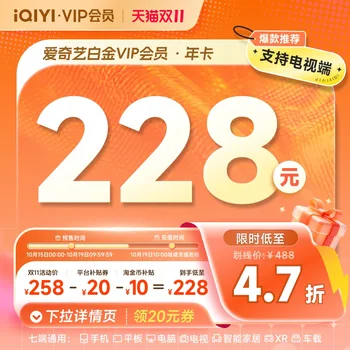
An iQIYI Platinum VIP membership eliminates these barriers by bringing high-end production value back to where it belongs: the central home display.
Gold VIP vs. Platinum VIP: What is the Real Difference?
The most common purchasing mistake with iQIYI is opting for the entry-level Gold VIP to trim a small margin, only to discover it cannot be used on television sets.
- Gold VIP (Mobile & PC only): Restricted strictly to smartphones, iPad/Android tablets, PC desktop clients, and web browsers. When opening the native TV client (Kiwi TV), a Gold membership cannot sign in or unlock big-screen playback privileges.
- Platinum VIP (Living Room TV + All Devices): Fully covers all mobile and desktop benefits, while natively supporting smart TVs, home theater projectors, TV boxes, and streaming dongles via the dedicated Kiwi TV app.
| Specification | Gold VIP | Platinum VIP (This Product) |
|---|---|---|
| Supported Platforms | Phones, Tablets, PC Web/App | TVs, Projectors, TV Boxes, Phones, Tablets, PCs |
| Native Big-Screen App | Not supported (Cannot log into Kiwi TV) | Native Kiwi TV App with full remote support |
| TV Stream Quality | Heavily limited via casting | Frame Vivid MAX / 4K Ultra HD / Dolby Vision |
| Big-Screen Audio | Standard Stereo | Dolby Atmos Surround Audio |
| Standalone Remote Control | No (Requires mobile casting initiator) | Yes (Direct TV OS UI navigation) |
| Cross-Device Cloud Sync | Mobile and desktop only | Unified real-time sync across all screens |
Why High-Bitrate Native Big-Screen Streaming Matters
iQIYI has established an exceptional benchmark for high-budget original drama productions, including critically acclaimed mystery thrillers, historical epics, and high-production cultural variety shows. These titles feature intricate color grading, dynamic low-light shadow depth, and multi-channel sound mixing that simply cannot be reproduced on a palm-sized smartphone screen.
On an OLED or Mini-LED television with Platinum VIP, activating 4K Ultra HD and Dolby Vision reveals dramatic visual clarity: subtle atmospheric smoke, authentic costume textures, and balanced contrast without blown-out highlights or murky shadows. Paired with a soundbar or home theater system, Dolby Atmos provides immersive acoustic staging that transforms evening entertainment.
The Advantage of a Fixed 12-Month Annual Pass
This package is structured as a fixed 12-month direct top-up card, free from recurring auto-debit ties:
- Zero Hidden Renewals: Subscriptions tied to continuous billing often renew unnoticed after a full year. A fixed 12-month pass credits 365 days of active access upfront. When the year concludes, the service simply expires unless you deliberately repurchase.
- Complete Year-Round Coverage: Seamlessly watch spring drama premieres, summer variety showcases, and winter holiday cinema releases without repeated monthly payments or price fluctuations.
- The Ideal Gift for Parents: By setting up Kiwi TV on your parents' television with an active 1-year pass, they can browse curated categories directly using the TV remote without wrestling with Wi-Fi connections or smartphone casting menus.
Setup and Verification Guide
- Account Accuracy: This product applies direct electronic crediting to your account. Ensure the mobile phone number provided at checkout matches your registered iQIYI profile. Because digital credentials apply instantaneously upon delivery, orders cannot be transferred or revoked once executed.
- TV Activation: Search for and install the official "Kiwi TV" (银河奇异果) application from your smart TV or TV box app store. Launch the app and use the mobile iQIYI app to scan the onscreen QR code for instantaneous big-screen pairing.
- Device Concurrency: Your membership allows multiple household devices to be linked. To prevent automatic account security locks, avoid sharing personal credentials across outside networks.
Restore simple, high-definition entertainment to your living room and enjoy television the way it was designed to be watched.