
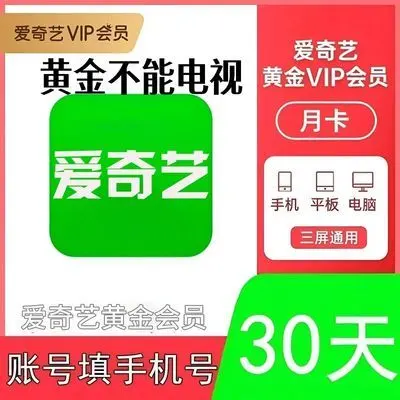
iQIYI Membership Buying Guide: Choosing Between Gold and Platinum TV Tiers
The most frustrating part of watching a drama is when everyone is discussing the latest cliffhanger, but when you open the video app, you have to sit through 90 seconds of pre-roll ads, followed by a popup saying "VIP Only: Subscribe to Unlock." Worse yet, non-paying viewers are often capped at 720p or heavily compressed 1080p, turning dark scenes into blurry pixel blocks and ruining the mood.

Why Do Viewers Buy iQIYI Memberships from Third-Party Listings?
Subscribing directly inside the official app often automatically enrolls you in an auto-renewing monthly subscription. While the first month may look discounted, if you forget to dig into your app store settings to cancel it right after finishing your show, it quietly renews at full price next month. Sourcing your pass via Pinduoduo is far cleaner:
- Fixed-term commitment: One month means one month, and a full year means 365 days. The access ends automatically without auto-debit renewals.
- On-demand flexibility: If you only want to catch a seasonal variety show or a mystery thriller miniseries, a single-month card is extremely affordable. If your whole household watches daily, grabbing an annual pass brings the daily cost down to pennies.
- Side-by-side tier comparison: Review Gold mobile tiers against Platinum TV tiers on the same product page and choose what fits your screen habits.
Gold VIP vs. Platinum VIP: Avoid the Common Screen Trap
This is the most critical distinction when purchasing an iQIYI subscription. Many buyers opt for the cheaper Gold pass, only to sit in front of their smart TV's "Galaxy Kiwi" (银河奇异果) app and realize Gold credentials do not unlock TV playback.
| Feature Comparison | Gold VIP | Platinum VIP |
|---|---|---|
| Supported Devices | Smartphones, Tablets (iPad/Android Pad), PC desktop apps, and Web browsers | Smartphones, Tablets, PCs, plus Smart TVs, Streaming Boxes, and Projectors (Galaxy Kiwi app) |
| Maximum Fidelity | 4K, Dolby Vision (on supported phones and PC monitors) | 4K, Dolby Vision, Frame Master (with native TV audio/video hardware decoding) |
| Casting Limitations | Limited casting (certain copyrighted dramas block AirPlay or downgrade resolution to 720p) | Native TV app login; full remote control navigation with zero resolution drops |
| Best For | Commuters, solo laptop/tablet streamers, dorm students | Living room TV setups, families, and viewers who want cinema-grade surround audio and 4K visuals |
Important note: iQIYI strictly restricts mobile-to-TV casting for Gold VIP users. Many premium titles disable AirPlay casting completely or lock down resolution. If your primary viewing occurs on the living room sofa, choose Platinum VIP.
Choosing the Right Duration
- Monthly or Quarterly Pass: Best for targeted viewing. If a new season of a hit series or Mist Theater just aired, the whole run typically concludes in four to five weeks. Buy a one-month pass, binge it, and move on.
- Annual Pass: Ideal for avid households. With iQIYI's packed year-round release schedule, exclusive box office digital drops, and long-running animation series, an annual pass offers the lowest daily rate with zero interruption.
Recharge Verification & Safety Checklist
Follow these quick verification steps to ensure instantaneous fulfillment without security risks:
- Double-check the phone number: For automated direct recharge, you only need to input the exact mobile phone number bound to your iQIYI account. Open your iQIYI app beforehand, navigate to "My Account", and verify the digits match.
- Card key redemption: If the purchased option is an electronic redemption code/voucher, open the iQIYI app, head to [My] → [VIP Member] → [Redeem Code], and paste the voucher key to activate your term.
- Account security rule: Legitimate direct top-ups and voucher activations never ask for your account password, and they will never ask for an SMS verification code. Never share login credentials or dynamic OTP codes with any seller.