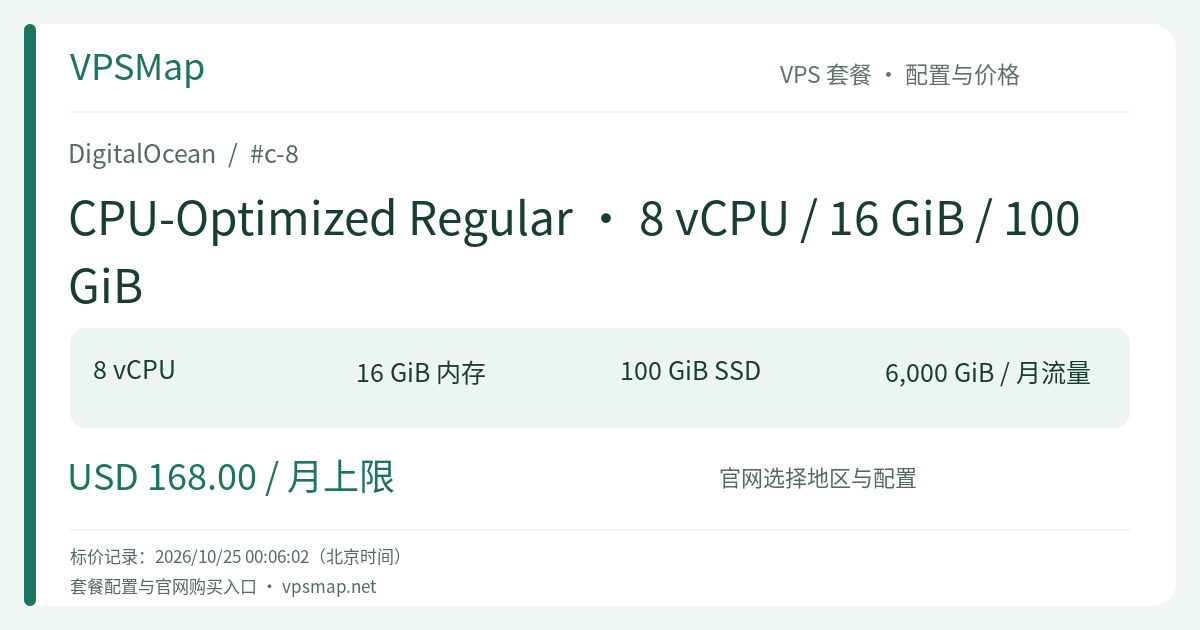
DigitalOcean c-8 Buyer's Guide: Dedicated 8 vCPU, 16 GiB RAM, and 100 GiB Local SSD for Pure Compute Workloads
Updated
Why Choose Dedicated 8-Core Compute (c-8)?#
In modern production environments, application bottlenecks frequently stem from compute starvation and erratic CPU scheduling rather than RAM exhaustion. While shared-CPU (Basic) Droplets offer budget-friendly entry points, their physical hyperthreads are shared among multiple tenants. Whenever a noisy neighbor spikes on the host hypervisor, your instance can experience unpredictable CPU steal time, resulting in long-tail latency spikes and sluggish background job execution.
DigitalOcean c-8 belongs to the CPU-Optimized Regular family, built around one core premise: 100% dedicated hardware hyperthreads. The 8 physical threads on the hypervisor are dedicated exclusively to your Droplet. With sustained baseline clock speeds exceeding 2.6 GHz, your applications receive deterministic processing throughput around the clock.
The 2:1 RAM-to-Core Ratio: Eliminate Idle Memory Waste#
General Purpose droplets typically follow a 4:1 memory-to-core ratio (for instance, 8 vCPUs with 32 GiB of RAM). However, many workloads are strictly CPU-bound and only require 8 to 12 GiB of working memory. Buying redundant memory capacity simply inflates cloud spend without adding value:
- API Gateways & Microservice Hubs: High-concurrency Node.js cluster processes, Go/Rust microservices, and Python ASGI workers where execution is driven by rapid I/O serialization and business logic.
- Parallel Code Build & CI/CD Runners: Multi-module builds, Go compilers, Rust crate assemblies, and asset bundling pipelines utilizing all 8 threads simultaneously.
- Stateless Video Processing & Audio Transcoding: FFmpeg slicing, frame extraction, thumbnail rendering, and automated media packaging pipelines integrated with object storage.
- Data Cleaning & Scraping Pipelines: Concurrent data fetching, JSON parsing, ETL normalization, and ingestion workers.
With 8 dedicated vCPUs and 16 GiB of RAM, the c-8 plan eliminates unnecessary RAM overhead, offering a highly cost-effective compute engine.
Architecture & Storage Trade-offs: Role of the 100 GiB Local SSD#
A common evaluation question is whether the 100 GiB local disk is sufficient for modern deployments.
Low-Latency Hypervisor-Attached Storage#
The 100 GiB SSD on the c-8 is directly attached to the physical hypervisor, not mapped over the network. This provides low latency and responsive random read/write speeds. For operating system binaries, Docker container images, application artifacts, and intermediate temporary buffers, 100 GiB provides plenty of high-performance headroom.
The Decoupled Cloud Architecture#
If your application stores large, growing datasets, modern infrastructure best practices suggest decoupling compute from persistence:
- Static Files & Media Assets: Offload to DigitalOcean Spaces (S3-compatible object storage), where intra-datacenter traffic routed via private DNS resolvers incurs no bandwidth charges.
- Database Storage: Attach scalable Volumes Block Storage, keeping the compute node stateless and simple to replace or upgrade.
Networking and Billing Mechanics#
DigitalOcean provides transparent pricing and generous bandwidth allocations on dedicated Droplets:
| Specification | Detail | Operational Advantage |
|---|---|---|
| Port Speed | 2,000 Mbps (2 Gbps) | Ample network bandwidth to prevent NIC packet congestion during traffic surges |
| Included Outbound Transfer | 6,000 GiB (pooled at team level) | Bandwidth aggregates across team Droplets; overages are billed at an affordable $0.01/GiB |
| Inbound Transfer | Unlimited & Free | Ingest logs, pull dependencies, and accept incoming customer uploads with zero fees |
| VPC Traffic | 100% Free | Private cross-server and database communications stay isolated and unbilled |
| Monthly Cap | 672 Hours (28 Days) | Capped at $168.00/month ($0.25/hour) to keep infrastructure spending predictable |
Billing Note: DigitalOcean bills on a per-second basis up to the monthly cap. Please keep in mind that powered-off Droplets still reserve dedicated hypervisor resources and disk allocations, and therefore continue to accrue charges. If an instance is used for temporary tasks, destroy it when finished to stop billing.
Quick Provisioning & Verification#
You can launch a c-8 Droplet in seconds using the web console or the doctl command-line utility:
# Inspect size details and confirm availability
doctl compute size list | grep "c-8"

# Provision a c-8 Droplet in the SFO3 region
doctl compute droplet create my-compute-node \
  --size c-8 \
  --image ubuntu-24-04-x64 \
  --region sfo3 \
  --ssh-keys <YOUR_SSH_KEY_FINGERPRINT> \
  --enable-monitoring
Benchmark Multi-Threaded Stability#
After logging in via SSH, verify the 8 dedicated threads using sysbench:
sudo apt-get update && sudo apt-get install -y htop sysbench

# Execute an 8-thread compute benchmark
sysbench cpu --cpu-max-prime=20000 --threads=8 run
Because the cores are fully dedicated, the execution rate remains uniform without the performance throttling common to multi-tenant shared clouds.
Summary: Is the c-8 Right for You?#
- Ideal Fit: Workloads requiring dedicated 8-core horsepower where 16 GiB of RAM is optimal and storage is either lean or decoupled to object stores/databases.
- When to Step Up: If your workload demands the same 8-core CPU profile but requires larger local disk for intensive build caches or database files, review the 200 GiB c2-8vcpu-16gb or the 500 GiB c5-8vcpu-16gb.