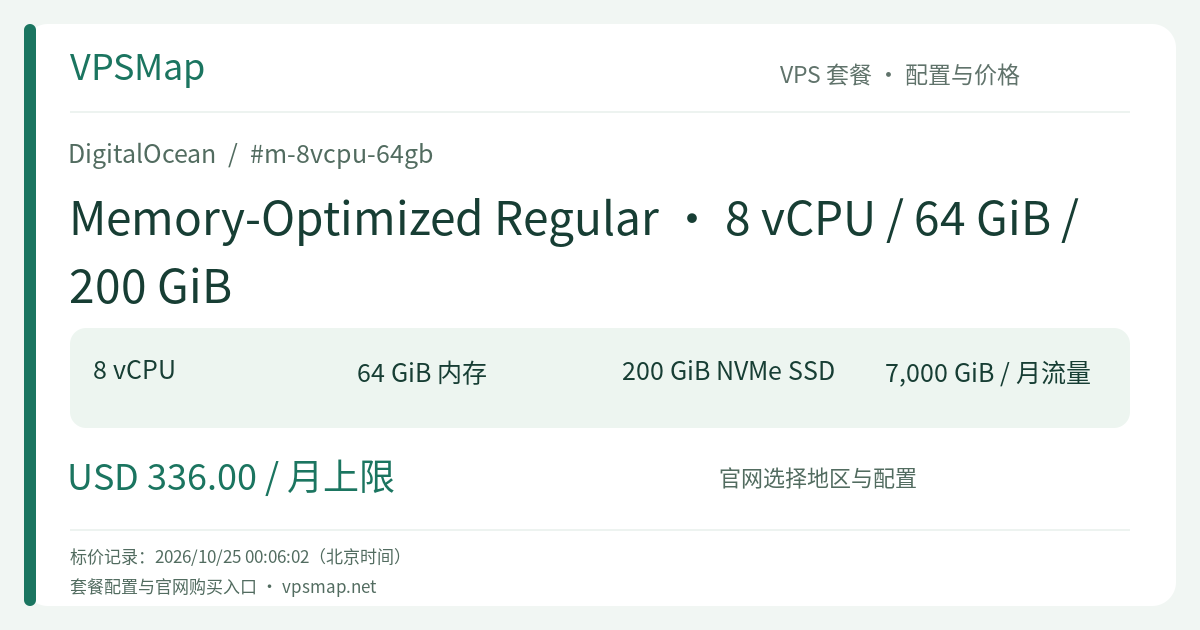
DigitalOcean m-8vcpu-64gb In-Depth Review & Sizing Guide: Dedicated 8 vCPUs and 64 GiB RAM for Memory-Heavy Workloads
Updated
Why Choose an 8:1 RAM-to-vCPU Architecture?#
Many engineering teams face a common infrastructure dilemma: CPU utilization hovers below 30%, yet system RAM is consistently exhausted. Peak traffic triggers the Linux Out-Of-Memory (OOM) killer, or aggressive swapping causes disk I/O thrashing and massive latency spikes. Upgrading to an oversized general-purpose instance just to acquire more memory forces you to pay for unused CPU cores.
The DigitalOcean m-8vcpu-64gb addresses this imbalance directly. As part of the Memory-Optimized family, it features a dedicated 8:1 RAM-to-vCPU ratio (8 GiB of RAM per dedicated vCPU). Compared to General Purpose (4:1) or CPU-Optimized (2:1) plans, it channels your budget straight into memory density without wasting compute spend.
Hardware Profile & Compute Foundation#
1. 100% Dedicated vCPUs#
Unlike shared-CPU Basic Droplets that contend for physical core slices on oversubscribed hypervisors, the m-8vcpu-64gb provides 8 dedicated vCPUs. Each vCPU corresponds to a physical hyper-thread on an Intel Xeon Scalable processor reserved exclusively for your workload. Performance remains predictable under full, sustained multi-core loads with zero noisy neighbor interference.
2. Direct-Attached Local NVMe SSD#
The instance comes equipped with 200 GiB of local NVMe solid-state storage. Because the disk sits directly on the hypervisor's PCIe bus rather than across a software-defined storage network (such as block storage volumes), it delivers microsecond-level access times and exceptional random IOPS—vital for transaction write-ahead logs (WAL), binlogs, and system indexing.
3. Enterprise Network & Pooled Outbound Bandwidth#
A 2,000 Mbps (2 Gbps) physical network interface supports high-throughput API gateways and internal database clustering. The plan bundles a generous 7,000 GiB (7 TB) monthly outbound data transfer allowance. DigitalOcean pools outbound transfer across all active Droplets at the team account level. Inbound traffic is completely free, and all intra-VPC private network communications bypass outbound bandwidth counters.
Ideal Production Workloads#
Production Relational Databases (PostgreSQL / MySQL)#
Database performance is fundamentally bounded by disk I/O. With 64 GiB of RAM, you can comfortably configure PostgreSQL's shared_buffers or MySQL's innodb_buffer_pool_size between 32 GiB and 48 GiB. Active tables and indexes remain memory-resident, shielding your storage layer from repetitive reads and dramatically lifting transactions per second (TPS).
High-Capacity In-Memory Caching (Redis / Dragonfly / KeyDB)#
For large-scale session management, distributed locks, and real-time leaderboards, 64 GiB offers substantial operational breathing room. You can allocate 40–45 GiB of active keys while preserving a 15–20 GiB safety buffer for Redis BGSAVE forks and copy-on-write memory overhead, preventing out-of-memory crashes during snapshotting.
Enterprise JVM & Microservice Hubs (Elasticsearch / Kafka / Spring Boot)#
Java applications thrive on abundant memory. On the m-8vcpu-64gb, you can allocate 31 GiB to the JVM heap to maximize object throughput while retaining Compressed OOPs (Ordinary Object Pointers), leaving the remaining 33 GiB completely free for the Linux kernel's Page Cache to accelerate Lucene search indexing or Kafka zero-copy socket transfers.
Billing Model & Financial Predictability#
- Per-Second Billing with a 672-Hour Monthly Cap: The plan is metered per second at an hourly rate of $0.50, capped at 672 hours (28 days) per billing cycle. Continuous operation throughout 30- or 31-day months caps out at $336.00/month, ensuring total budget predictability.
- Frictionless Ephemeral Utility: If you only need this instance for a 6-hour load testing phase, a staging run, or an off-peak data pipeline, you can spin it up on demand and tear it down immediately, paying only for the exact hours consumed.
- Power-Off Billing Rule: Powering off a Droplet in the Control Panel suspends OS execution, but its dedicated vCPUs, RAM, and NVMe footprint remain strictly reserved on the physical hypervisor. DigitalOcean continues to bill for powered-off instances. To stop billing permanently, the Droplet must be Destroyed.
- Automated Incremental Backups: For production readiness, automated backups can be toggled on. Weekly backups (4 snapshots retained for 4 weeks) cost 20% of the Droplet base price (+$67.20/month); daily backups (7 snapshots retained for 7 days) cost 30% (+$100.80/month). Backups run incrementally in the background without workload interruption.
Architecture Guidance & Next Steps#
If your active database footprint fits comfortably within 100–150 GiB, or your storage-heavy assets are offloaded to Spaces Object Storage, the standard 200 GiB storage on m-8vcpu-64gb offers the cleanest price-to-performance entry point. If local disk demands increase down the road, you can easily attach Volumes Block Storage or resize directly into storage-expanded variants like m3-8vcpu-64gb (600 GiB) or m6-8vcpu-64gb (1170 GiB).
Notice: Capacity is verified in real-time inside the cloud console; published rates reflect active catalog pricing rather than persistent regional inventory. Verify availability directly during creation.