Evoxt Premium Plus VM-1.5 Deep Dive: Doubling High-Clock Cores for Just $0.96 More
Updated
The Significance of Doubling Cores for Just $0.96#
In conventional cloud hosting tiers, transitioning from a single core to a dual-core instance usually doubles the monthly bill or tacks on at least a 50% price surge. Evoxt breaks this pattern with an unconventional, highly attractive price point in their Premium Plus VM-1.5:
- VM-1 (1 Core, 2GB RAM, 20GB Disk, 300GB Traffic): $5.99 / month
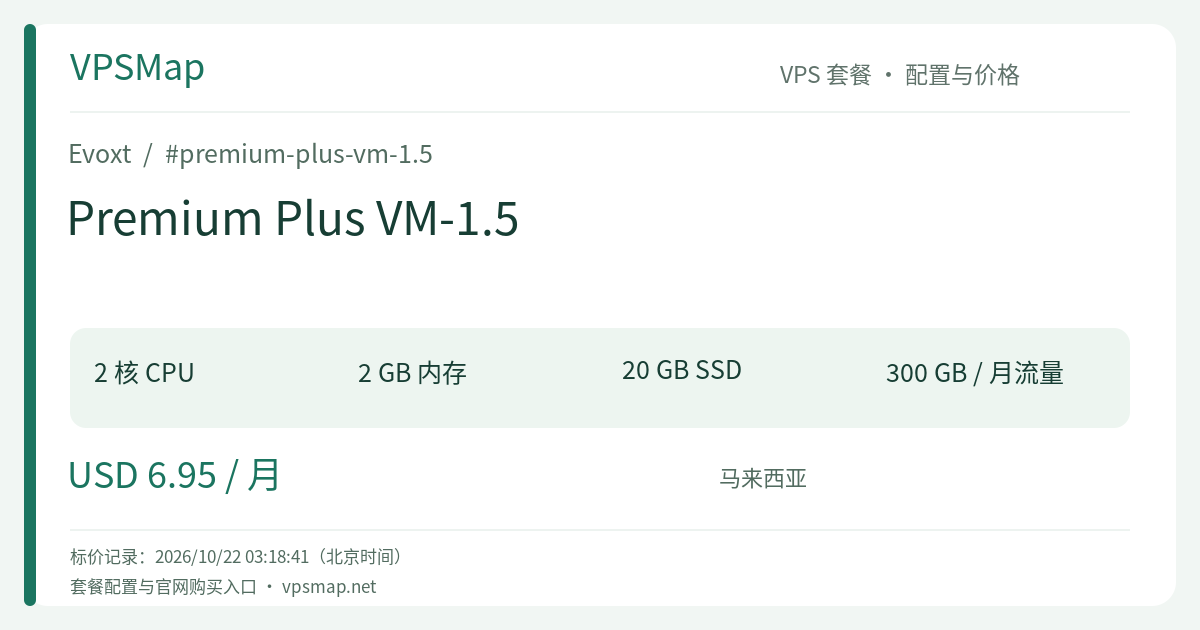
- VM-1.5 (2 Cores, 2GB RAM, 20GB Disk, 300GB Traffic): $6.95 / month
The price difference between the two is exactly $0.96 / month. For less than the cost of a cup of coffee, you get a full additional vCore capable of turbo clocking up to 6.0 GHz. For engineers running concurrent background jobs or multi-worker web servers, doubling the core count yields an immediate improvement in responsiveness that memory upgrades alone cannot deliver.
Why a Second Core Transforms System Stability#
1. Eliminating System Freezes Caused by Background Tasks#
On a single-core instance, periodic CPU-intensive background tasks—such as nighttime database dumps, archive decompression, automated backups, or software compilation—instantly saturate 100% of available processor cycles. When that happens, your front-end Nginx server, active PHP handlers, and even incoming SSH sessions stall out or throw 504 Gateway Timeouts.
Adding a second core provides critical operational breathing room. The Linux CFS scheduler can assign heavy asynchronous processing to one core while keeping the second core free to handle network I/O, TLS handshakes, and user-facing HTTP requests without perceptible latency spikes.
2. Tailor-Made for Multi-Threaded Workloads#
Modern application stacks are architected specifically to exploit multi-core environments:
- Node.js: The Node runtime can leverage the Cluster module to spin up two dedicated worker processes, immediately doubling concurrent request capacity;
- Python (Gunicorn / Uvicorn): You can comfortably maintain
workers = 2, processing parallel requests without bottlenecking; - Go / Rust Services: Go routines and lightweight system threads cleanly distribute across two physical cores, eliminating aggressive single-core context switching.
Strategic Network Positioning: Malaysia Premium Plus#
Hosted inside Evoxt's Malaysia (Premium) datacenter, VM-1.5 leverages the high-spec Premium Plus Network tier:
- Direct MyIX Connectivity: Directly connected to the Malaysia Internet Exchange, ensuring local round-trip times between 5ms and 15ms across Peninsula Malaysia and surrounding telecom carriers.
- ASEAN Regional Coverage: Optimized paths into Singapore, Indonesia, and Thailand make this an outstanding host for e-commerce stores, localized API gateways, and regional data ingestion pipelines.
- 1 Gbps Port Speed with 300GB Transfer: Generous burst capability ensures assets download instantaneously without queueing, while 300GB comfortably accommodates standard corporate sites, webhooks, and automation bots.
Ideal Use Cases#
+-------------------------------------------------------------+
|               Recommended Workloads for VM-1.5              |
+-------------------------------------------------------------+
|  [1] Active WordPress / WooCommerce (Dual-Worker PHP-FPM)   |
|  [2] Automation & Crawlers (Concurrent Fetch + Transform)   |
|  [3] Regional API Gateways & WebSocket Hubs                 |
|  [4] Small-Team CI/CD Build & Verification Node             |
|  [5] 2 to 4 Linked Docker Services (Proxy, API, Redis, DB)  |
+-------------------------------------------------------------+
Technical Boundaries to Keep in Mind#
Despite the significant compute boost, practical deployments must account for this tier's hardware boundaries:
- 2GB Memory Footprint: Dual cores invite heavier concurrent execution, but memory remains capped at 2GB. Monolithic, memory-heavy applications (such as large JVM services or Elasticsearch) must be tuned carefully. Setting up a 2GB swap file is highly recommended to protect against memory spikes.
- 20GB Disk Space: Net usable storage after a clean OS install is roughly 15GB. It is perfectly scaled for application runtimes and lean databases, but static assets and media files should be offloaded to S3-compatible cloud storage.
- Burst Capacity vs. Sustained Compute: The 6.0 GHz Turbo Clock represents an elastic burst threshold on top of enterprise KVM hypervisors. It is built for dynamic web workloads with intermittent peaks, rather than constant 24/7 stress testing or cryptocurrency mining.
Tier Comparison: VM-1 vs. VM-1.5 vs. VM-2#
| Specification | VM-1 ($5.99) | VM-1.5 ($6.95) | VM-2 ($11.99) |
|---|---|---|---|
| vCPU Cores | 1 Core (up to 6.0 GHz) | 2 Cores (up to 6.0 GHz) | 2 Cores (up to 6.0 GHz) |
| Memory | 2 GB | 2 GB | 4 GB |
| Storage | 20 GB | 20 GB | 30 GB |
| Bandwidth | 300 GB | 300 GB | 600 GB |
| Best Fit | Extreme low-budget, single service | Maximum compute-per-dollar ratio | Heavy CMS panels & larger database stores |
- VM-1 vs. VM-1.5: Unless your budget is restricted to the absolute cent, VM-1.5 is the clear winner. For $0.96 more, having two distinct CPU cores safeguards your server from locking up during routine background maintenance.
- When to Consider VM-2: If your stack runs out of memory before it runs out of CPU cycles (such as hosting GitLab, large e-commerce backends, or heavy cPanel setups requiring more than 2GB of RAM), stepping up to the $11.99 VM-2 plan is the natural choice.
Platform Advantages: Backups & Built-in Security#
Evoxt bundles critical management utilities right into the control panel:
- Free Automated Weekly Offsite Backups: Evoxt snapshots and stores your virtual machine offsite on a weekly cadence at zero extra cost, giving you reliable disaster recovery.
- Native Layer 3 Firewall: Secure your instance in seconds via the web UI without wrestling with local firewall syntax before your server is even exposed to public traffic.
- Browser VNC Console & One-Click Rescue Mode: Troubleshoot corrupted network settings or forgotten SSH credentials without losing access to your system drive.
Ordering & Deployment Guide#
- Go to the Evoxt Portal and complete account registration.
- In the navigation menu, select Deploy.
- Under regional categories, choose Premium Plus Network -> Malaysia (Premium).
- Select the VM-1.5 tier (confirming 2 Cores, 2GB RAM, 20GB Storage, 300GB Transfer at $6.95/month).
- Choose your operating system (Debian 12, Ubuntu 22.04 LTS, or a 1-click stack like Docker, LAMP, or OpenLiteSpeed).
- Select your preferred billing cycle (monthly up to 3 years) and checkout using credit/debit cards, PayPal, or supported cryptocurrencies. Your VM will be provisioned with an active IPv4 and IPv6 in roughly 2.5 minutes.