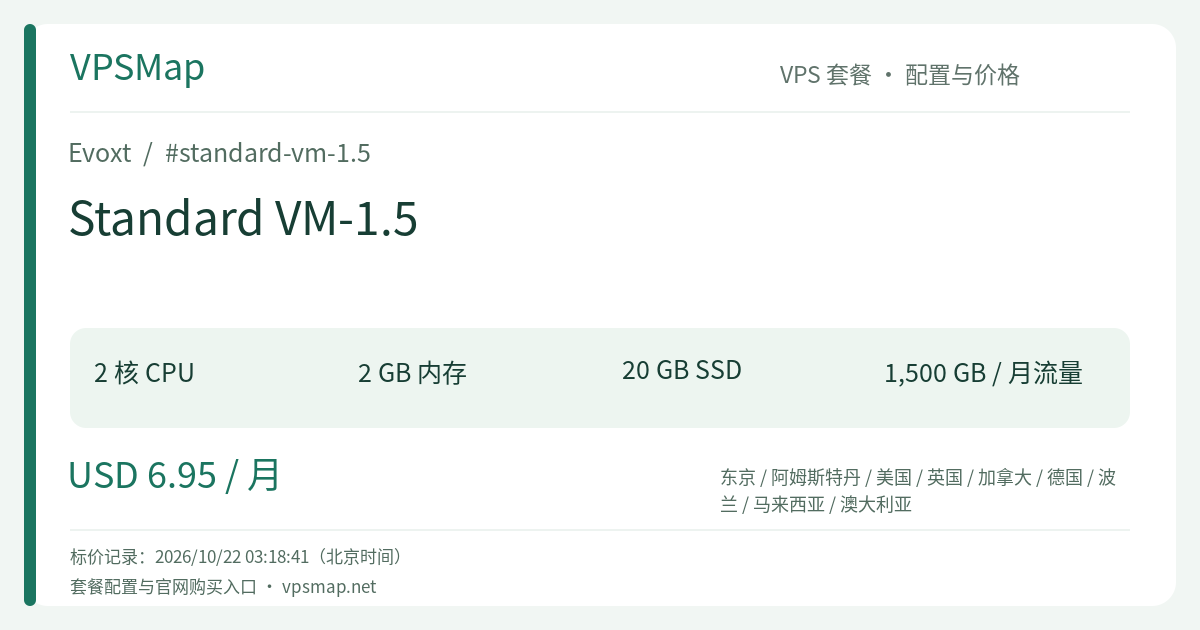
Evoxt Standard VM-1.5 Review: Dual-Core 6.0 GHz Power for $6.95/mo – Eliminating Concurrency Bottlenecks
Updated
Why a 96-Cent Upgrade Changes Everything#
In cloud computing tiers, steep leaps in architectural capability rarely come this affordably:
- Standard VM-1: 1 vCore / 2GB RAM / 20GB Storage / 1000GB Transfer — $5.99 / month
- Standard VM-1.5: 2 vCores / 2GB RAM / 20GB Storage / 1500GB Transfer — $6.95 / month
Between these two configurations sits a nominal difference of just $0.96 per month. Yet, that pocket change unlocks an entire second compute core boasting up to 6.0 GHz Turbo clock, alongside 500 GB of extra monthly transfer (1.5 TB total).
On single-core VPS environments, routine background cron tasks, database indexing, or automated log compression can instantly spike CPU utilization to 100%. When that occurs, incoming HTTP requests stall, and SSH consoles become unresponsive. Moving to a dual-core topology breaks this concurrency bottleneck entirely. For developers seeking smooth multitasking under a strict budget, Standard VM-1.5 stands out as an exceptional value proposition.
Hardware Profile & Multi-Core Concurrency#
| Operational Dimension | Detailed Specification | Architectural Advantage |
|---|---|---|
| Processor | 2 vCores (Up to 6.0 GHz Turbo) | Symmetric multi-core processing eliminates host freezes caused by single-thread saturation. |
| System Memory | 2048 MB (2 GB) RAM | Balanced operational capacity supporting web servers, datastores, and worker processes. |
| Disk Storage | 20 GB SSD | High-throughput NVMe/SSD storage for OS installations and operational data persistence. |
| Networking | 1 Gbps Port / 1500 GB (1.5 TB) Transfer | Substantial bandwidth headroom accommodating busy content platforms and media transfers. |
| Data Protection | Free Weekly Offsite Backup | Automatic off-site recovery safeguarding against accidental deletion and software corruption. |
| Standard Pricing | $6.95 / month (Monthly up to 3 years) | Flexible multi-currency checkout via credit cards, PayPal, and cryptocurrencies (BTC, USDT, etc.). |
The Dual-Core Advantage: True Task Isolation#
Under a dual-core architecture, the Linux process scheduler can effectively isolate divergent workloads:
- Core 0 (Frontend Engine): Dedicated to Nginx / OpenLiteSpeed for TLS termination and rapid HTTP dispatch.
- Core 1 (Backend Pipeline): Dedicated to MariaDB execution, Redis maintenance, file compression, and asynchronous queues.
Even when backend workers process data imports or generate report archives, visitors accessing your web interface continue to enjoy instantaneous responses without degradation.
Primary Practical Scenarios#
1. Concurrent WordPress & WooCommerce Stores#
Running dynamic e-commerce platforms like WooCommerce introduces substantial computational overhead during cart updates and checkout processing. The dual high-frequency cores of VM-1.5 significantly increase PHP-FPM worker concurrency, ensuring store checkouts remain reliable during traffic spikes.
2. Web Application Stacks with Asynchronous Workers (FastAPI / Laravel / Django + Celery)#
Modern applications frequently divide responsibilities between synchronous HTTP handling and background tasks:
- Web API workers serve live user traffic instantly;
- Background daemons (Celery, BullMQ, or Sidekiq) process notifications, encode images, and query external APIs on the secondary core. VM-1.5 provides the dual-core foundation needed to keep both pipelines operating smoothly.
3. Lightweight DevOps & CI/CD Runners (Gitea + Runner)#
Hosting a self-hosted Git forge like Gitea alongside a light CI/CD test runner can easily overwhelm a single CPU during software builds. Two dedicated high-clock cores prevent automated build suites from knocking out primary web services.
4. Advanced Network Routing & Multi-Protocol Proxies#
For multi-tenant gateways handling concurrent TLS termination, routing filters, and DNS inspection, dual cores ensure minimal packet jitter and sustained gigabit line-rate throughput.
Architectural Considerations & Optimization#
To make the most of VM-1.5, take into account its underlying configuration boundaries:
- Memory & Storage Footprint: Memory remains at 2GB and storage at 20GB. Your primary engineering boundary is memory capacity rather than raw compute. Avoid deploying heavy enterprise JVM stacks or unconstrained analytics databases.
- Database Tuning: Configure database buffer parameters prudently (e.g., set
innodb_buffer_pool_size = 512Mfor MariaDB) and leverage Redis as an object caching layer to protect RAM while maximizing query throughput.
Tier Comparison: Is VM-1.5 Your Ideal Pick?#
- Compared to Standard VM-1 ($5.99/mo): The price gap is merely $0.96 / month. If your deployment involves concurrent traffic, asynchronous workers, or heavy cron schedules, choosing VM-1.5 is a straightforward decision. The added stability of an extra 6.0 GHz vCore far exceeds the pocket-change cost difference.
- Compared to Standard VM-2 ($11.99/mo): VM-2 doubles memory to 4GB and increases disk to 30GB, but the monthly price jumps to $11.99 ($5.04 more). If your application does not require more than 2GB of resident memory and simply needs multi-core agility and generous bandwidth, staying on the $6.95 VM-1.5 delivers massive long-term cost savings.
Global Locations & Ordering Walkthrough#
Evoxt Standard instances are deployed across 9 global hubs: Los Angeles, New York, Montreal, London, Frankfurt, Amsterdam, Warsaw, Tokyo, Malaysia, and Sydney, backed by robust local peering.
Deployment Steps:#
- Open the official deployment portal: Deploy Standard VM-1.5 on the Evoxt Console.
- Sign in to your dashboard and select VM-1.5 under the Standard catalog tier.
- Pick your desired datacenter region based on where the majority of your users reside.
- Select your preferred Linux image (Debian 12 or Ubuntu 22.04 LTS are recommended) or choose a 1-Click App (such as WordPress LiteSpeed, Docker, or CyberPanel).
- Pick your preferred billing term (monthly or multi-year terms) and complete payment using credit cards, PayPal, or crypto.
- Your server will provision automatically within 2.5 minutes, providing full access to Layer 3 firewall configurations, free weekly offsite backups, and floating IP reassignment tools.