RackNerd 4 GB Windows VPS Buying Guide: High-Frequency Ryzen and Pure NVMe for a Seamless Remote Desktop
Updated
When selecting an entry-level Windows cloud server, many users fall into the classic trap of underestimating the base footprint of Windows Server just to save a couple of dollars. When a virtual machine only has 1 GB or 2 GB of RAM, the graphical interface, Windows Defender, core background services, and system updates can consume between 1.3 GB and 1.8 GB right after boot. The moment you launch a web browser or run an automation process, the operating system aggressively thrashes its pagefile, causing sluggish Remote Desktop (RDP) interactions and frustrating mouse latency.
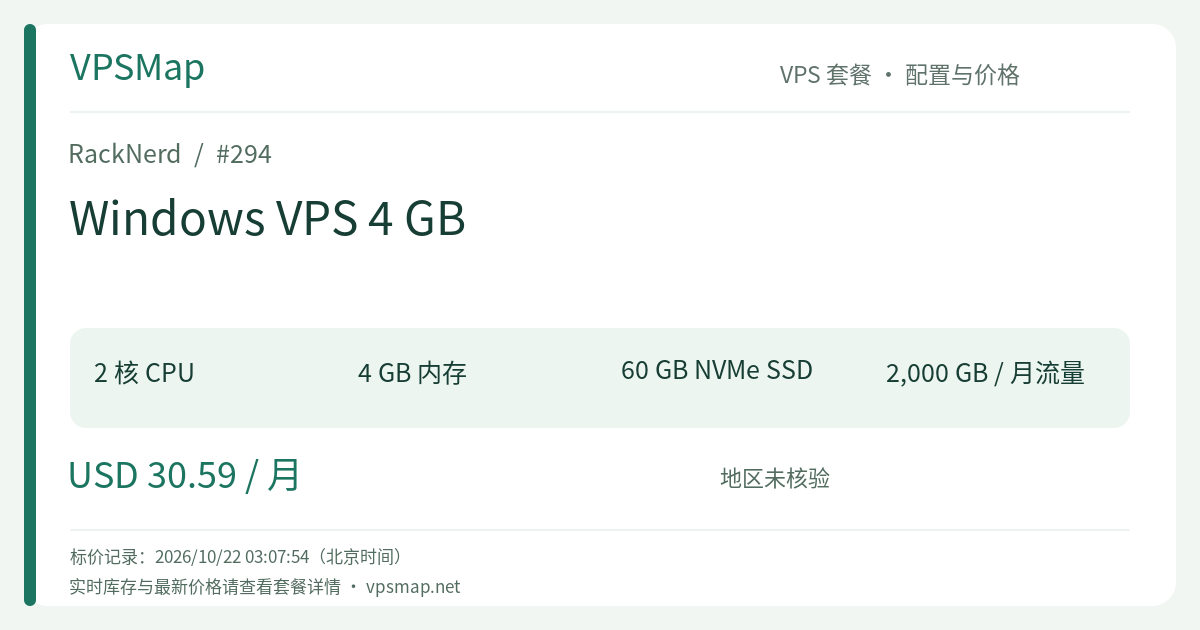
RackNerd's Windows VPS 4 GB marks the decisive threshold where a Windows cloud instance transforms from "merely boots up" to "smooth, production-ready daily driver." Powered by 2 AMD Ryzen 3900X high-frequency cores, 4096 MB RAM, 60 GB pure NVMe SSD storage, and 2000 GB monthly bandwidth over a 1Gbps uplink, this plan is priced at $30.59/month. Compared to the 2 GB tier at $27.59/month, an extra $3 per month doubles your physical memory and expands fast NVMe capacity, delivering disproportionately higher practical value.
Underlying Infrastructure: Ryzen 3900X Single-Core Muscle Meets Pure NVMe#
Windows Server behaves fundamentally differently from minimalist Linux distributions. While Linux thrives in headless command-line terminals without requiring high single-core IPC or intense random disk I/O, Windows is a full-featured desktop environment. Proprietary business suites, financial trading platforms, and desktop browser automations rely heavily on single-thread responsiveness and low storage latency.
1. High Single-Core Performance via AMD Ryzen 3900X#
Budget cloud hosts often rely on legacy multi-socket Intel Xeon processors running at 2.0 GHz to 2.4 GHz. In remote desktop sessions, dragging windows, rendering client interfaces, or executing single-threaded operations on older architectures can cause noticeable lag. RackNerd leverages AMD Ryzen 3900X processors with modern IPC and sustained high clock speeds, guaranteeing that your cursor movements and graphical responses remain fluid and responsive.
2. Pure NVMe RAID-10 Array Exceeding 1 GB/s Disk I/O#
Remote desktop unresponsiveness is often driven by disk I/O bottlenecks rather than CPU limits. When traditional spinning disks or budget SATA SSDs saturate their I/O queues, the entire Windows session freezes. RackNerd utilizes pure NVMe SSDs configured in redundant RAID-10 arrays, delivering over 1 GB/s in disk throughput. Whether processing system patches, booting trading terminals, or writing continuous log files, the storage layer never chokes.
Ideal Use Cases for the 4 GB Windows Plan#
While not designed for massive multi-tier enterprise databases, this plan hits the sweet spot for solo developers, traders, and agile e-commerce operators who require an uninterrupted 24/7 Windows environment:
1. 24/7 Automated Trading (MetaTrader 4 / MetaTrader 5)#
Algorithmic trading demands absolute uptime, minimal latency, and consistent memory headroom. On this 4 GB VPS, you can comfortably run 3 to 4 MT4 or MT5 instances running Expert Advisors (EAs). The 4 GB allocation allows plenty of room for historical chart caching and multi-pair indicators, backed by a stable 1Gbps network port with Noction IRP path routing.
2. Multi-Store E-Commerce Operations & Clean Browser Workstations#
Managing accounts on marketplaces like Amazon, eBay, or Walmart requires rigorous fingerprint and network isolation. This Windows VPS provides a dedicated public IPv4 address, genuine Windows OS licensing, and a secure desktop context. You can operate merchant backends or social outreach campaigns through familiar browsers like Chrome or Edge without device crossover.
3. Lightweight .NET & Business Software Hosting#
Many organizations rely on legacy Windows-only enterprise resource software, accounting suites, or in-house C# .NET utilities. With 4 GB of RAM and 60 GB NVMe space, you can comfortably host a local IIS web instance paired with Microsoft SQL Server Express for continuous internal availability.
4. Continuous RPA Bots and Automation Scripts#
Running headless or GUI-driven automation scripts using Python, Playwright, or Selenium requires steady RAM. A 4 GB allocation reliably supports multiple concurrent browser processes without triggering sudden out-of-memory crashes.
Side-by-Side Comparison: 2 GB, 4 GB, or 6 GB?#
Here is how the adjacent tiers in RackNerd's Windows lineup compare:
| Plan | CPU Cores | Memory | NVMe Storage | Bandwidth | Price | Practical Verdict |
|---|---|---|---|---|---|---|
| Windows 2 GB | 1 vCore | 2048 MB | 35 GB | 2 TB | $27.59/mo | Minimal testing only; base OS consumes most resources, leaving little room for workloads |
| Windows 4 GB | 2 vCores | 4096 MB | 60 GB | 2 TB | $30.59/mo | The true sweet spot! For $3 more, you double RAM and CPU threads for dependable daily work |
| Windows 6 GB | 2 vCores | 6144 MB | 85 GB | 3 TB | $35.59/mo | Ample headroom for running multiple active browser profiles or database caching |
Buying Takeaway:
- Avoid the 2 GB plan if you intend to do meaningful daily work; saving $3 a month is not worth fighting chronic memory constraints on Windows.
- Choose the 4 GB plan for focused single-purpose tasks (such as automated trading or one isolated business app). If you anticipate running multiple desktop applications simultaneously alongside background services, step up to the Windows VPS 6 GB at $35.59/month.
Order Configuration & Initial Setup Walkthrough#
Step 1: Open the Official Order Portal#
Access the dedicated plan page directly: Order RackNerd Windows VPS 4 GB.
Step 2: Choose Your Operating System and Location#
- Operating System Selection: The ordering form offers Windows Server 2012, 2016, and 2022. We strongly recommend choosing Windows Server 2022 for its superior modern kernel efficiency, enhanced security policies, and broader current software compatibility.
- Location Selection: The default Los Angeles datacenter provides balanced routes globally and toward Asia-Pacific networks. Select alternative regions if your counterparties or target APIs reside primarily in Europe or the US East Coast.
- Promo Code Notice: Note that promotional codes such as
15OFFDEDIapply solely to dedicated bare-metal servers and do not apply to VPS offerings.
Step 3: Instant Provisioning#
Upon completing payment, RackNerd provisions your virtual machine automatically. Within minutes, you will receive an onboarding email containing your dedicated IPv4 address, default administrative username (Administrator), and initial password.
Step 4: Connecting via Remote Desktop (RDP)#
- Launch Remote Desktop Client: On Windows, press
Win + R, typemstsc, and hit Enter. On macOS, install Microsoft Remote Desktop from the App Store. Enter your server's assigned IP address and administrative credentials. - Browser Security Adjustment: In Windows Server Manager, adjust or disable "IE Enhanced Security Configuration" if you need to quickly download tools and browsers directly inside the session.
- Security Hardening (Recommended): Change the default RDP port (3389) to a custom high port in the registry, adjust your Windows Firewall rules accordingly, and use a strong custom password.
- Claim Free IPv6: If deployed in Los Angeles, you can request up to 100 free IPv6 addresses by submitting a support ticket from your client portal.
Final Verdict: Is It Worth the Money?#
Procuring individual Windows Server licenses and maintaining on-premises hardware requires substantial upfront capital and maintenance overhead. RackNerd's 4 GB Windows VPS bundles genuine Administrator remote desktop access, AMD Ryzen 3900X computing performance, and pure RAID-10 NVMe reliability into a flexible, monthly-billed $30 tier. It provides the essential breathing room that makes Windows Server genuinely usable 24/7.
Launch your dedicated remote workstation: Deploy the RackNerd 4 GB Windows VPS