RackNerd 6 GB Windows VPS Buying Guide: The Ideal Balance for Demanding Desktop Apps and Multitasking
Updated
When shopping for a reliable Windows cloud server, users frequently find themselves torn between 4 GB and 8 GB configurations. A 4 GB instance is excellent for a single dedicated job, but open a dozen browser tabs alongside a local database and a couple of background daemons, and RAM consumption quickly climbs toward 85%. On the other hand, jumping straight to an 8 GB tier increases the monthly commitment to $44.59.
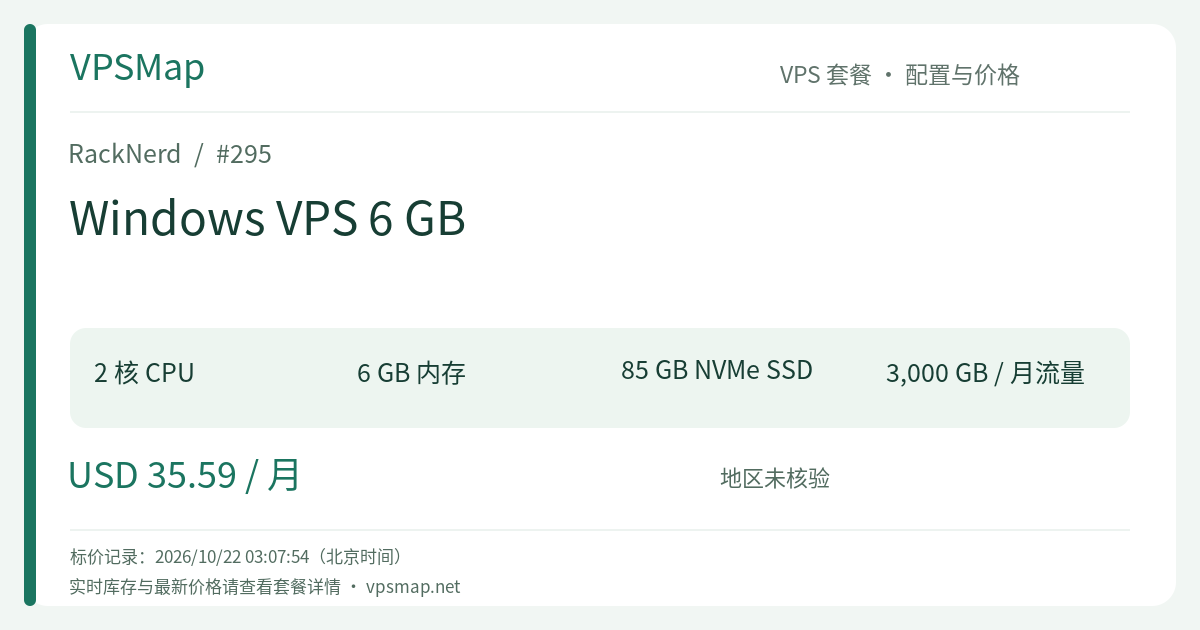
This is precisely why the RackNerd Windows VPS 6 GB is widely considered the ultimate sweet-spot plan. Priced at $35.59/month, it provides 2 high-frequency AMD Ryzen 3900X vCores, 6144 MB of physical memory, 85 GB pure NVMe SSD storage, and 3000 GB monthly bandwidth over a 1Gbps connection. For just $5 more per month than the 4 GB tier, you unlock 50% more RAM (an entire 2 GB buffer), 25 GB of extra NVMe capacity, and an additional 1000 GB of transfer. It is purposefully engineered for multitasking workloads that need breathing room.
Why 6 GB is the "Comfort Zone" for Windows Server#
Windows Server heavily leverages memory caching and working-set retention. When physical RAM is abundant, the kernel keeps shared DLLs, background process states, and frequently accessed filesystem pages directly in physical memory, resulting in instant window switching and zero RDP stutter.
1. Eliminating the 4 GB Ceiling#
On a standard 4 GB machine, baseline Windows Server 2022 operations consume around 1.5 GB right off the bat, leaving approximately 2.5 GB of truly usable space for applications. If you run a local database consuming 800 MB and open two browser profiles that each eat 600 MB, memory reserves dwindle rapidly, forcing Windows to compress memory and page out to disk.
With 6 GB (6144 MB), after accounting for base system services, you retain nearly 4.5 GB of free, unconstrained RAM. This extra headroom prevents disk thrashing, eliminates browser tab discards, and lets multi-threaded automation scripts run without sudden memory crashes.
2. Peace of Mind with 85 GB Pure NVMe#
Windows Server system folders—notably WinSxS, update rollback caches, and service packages—gradually expand over time, often claiming 35 GB to 45 GB of space after months of routine maintenance. On a 35 GB or 60 GB disk, administrators are frequently forced to run manual disk cleanups. This 6 GB plan provides 85 GB of RAID-10 protected NVMe storage operating at over 1 GB/s throughput, leaving generous headroom for program files, transaction databases, and local log archives.
Prime Use Cases for the 6 GB Windows Tier#
1. Multi-Store E-Commerce & Anti-Detect Browser Workstations#
Merchants managing stores across Amazon, Walmart, eBay, or social commerce platforms frequently run anti-detect multi-login browsers (e.g., AdsPower, Hubstudio, VMLogin). The 6 GB RAM and 85 GB storage allocation comfortably support running 4 to 8 concurrent active browser profiles without UI lag, ensuring clean separation and continuous productivity.
2. Business Desktop Software & ERP Hosting#
Many classic accounting systems, ERP suites, and inventory databases require native Windows execution. A 6 GB instance effortlessly hosts Microsoft SQL Server Express alongside the primary software service and active remote administrative sessions, serving as a stable private cloud hub for small teams.
3. Multi-Terminal Algorithmic Trading Grids (MT4 / MT5)#
If your trading strategies involve running 5 to 8 separate MetaTrader terminals for cross-pair hedging or copy-trading, 6 GB of RAM guarantees that chart buffers and historical ticks are retained in memory. Paired with high single-thread Ryzen clock rates and 1Gbps connectivity, your trade triggers execute without interface stalls.
4. 24/7 RPA and Automated Desktop Tasks#
Automation stacks using Python, Selenium, or native Windows automation engines regularly process Office spreadsheets, render web views, and communicate over APIs. Having 6 GB of physical RAM absorbs sudden allocation spikes, keeping unattended background jobs running smoothly around the clock.
Stepped Comparison: 4 GB, 6 GB, and 8 GB#
| Specification | Windows 4 GB | Windows 6 GB (This Plan) | Windows 8 GB |
|---|---|---|---|
| CPU Cores | 2 vCores (Ryzen 3900X) | 2 vCores (Ryzen 3900X) | 3 vCores (Ryzen 3900X) |
| RAM | 4096 MB | 6144 MB (+50%) | 8192 MB |
| NVMe Storage | 60 GB | 85 GB (+41%) | 110 GB |
| Bandwidth | 2 TB @ 1Gbps | 3 TB @ 1Gbps (+50%) | 5 TB @ 1Gbps |
| Monthly Price | $30.59 /mo | $35.59 /mo (+$5.00) | $44.59 /mo (+$9.00) |
| Ideal Audience | Single focused task, light browsing/trading | Multitasking comfort, multi-account browsing, databases | Compute-heavy multi-user desktop workstations |
Decision Summary:
- For single-purpose, lightweight execution, stick with 4 GB;
- If you intend to run multiple concurrent browser windows while background databases or bots stay active, upgrading to 6 GB for just $5/month is the single highest-value upgrade available;
- Only move up to the $44.59 8 GB model if your workload demands 3 dedicated CPU cores or multiple concurrent RDP user sessions.
Deployment & Configuration Walkthrough#
1. Ordering and Location Selection#
Navigate directly to the official setup portal: Order RackNerd Windows VPS 6 GB.
- Datacenter: We recommend selecting Los Angeles, which offers premium routing across North America and Asia-Pacific, along with free IPv6 support upon request.
- OS Selection: Select Windows Server 2022 on the checkout page. The 2022 release provides the most refined memory compression, stronger security protections, and maximum compatibility with current software.
- Promo Notes: The coupon code
15OFFDEDIapplies strictly to dedicated bare-metal servers. This VPS plan is billed at its standard competitive monthly rate.
2. Rapid Provisioning & Remote Login#
Upon payment verification, the server is automatically provisioned via instant setup. Within minutes, your welcome email will arrive with the public IPv4, administrator username (Administrator), and initial password.
Launch mstsc on your local Windows PC or use Microsoft Remote Desktop on macOS to establish your RDP connection.
3. Immediate Setup Recommendations#
- Disable IE ESC: Open Server Manager and toggle "IE Enhanced Security Configuration" to Off to streamline browser downloads.
- Verify NVMe Partitioning: Open Disk Management to verify the 85 GB pure NVMe partition is active and ready to deliver >1 GB/s speeds.
- Request Free IPv6: If your application benefits from IPv6 connectivity, open a quick support ticket in the client portal to request up to 100 free IPv6 addresses for your Los Angeles instance.
Final Conclusion: The Best Bang-for-Your-Buck Multitasker#
Many hosting providers charge hefty $15–$20 step-ups to jump from 4 GB to 6 GB. RackNerd makes this leap effortless with a tiny $5 increment. If you want the peace of mind that comes with 6 GB of dedicated RAM, 85 GB of blazing RAID-10 NVMe storage, and AMD Ryzen 3900X processing power, this tier is arguably the most sensible, well-balanced Windows cloud desktop you can buy.
Deploy your balanced Windows server today: Order RackNerd 6 GB Windows VPS