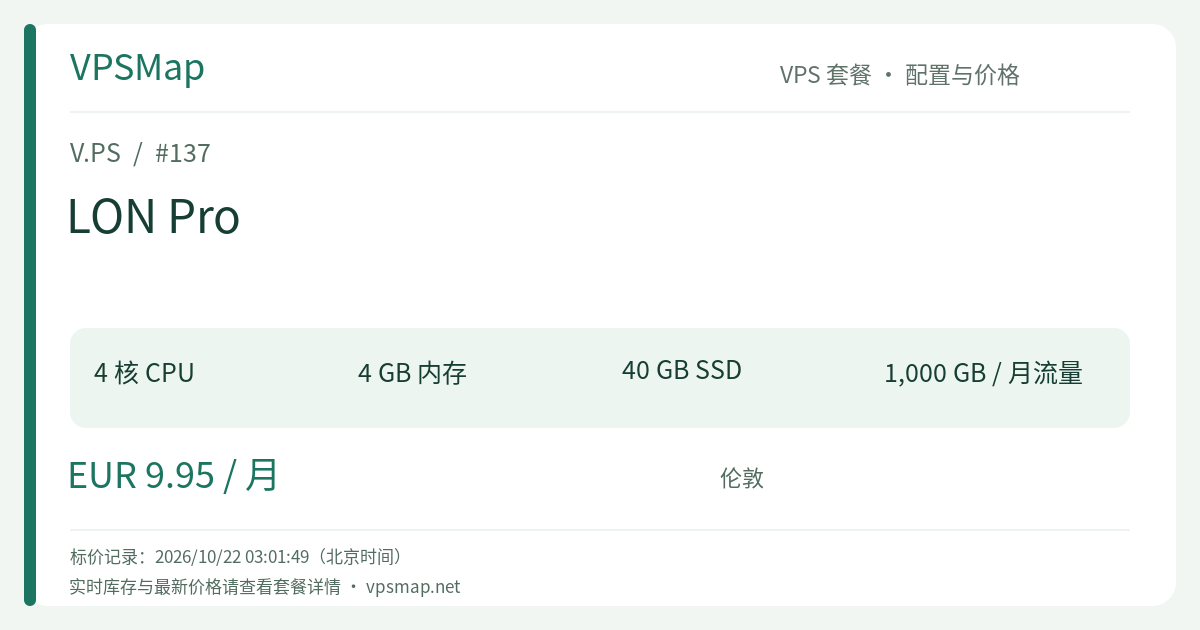
V.PS London Cloud KVM Pro Review: A Rare Sub-€10 4-Core 4GB Multithreaded European Cloud Server
Updated
Why 4 Cores and 4GB RAM Represent a Critical Production Turning Point#
Across mainstream public clouds, configurations featuring 4 CPU cores and 4 GB of RAM are classified as mid-tier or compute-optimized compute instances, routinely commanding monthly fees of $25 to $40 or more. When developers, small startups, or infrastructure teams need multithreaded horsepower for tasks like automated Docker builds, CI testing, web scraping, or multi-worker backend frameworks, budget constraints often force them onto constrained 1-core or 2-core instances that stall under peak CPU load.
The Cloud KVM Pro tier at V.PS London shatters this barrier at €9.95 per month. Coupling enterprise-grade European network transit with 4 compute cores, 4 GB physical RAM, and 40 GB SSD storage, this plan stands as an exceptional high-performance value option under the €10 threshold.
Technical Specifications & Architecture#
- Multithreaded Compute (4 vCPU Cores): Built on battle-tested KVM virtualization, 4 vCPU cores give your applications genuine parallel processing power. When traffic spikes or heavy background cron jobs execute, the OS scheduler distributes tasks smoothly across cores, preventing complete system freezes.
- 4 GB Physical Memory: Sufficient headroom to run complete database engines (PostgreSQL 15 or MySQL 8), in-memory stores (Redis), and multiple application runtimes concurrently—including lightweight JVM services, Go binaries, and Node.js instances.
- 40 GB High-Speed SSD Storage: Generous local disk space providing responsive I/O operations for heavy dependencies, application caches, and operational databases.
- 1 Gbps Network Port & 1 TB Bandwidth: Connected directly to Tier-1 European transit providers and London's key Internet Exchange Points (IXPs), delivering sustained low latency and high throughput.
- Native Dual-Stack Public IPs: Includes 1 dedicated IPv4 address and 1 routed IPv6 address, supporting rDNS customizations and modern network architectures.
Practical Workloads Built for the 4-Core 4GB Tier#
1. High-Concurrency Asynchronous Backends (FastAPI / Django / Go Gin)#
Modern async web frameworks rely on multiple worker processes to fully utilize CPU bandwidth (following the established formula: 2 × cores + 1). On the LON Pro plan, you can run 8 to 9 concurrent Gunicorn or Uvicorn workers with full in-memory caching, multiplying your request-handling throughput across the UK and Continental Europe.
2. Self-Hosted CI/CD Runners (GitHub Actions / GitLab Runner)#
Compiling software, packaging container images, and running headless tests consume substantial CPU cycles. By hosting your own dedicated runner on LON Pro, 4-core parallel processing drastically cuts pipeline execution times while benefiting from millisecond package downloads via London's premier connectivity.
3. Distributed Scraping & Headless Automation (Playwright / Puppeteer)#
Headless browser instances are notoriously resource-heavy. With 4 vCPUs and 4 GB of memory, this server can comfortably sustain 3 to 5 simultaneous headless browser instances for structured data extraction or end-to-end browser testing without triggering kernel crashes.
4. Team Collaboration Platforms (Nextcloud / Mattermost)#
For organizations seeking sovereign, self-hosted file synchronization, messaging, and documentation platforms, LON Pro provides the exact resource baseline necessary to deliver a fluid experience for teams of 10 to 30 active members.
Upgrade Matrix: Essential (€7.95) vs. Pro (€9.95) vs. Premium (€19.95)#
| Dimension | LON Essential | LON Pro | LON Premium |
|---|---|---|---|
| CPU Cores | 2 Cores | 4 Cores (Doubled) | 8 Cores |
| Memory | 2 GB | 4 GB (Doubled) | 8 GB |
| Storage | 30 GB | 40 GB | 80 GB |
| Bandwidth | 1 TB | 1 TB | 1 TB |
| Monthly Price | €7.95 | €9.95 | €19.95 |
| Price Difference | Baseline | Only +€2.00/month | +€10.00/month vs. Pro |
Takeaway:
- Stepping up from Essential to Pro costs only an additional €2.00 per month while doubling both CPU cores (from 2 to 4) and memory (from 2GB to 4GB). This is one of the highest cost-to-performance upgrades in the hosting sector.
- If your workload entails concurrent background tasks, multiple Docker containers, or high-throughput API endpoints, the LON Pro plan is the logical sweet spot.
Step-by-Step Purchasing Walkthrough#
- Initiate Your Order: Access V.PS Official Website to ensure your account is registered with full referral tracking before landing on the V.PS portal.
- Locate Cloud KVM: From the top navigation, click Deploy or Pricing / Products, and navigate to Cloud KVM VPS.
- Select London Pro: Under data centers, select Europe - London (LON), locate the LON Pro plan (€9.95/month), and click Order.
- System Configuration:
- Pick your Linux distribution (Debian 12, Ubuntu 22.04 LTS, Rocky Linux, or AlmaLinux);
- Set your machine hostname and paste your public SSH key;
- Optionally mount netboot.xyz if deploying custom OS ISOs.
- Anti-Fraud Requirements: Enter your legitimate legal name and billing address. V.PS enforces thorough automated and manual fraud prevention; orders placed behind obfuscated proxies or using fictitious records are subject to immediate cancellation.
- Payment & Deployment: Settle the invoice using Credit Card, PayPal, Bank Transfer, or supported local methods like Alipay. Provisioning proceeds automatically, delivering full root credentials within minutes.
Production Performance Tuning & Maintenance#
1. Optimize Nginx for 4 Cores#
Ensure Nginx takes full advantage of your 4 cores by assigning dedicated worker affinities:
# /etc/nginx/nginx.conf
worker_processes 4;
worker_cpu_affinity auto;
events {
    worker_connections 2048;
    multi_accept on;
}
2. Routine Docker Storage Maintenance#
With 40 GB of SSD storage, ongoing container builds can accumulate dangling image layers over time. Maintain a clean disk state with automated garbage collection:
# Clean unused Docker images and build caches
docker system prune -af --volumes
3. Understanding the 14-Day Refund Terms#
V.PS offers a 14-day refund window via ticket subject to clear terms: limited to one refund per account; total data transfer must remain under 10 GB; no active BGP routing sessions; no IP abuse complaints; and no crypto or wire transfer payments. Ensure your testing adheres to these limits during initial onboarding.