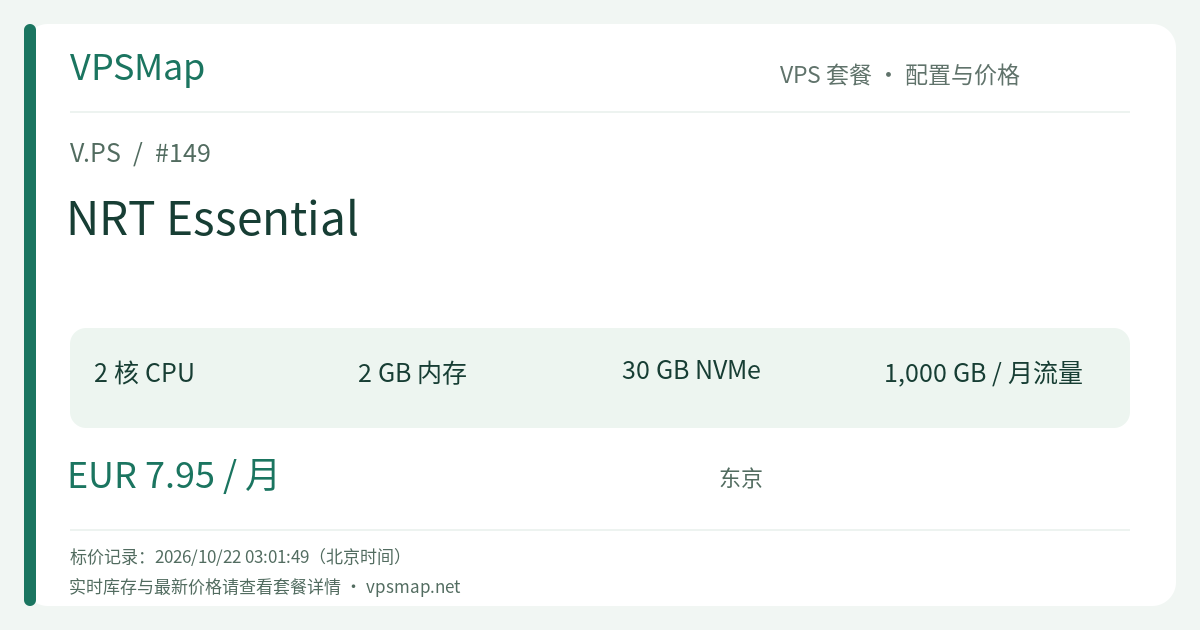
V.PS Tokyo NRT Essential Review: The €7.95/mo Sweet Spot for 2GB RAM & 30GB NVMe
Updated
Why 2GB RAM is the True Baseline for Modern Cloud Compute#
When sizing budget cloud servers, developers frequently encounter a common bottleneck: 1GB entry instances appear cost-effective initially, but once you run Docker, boot a relational database (PostgreSQL), attach a Redis cache, and deploy an application container, memory consumption quickly pushes past 800MB. A brief spike in concurrent requests or a periodic background job is often enough to trigger an Out-Of-Memory (OOM) crash.
Conversely, scaling up to 4GB tiers with major public clouds usually demands a steep budget leap to €15–€20+ per month, which feels disproportionate for agile side projects or single-service micro-SaaS deployments.
Within V.PS's Tokyo (NRT) datacenter fleet, the Cloud KVM VPS - NRT Essential plan lands right on the architectural sweet spot: €7.95/month. Compared to the starter tier (€6.95/month), spending just €1.00 more doubles system memory from 1GB to 2GB and expands fast NVMe storage by 50% to 30GB, all while keeping 2 vCPU cores, 1TB monthly bandwidth, and a 1Gbps uplink.
That single euro fundamentally shifts the instance from an anemic monitoring probe into a stable, fully capable development and production host.
Technical Specifications and Value Analysis#
| Specification | Configuration | Practical Operational Benefit |
|---|---|---|
| vCPU | 2 Cores | Handles multi-threaded concurrency and containerized processes without UI freezing. |
| Memory | 2048 MB (2 GB) | Reaches the production threshold for modern runtimes (Next.js, FastAPI, Django, Rails). |
| NVMe Disk | 30 GB NVMe | An extra 10GB margin allows comfortable retention of Docker images, logs, and database dumps. |
| Bandwidth | 1,000 GB (1TB) / mo | Generous quota easily supporting high-frequency API calls or dozens of web domains. |
| Network Port | 1 Gbps | High-speed uplink prevents pipeline congestion during traffic spikes. |
| IP Networking | 1 IPv4 + 1 IPv6 | Dual-stack connectivity suitable for modern IPv6 deployments and global testing. |
| Price | €7.95 / month | High-value monthly billing with zero long-term contract lock-in. |
Why This Single Euro Pays Compound Dividends#
- Docker Compose Flexibility: On a 1GB server, containerization requires rigorous memory shaving. On the 2GB NRT Essential, you can comfortably deploy a modern application stack:
Caddy ingress proxy + Node.js/Go app + PostgreSQL + Redis. Memory usage comfortably hovers around 1.1GB–1.4GB, leaving ample OS buffer for page caches and sudden load spikes. - Storage Safety Margin: A clean Linux installation takes approximately 4–6GB. Add base container layers, security updates, application artifacts, and runtime logs, and a 20GB disk quickly faces high disk alerts. 30GB NVMe provides practical headroom.
- xTom Upstream Infrastructure: Backed by xTom's Tier 1 routing networks and peering relationships at key internet exchanges (DE-CIX, AMS-IX, LocIX), V.PS provides a 99.9% network SLA across its range, with public Looking Glass nodes available for independent route validation.
Primary Deployment Use Cases#
NRT Essential handles standard small-to-medium software tasks with ease:
- Dynamic Web and Publishing Platforms: Host full-fledged CMS stacks like WordPress (with Redis caching and PHP-FPM), Ghost, or Strapi handling tens of thousands of daily visitors.
- Micro-SaaS Backends & API Gateways: Deploy microservices built with FastAPI, NestJS, Gin, or Actix-web requiring steady execution within East Asia.
- Self-Hosted Productivity Applications: Host private cloud utilities including Gitea (self-managed Git repositories), Vaultwarden (Bitwarden-compatible password vault), and Uptime Kuma.
- Automated Data Processing: Utilize the dual-core compute and 1Gbps uplink for periodic web scraping, data transformations, and asynchronous API ingestion.
Quickstart: Deploying a Production Docker Foundation#
Upon instance provisioning, modern distributions like Debian 12 Stable or Ubuntu 22.04 LTS are recommended. Initialize your container runtime using standard tools:
# 1. Update system packages
sudo apt update && sudo apt upgrade -y

# 2. Install official Docker Engine
curl -fsSL https://get.docker.com -o get-docker.sh
sudo sh get-docker.sh
sudo usermod -aG docker $USER

# 3. Create a production-ready stack (Caddy reverse proxy + Uptime Kuma)
mkdir -p ~/deploy && cd ~/deploy
cat << 'EOF' > docker-compose.yml
version: '3.8'
services:
  caddy:
    image: caddy:2-alpine
    restart: always
    ports:
      - "80:80"
      - "443:443"
    volumes:
      - ./Caddyfile:/etc/caddy/Caddyfile
      - caddy_data:/data
      - caddy_config:/config

  status:
    image: louislam/uptime-kuma:1
    restart: always
    volumes:
      - uptime_data:/app/data

volumes:
  caddy_data:
  caddy_config:
  uptime_data:
EOF

# 4. Launch containers
docker compose up -d
With 2GB of physical memory and NVMe drive speeds, dependencies and layers download and boot in seconds without memory paging.
Plan Comparison: Tokyo Cloud KVM Lineup#
| Feature | NRT Starter | NRT Essential (Top Recommendation) | NRT Pro |
|---|---|---|---|
| Price | €6.95 / mo | €7.95 / mo | €9.95 / mo |
| CPU | 2 Cores | 2 Cores | 4 Cores |
| Memory | 1 GB | 2 GB | 4 GB |
| NVMe | 20 GB | 30 GB | 40 GB |
| Bandwidth | 1 TB | 1 TB | 1 TB |
- Compared to Starter: For just €1.00 extra per month, doubling RAM and adding 10GB NVMe storage makes Essential by far the highest-value tier in the lineup.
- Compared to Pro: Moving to Pro requires another €2.00/month for 4 cores and 4GB RAM. If your workloads include intensive concurrent compilation or JVM services, pick Pro; otherwise, Essential remains the optimal sweet spot for standard web services.
Step-by-Step Purchasing and Verification Guide#
- Session Initiation: Start at the V.PS Official Portal to ensure proper affiliate tag association on the landing page.
- Navigate to VPS Catalog: Click Deploy a Server or go to Cloud KVM VPS, then select Tokyo (NRT) under Asia Pacific.
- Select NRT Essential: Choose NRT Essential (€7.95/month) and click Order.
- Host Configuration:
- Select an OS distribution (Debian, Ubuntu, Rocky Linux, AlmaLinux, or custom netboot.xyz ISO).
- Define your server hostname and paste your SSH public key for secure credential management.
- Anti-Fraud Billing Compliance:
- V.PS mandates genuine billing identity records, including accurate legal names and verifiable residential addresses.
- Avoid commercial proxies or fabricated personal data during checkout; automated anti-fraud filters reject fraudulent orders and initiate automatic refunds.
- Payment Processing: Settle your invoice via PayPal, major international credit cards, bank wire, or localized payment options like Alipay, iDEAL, or Bancontact.
- Refund Policy Overview:
- KVM VPS services include a 14-calendar-day refund window upon ticket submission (one refund per account lifetime).
- Ineligible conditions include: exceeding 10GB transfer usage, active BGP/IX services, service transfers, abuse reports, IP blacklisting, or prior IP replacements. Crypto and wire transfer payments cannot be refunded.
Summary#
For developers needing an accessible Tokyo VPS that effortlessly runs real-world containerized applications without constant memory triage, V.PS NRT Essential represents the most sensible tier in the Tokyo Cloud lineup. The €1 difference from the entry model pays off on day one.
Deploy your instance today: 👉 Deploy V.PS Tokyo NRT Essential on Official Portal