V.PS San Jose SJC Pro Guide: €19.95/mo 4-Core 4GB Workhorse for Microservices and CI/CD
Updated
When Should You Step Up to SJC Pro?#
When your application transitions from an early stage prototype to a production environment that demands high concurrency, automated CI/CD builds, and SLA consistency, entry-level dual-core instances often show signs of strain. Intensive builds choke single-thread queues, multi-container deployments trigger memory pressure, and asynchronous background jobs lag during traffic spikes.
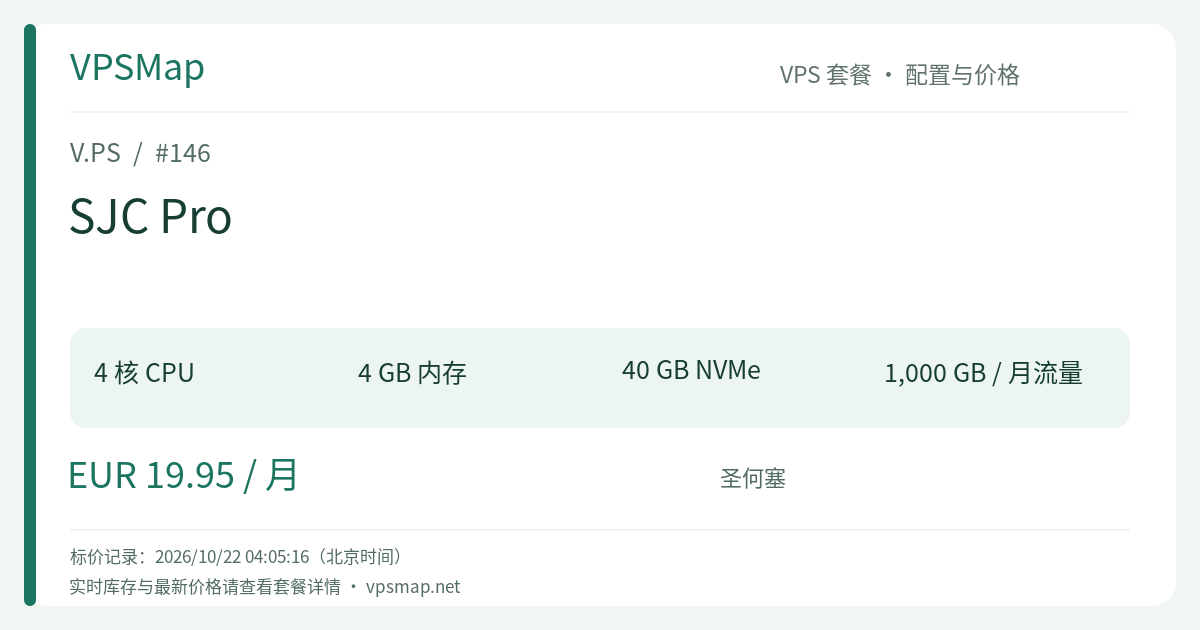
V.PS Cloud KVM VPS - SJC Pro is engineered specifically for this tier of demanding workloads. Priced at €19.95 per month, it delivers 4 vCPU cores, 4 GB RAM, 40 GB NVMe storage, a 1 Gbps port, and 1 TB of monthly bandwidth. Positioned directly in Silicon Valley's major connectivity hub in San Jose, this instance blends substantial multi-core throughput with ample memory, serving as a dependable workhorse for growing businesses, independent developers, and engineering teams.
Hardware Architecture and Workload Capacity#
The technical balance of SJC Pro represents an ideal equilibrium for professional hosting:
| Technical Parameter | Specification Metric | Operational Capability |
|---|---|---|
| Processor | 4 vCPU Cores (KVM Architecture) | True quad-core parallelism for concurrent web workers, databases, and tasks |
| RAM | 4096 MB (4 GB) | Generous memory headroom, easily handling 10+ active Docker containers |
| Storage | 40 GB NVMe SSD | Pure NVMe array providing rapid I/O speeds for database commits and image layers |
| Port Speed | 1 Gbps High-Speed | High burst capacity to handle traffic surges and rapid file ingestion |
| Bandwidth | 1000 GB (1 TB Monthly) | Ample for API backends and routine services; monitor high-volume raw media streaming |
| IP Networking | 1 × Dedicated IPv4 + 1 × IPv6 | Comprehensive dual-stack routing for modern cloud topologies |
| Infrastructure SLA | 99.9% Uptime SLA | Direct peering with major Internet Exchange Points (DE-CIX, AMS-IX) and Tier 1 transit |
Core Production Use Cases#
- Multi-Container Microservice Stacks: Deploy a unified environment containing
Traefik/Nginx + 3-5 application containers + PostgreSQL + Redis + Celery/RabbitMQbackground workers without out-of-memory risks. - Dedicated CI/CD Build Nodes: Act as a self-hosted GitHub Actions or GitLab runner. Four vCPU cores drastically reduce frontend build times (Vite/Webpack) and Docker layer packaging durations compared to dual-core instances.
- Automated Scraping & Headless Processing: Concurrently run headless browsers (Playwright, Puppeteer) and data processing pipelines where multiple browser contexts require stable 4-core scheduling.
- Multi-Tenant CMS & eCommerce Backends: Host robust multi-site WordPress environments or high-throughput REST/gRPC microservice gateways catering to North American and trans-Pacific audiences.
Tier Comparison: Is SJC Pro the Right Investment?#
| Plan Name | Price | Compute & Storage | Monthly Transfer | Best Suited For |
|---|---|---|---|---|
| SJC Essential | €9.95 /mo | 2 vCPU / 2 GB / 30 GB NVMe | 1 TB | Lean full-stack apps and single-container deployments |
| SJC Pro | €19.95 /mo | 4 vCPU / 4 GB / 40 GB NVMe | 1 TB | Multi-container microservices, CI/CD runners, and active web APIs |
| SJC Premium | €39.95 /mo | 8 vCPU / 8 GB / 80 GB NVMe | 1 TB | High-thread compilation and enterprise parallel computing |
- Compared to SJC Essential (€9.95/mo): SJC Pro doubles both CPU cores (2 -> 4) and RAM (2 GB -> 4 GB) for an extra €10 per month. If your stack involves background task queues, periodic compilation, or multi-tenant workloads, SJC Pro provides the necessary buffer to prevent performance degradation.
- Compared to SJC Premium (€39.95/mo): Premium scales to 8 cores, but comes at double the monthly cost. Unless your services specifically require heavy multi-threaded parallel computation, SJC Pro delivers the most balanced capacity for standard production budgets.
Practical Resource Allocation Strategy#
With 4 vCPUs and 4 GB RAM, you can structure a robust service architecture. Here is an optimal memory allocation framework:
# Suggested Production Allocation Strategy:
# 1. Core Database (PostgreSQL / MySQL): Cap at 1.0 GB RAM (shared_buffers = 256MB)
# 2. In-Memory Cache (Redis): Cap at 512 MB RAM with LRU eviction enabled
# 3. Application Services (Node.js / Go / Python): Allocate 1.5 GB pooled memory
# 4. Ingress & Operating System Overhead: Reserve ~1.0 GB for OS buffers and Nginx
This structure ensures memory stability, allowing the Linux kernel to keep critical filesystem indexes cached in remaining RAM.
Official Terms of Service, Refund Guidelines & Anti-Fraud#
Ensure compliance with V.PS operating policies before provisioning:
- 14-Day Refund Policy & Critical Conditions:
- Eligible for a refund request via support ticket within 14 calendar days of creation.
- Strict Data Cap: Cumulative data usage must be under 10 GB. Running intensive network benchmarks can quickly exceed this threshold and void refund eligibility.
- Lifetime Limit: Only one refund is granted per customer account.
- Exclusions: Cryptocurrency and Bank Transfer payments are strictly non-refundable. Service renewals, discounted flash sale items, instances with active BGP sessions, and IPs flagged for abuse or blacklisted (Spamhaus, GFW, etc.) are non-refundable.
- Anti-Fraud Account Verification:
- Orders undergo automated screening and human audit. You must provide your accurate legal name and valid billing address.
- Avoid checking out behind commercial VPNs or datacenter proxies. Location discrepancies will trigger order cancellation and automated reversal.
- Billing Currency and Methods:
- Billed in Euros (EUR). Supported payment options include PayPal, major international Credit Cards (Visa, MasterCard, Amex), and localized payment systems like Alipay, iDEAL, and Bancontact.
Step-by-Step Purchase Instructions#
Follow these explicit steps to navigate the catalog and deploy the SJC Pro instance:
- Visit Provider Portal: Use the official link V.PS Main Service Page to properly record affiliate attribution on the homepage.
- Open Deployment Section: Click Deploy a Server or See Pricing in the header navigation.
- Select Server Tier: Choose Cloud KVM VPS from the available product lines.
- Locate San Jose Data Center: Find North America -> San Jose (SJC).
- Network Diagnostics: Click Test this network to inspect network routes and latency via the Looking Glass tool.
- Select SJC Pro: Scroll to SJC Pro (4 CPU cores, 4 GB memory, 40 GB NVMe, 1 TB transfer @ €19.95 /mo), then click Order.
- Finalize Configuration & Payment: Select your preferred operating system (Debian, Ubuntu, Rocky Linux, or custom netboot.xyz ISO), enter genuine billing credentials, and select your payment method. The instance will be automatically provisioned within seconds.