V.PS Sydney Cloud KVM Essential Review: The 1-Euro Double-RAM Sweet Spot for Australian VPS
Updated
The €1 Upgrade: Why 2GB RAM is the Gold Standard for Linux Hosting#
When sizing cloud servers, developers frequently confront a familiar dilemma: should you cut costs to the absolute bone with a bare-minimum 1 GB RAM instance, or slightly adjust your budget to secure breathing room?
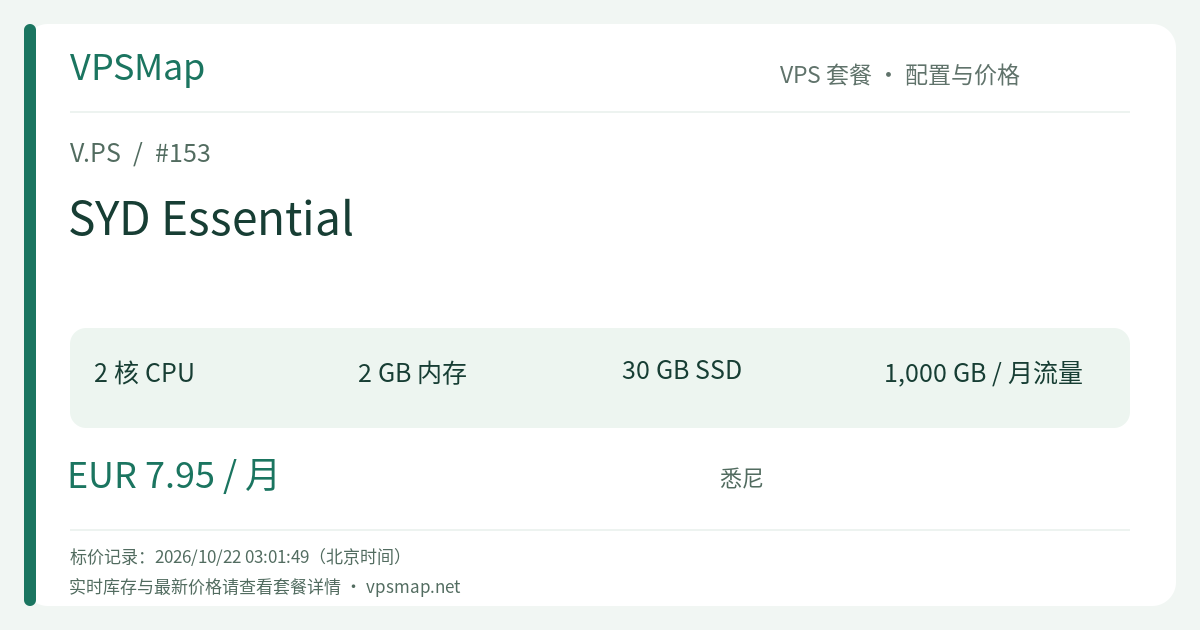
Within the V.PS Sydney (SYD) Cloud KVM lineup, that choice is an effortless calculation. The Starter plan costs €6.95 per month, while the SYD Essential tier sits at €7.95 per month. The price difference is exactly €1.00 (around 3 to 4 cents a day), but the hardware upgrade is massive: your system RAM instantly doubles from 1 GB to 2 GB, and high-speed SSD storage increases from 20 GB to 30 GB.
In daily operations, 1 GB of memory requires vigilant tuning, aggressive swap allocations, and constant worry about the Linux OOM Killer during minor traffic spikes. A 2 GB environment, by contrast, hits the coveted operational sweet spot. It allows your operating system, relational database, web server, and reverse proxy to comfortably coexist, elevating your server experience from fragile survival to rock-solid stability.
SYD Essential: Hardware & Comparative Tier Matrix#
To appreciate the strategic value of the Essential plan, examine it alongside its adjacent counterparts in the Sydney cluster:
| Specification | SYD Starter (Base) | SYD Essential (Sweet Spot) | SYD Pro (Advanced) |
|---|---|---|---|
| CPU Cores | 2 vCPU | 2 vCPU | 4 vCPU |
| RAM | 1024 MB (1 GB) | 2048 MB (2 GB) | 4096 MB (4 GB) |
| Storage | 20 GB SSD | 30 GB SSD | 40 GB SSD |
| Network Speed | 1 Gbps port | 1 Gbps port | 1 Gbps port |
| Traffic Quota | 1000 GB (1 TB) | 1000 GB (1 TB) | 1000 GB (1 TB) |
| IP Address | 1 IPv4 + 1 IPv6 | 1 IPv4 + 1 IPv6 | 1 IPv4 + 1 IPv6 |
| Monthly Rate | €6.95 / mo | €7.95 / mo | €9.95 / mo |
For a modest ~14% increase in monthly spending over Starter, Essential delivers a 100% boost in usable memory and a 50% expansion in disk storage, all while maintaining 1 Gbps burstable networking, a 1 TB bandwidth envelope, and a 99.9% uptime SLA. Pound-for-pound, it is arguably the most sensible investment in V.PS's Australian portfolio.
Practical Production Workloads for SYD Essential#
With 2 GB RAM and 30 GB SSD backing your services, the scope of what you can comfortably host in Australia broadens dramatically:
- Oceania Business Web Portals & CMS Stacks: If you operate an e-commerce storefront, company website, or professional blog targeting audiences across Australia and New Zealand, hosting locally in Sydney slashes network latency. A 2 GB footprint comfortably powers standard Nginx + MariaDB/MySQL 8.0 + PHP-FPM setups, completely eliminating the memory bottlenecks common on smaller instances.
- Lightweight Docker Compose Stacks: Want to self-host essential open-source utilities? A micro-stack comprising an Nginx Proxy Manager, an Uptime Kuma monitoring daemon, and a Vaultwarden password backend can run concurrently without breaking a sweat, leaving ample RAM to absorb burst traffic.
- Oceania Market Scraping & Automation: Running monitoring scripts and data ingestion tasks against Australian marketplaces (such as Amazon AU or local real estate platforms) requires genuine local IP presence and consistent processing capacity. Two vCPU cores and 2 GB of memory allow multi-threaded headless crawlers to run cleanly without freezing the shell.
- Secure Corporate Gateway & Jumpbox: Deploy a WireGuard secure access point or a Nextcloud instance for remote cross-border teams. A dedicated Australian node with native dual-stack IPv4/IPv6 provides an uncluttered, high-bandwidth communication pipeline.
Operational Capabilities: Modern Control & Flexibility#
Operated by xTom, V.PS cuts through the cumbersome ticketing overhead typical of old-school hosting providers, providing direct, automated self-service controls:
- Instant Rebuilds & Operating Systems: Quickly reboot, rebuild, or scale instances directly from the customer portal. Pre-configured templates include production-grade releases of Debian Stable, Ubuntu LTS, CentOS Stream, Rocky Linux, and AlmaLinux.
- netboot.xyz Network Boot Flexibility: For sysadmins who demand complete control over partition layouts, or who wish to deploy custom operating systems like Alpine Linux or FreeBSD, V.PS supports direct mounting of the netboot.xyz ISO with interactive VNC console access.
- Robust Tier 1 Upstreams & IX Peering: V.PS maintains direct Tier 1 upstream connections alongside peering presences across major exchanges like DE-CIX, AMS-IX, and LocIX. BGP sessions are also available upon request, accommodating advanced routing architectures.
Deployment & Anti-Fraud Best Practices#
To ensure your order activates immediately without being flagged by automated security safeguards, follow this guide:
- Access the Platform: Visit the V.PS Official Portal. This link ensures proper referral attribution and brings you to the landing page. Click Deploy a Server or head to the product overview.
- Locate Plan & Location: Under Cloud KVM VPS, navigate to Asia Pacific -> Sydney (SYD), locate SYD Essential (2 vCPU / 2GB RAM / 30GB SSD), and click Order.
- Select OS & Hostname: Pick your preferred Linux distribution and assign a server hostname.
- Provide Accurate Identity Details: V.PS applies strict anti-fraud filters. Ensure your legal name, residential address, and billing information are genuine and accurate. Orders placed using fake identities or high-risk proxies are automatically flagged and refunded by the security system.
- Payment & Automated Provisioning: Settle your invoice via PayPal, credit cards, or supported regional methods (such as Alipay where available). Your virtual instance will deploy automatically within moments, and root credentials will be sent to your account email.
Official 14-Day Refund Terms#
Review the standard refund parameters to guarantee your planned usage complies with official policies:
- 14-Day Window: You may request a full refund within 14 calendar days of order activation by submitting a support ticket.
- Policy Conditions: Limited to one refund per customer account; invalidated if more than 10 GB of data transfer has been consumed; invalidated if BGP or Internet Exchange (IX) services have been bound to the VPS; invalidated if the service was transferred to or from another account; invalidated if the IP address received abuse complaints or was listed on public blacklists (Spamhaus, blocklist.de, GFW, etc.); invalidated if an IP replacement was requested; cryptocurrency and bank wire payments are non-refundable; renewals and discounted flash-sale products are non-refundable.
If you want the peace of mind that comes with doubling your system memory for an extra €1.00 per month, V.PS Sydney Essential represents the undisputed sweet spot in Oceania cloud hosting.