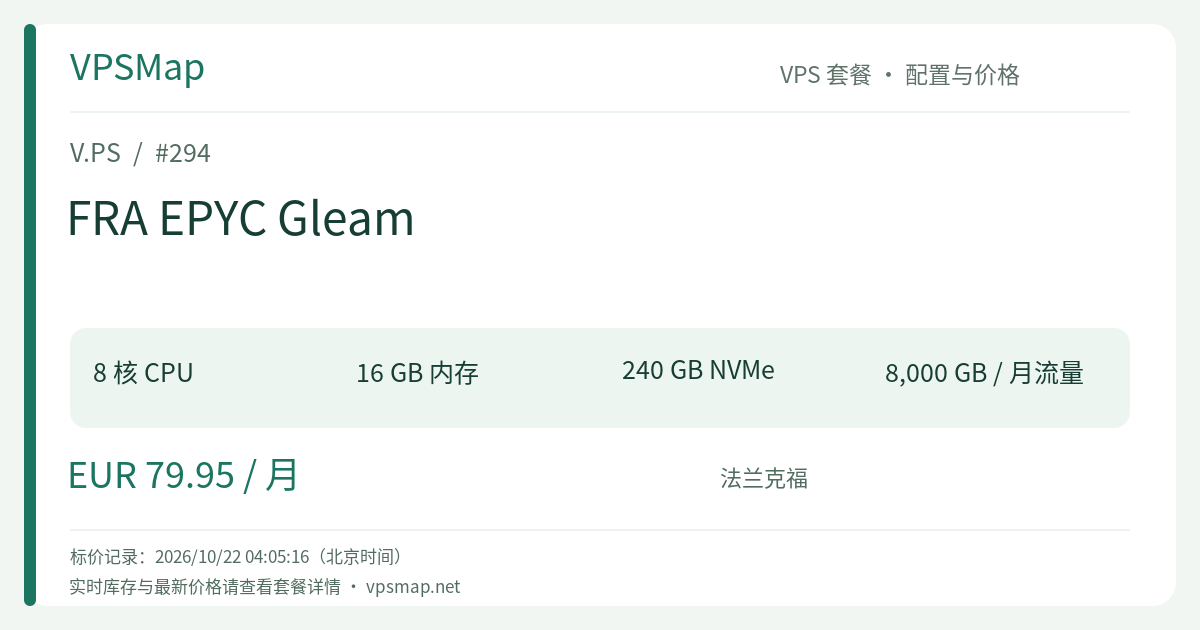
V.PS Frankfurt Performance FRA EPYC Gleam Flagship Review: 8 vCPU / 16GB RAM / 2 Gbps Ultimate European Node
Updated
The Pinnacle of European Compute: Why FRA EPYC Gleam?#
In cross-border enterprise deployments, multi-tenant SaaS environments, and modern container platforms, the European central node often carries the heaviest operational burden. Frankfurt represents the premier data gateway for continental Europe, offering direct low-latency connectivity across EU member states and transatlantic routes. However, when a single node must simultaneously handle dozens of microservices, message brokers (Kafka/RabbitMQ), extensive in-memory caches, and concurrent database transactions, entry-level servers quickly hit CPU and memory limits.
To meet the needs of resource-intensive production architectures, V.PS (operated by established infrastructure provider xTom, with client billing at vps.hosting) provides its most capable flagship tier in Frankfurt, Germany: FRA EPYC Gleam.
As the heavyweight anchor of the Frankfurt Performance family, Gleam offers remarkable hardware density: 8 AMD EPYC shared vCPUs, 16384 MB (16 GB) of RAM, 240 GB of enterprise NVMe storage, 8000 GB (8 TB) of monthly bandwidth, and an uncompromising 2 Gbps (2000 Mbps) port, backed by 2 complimentary backup slots. At €79.95/month, it brings enterprise-grade compute power within reach of scaling organizations.
Specification Matrix & Technical Highlights#
| Specification Component | Official Standard |
|---|---|
| Model | FRA EPYC Gleam (PID 294) |
| Datacenter | Frankfurt, Germany (FRA) |
| Compute Capacity | 8 vCPU (AMD EPYC, Shared Cores) |
| System Memory | 16384 MB (16 GB RAM) |
| Storage Capacity | 240 GB Enterprise NVMe SSD |
| Network Speed | 2 Gbps (2000 Mbps) Uncapped Uplink |
| Bandwidth Allowance | 8000 GB (8 TB) / Month |
| IP Allocation | 1 Dedicated IPv4 + 1 Native IPv6 |
| Data Protection | 2 Backup Slots Included |
| Pricing | €79.95 / month (Billed in EUR, renewable at identical price) |
1. 8 AMD EPYC Cores & 16 GB RAM: Full Architectural Freedom#
Having 16 GB of physical memory and 8 vCPUs eliminates the need for swap tricks or constant memory management:
- Deploy a complete single-node Kubernetes (K3s) or Nomad cluster orchestrating dozens of production containers;
- Dedicate 6–8 GB directly to PostgreSQL or MySQL buffer caches, ensuring high in-memory hit rates for intensive read/write operations;
- With 240 GB of high-speed NVMe storage, your system accommodates extensive Docker layers, local builds, database binlogs, and application data without disk space alerts.
2. Full 2 Gbps Port with 8 TB Monthly Transfer#
While most cloud providers cap virtual machines at 1 Gbps, Gleam provides a full 2 Gbps interface. Positioned directly at Europe's primary interconnect exchange, DE-CIX, and peering with AMS-IX, LocIX, and tier-1 upstreams, throughput is exceptional. The generous 8 TB transfer quota gives scaling platforms the freedom to stream media, synchronize backups across clouds, and absorb unexpected traffic surges. Important routing note: V.PS designs the Premium Network around superior European peering and tier-1 capacity; it does not promise specific CN2 GIA routing or latency guarantees to mainland China. Its strength lies in European and global transit performance.
3. Integrated Dual-Slot Backup Protection#
Operating mission-critical systems demands robust safety nets. Gleam bundles two full-system backup slots in the control panel. Prior to major database schema changes or operating system upgrades, taking an on-demand snapshot provides peace of mind, allowing complete rollbacks in minutes without third-party fees.
Target Deployments: Real-World Scenarios#
- Enterprise E-Commerce & Scaled Multi-Site Networks: Host high-concurrency Magento 2, Shopware, or multi-tenant WooCommerce stores serving customers across Europe during high-volume sales events.
- Self-Hosted Data Analytics & Observability: Run a full-scale Elasticsearch, ClickHouse, or Grafana Loki stack capable of indexing thousands of log lines and metric data points per second from distributed agents.
- Single-Node Container Orchestration (K3s / Docker Swarm): Consolidate API gateways, internal microservices, Redis clusters, and worker queues on a single well-resourced instance for operational simplicity.
- High-Throughput CI/CD Build Hubs: Serve as a high-powered GitLab Runner or Jenkins build server, compiling large frontend assets and building Docker images with fast turnaround times.
Deciding on the Right Performance Tier#
Choosing the optimal tier in the Frankfurt Performance lineup ensures efficient resource usage:
- Compared to FRA EPYC Grand (€39.95/mo, 4 vCPU / 8GB / 120GB / 1.75 Gbps): Gleam doubles the investment but doubles every critical resource—from 4 to 8 vCPUs, 8GB to 16GB of RAM, 120GB to 240GB of NVMe storage, 4TB to 8TB of bandwidth, and raises the port speed to a full 2 Gbps. If your active memory footprint exceeds 6 GB or you need to run resource-intensive multi-container setups, Gleam provides essential headroom.
- For Standard Web Applications: If you only need to run a standalone website or moderate API backend, the entry-level Grit (€9.95/mo) or sweet-spot Gutsy (€19.95/mo) will meet your needs with lower expenditure.
- Shared vCPU Understanding: Gleam's 8 cores are high-performance shared AMD EPYC cores. They deliver outstanding burst capabilities for real-world web traffic. However, sustained 100% compute loads (like cryptocurrency mining or continuous 24/7 video rendering) are prohibited under standard acceptable use policies.
Step-by-Step Purchase & Deployment Guide#
Follow these recommendations to configure and launch your server:
Step 1: Open the V.PS Portal#
Visit the V.PS Official Portal. Navigate to the top menu, click on Products, and select Performance KVM VPS.
Step 2: Select Frankfurt & Choose Gleam#
Under the datacenter list, choose Europe - Frankfurt (FRA). Locate the FRA EPYC Gleam card and click Order.
Step 3: Configure Operating System & Security#
- Hostname: Enter your fully qualified domain name (FQDN).
- OS Distribution: Choose Ubuntu 24.04/22.04 LTS, Debian 12, Rocky Linux, or AlmaLinux. Custom netboot.xyz ISO installations are also supported.
- SSH Key: Add your public SSH key for password-free login upon initial boot.
Step 4: Account Registration & Verification#
- Anti-Fraud Compliance: V.PS maintains strict fraud detection. You must provide your genuine legal name and correct residential address. Mismatches between billing details and payment origin will trigger automated fraud checks and order cancellation.
- Payment Gateways: Choose from PayPal, major credit cards, Alipay, or regional European options (iDEAL, Sofort, etc.). All pricing is processed in Euros (EUR).
Step 5: Activation and Refund Conditions#
Your instance will be deployed automatically within a few minutes of payment.
- 14-Day Refund Terms: V.PS provides a 14-day refund window via support ticket under strict terms: bandwidth usage must not exceed 10 GB; only one refund per customer account; no active BGP/IX services; IP must not be blacklisted; and cryptocurrency and bank wire payments are non-refundable. Keep data transfer minimal while evaluating the instance.