
Identify Real Bottlenecks Before Paying for Upgrades#
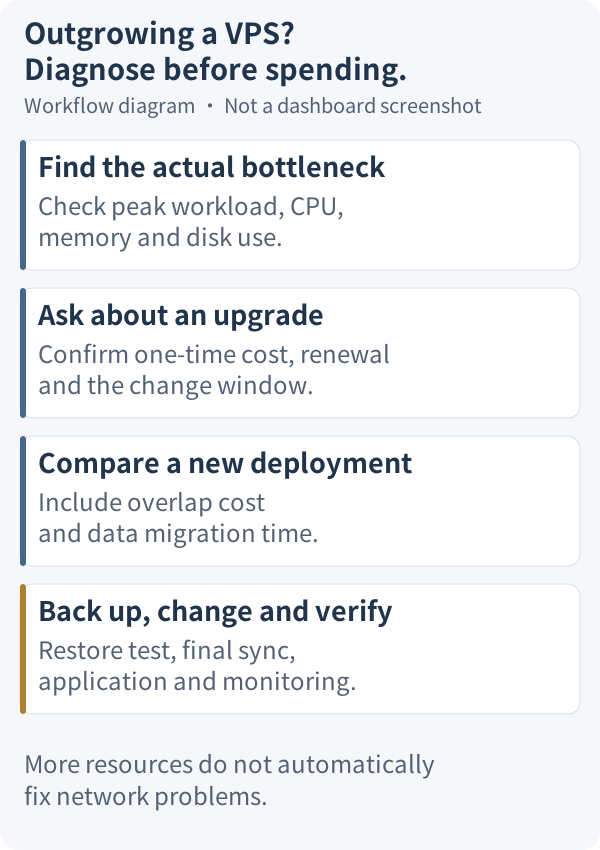
When your server feels sluggish or application responses slow down, do not rush to pay for a higher-tier plan. In many cases, slowdowns result from network congestion, unrotated logs, or misconfigured services rather than a lack of hardware power. Upgrading blindly costs more without guaranteeing resolution.
Start by examining how your server behaves during actual traffic peaks:
| Symptom | Recommended Metrics | Common Causes and Diagnostic Notes |
|---|---|---|
| Sluggish pages, slow API responses | Peak CPU utilization, Available Memory, Swap I/O | Concurrency spikes, runaway processes, or missing database indexes; if available memory is healthy, do not mistake buffer/cache allocation for memory exhaustion |
| Write errors, unexpected service stops | Available disk space (df -h), inode usage (df -i) | Unrotated application logs, accumulating cache, or organic data growth; inspect file sources before cleaning, and avoid destructive blanket deletion commands |
| Frequent SSH drops, sudden latency spikes | System load averages, multi-network ping latency, end-to-end packet loss | Could stem from transit routing congestion or extreme system load; cross-check server load with network tests, and avoid treating intermediate ICMP rate-limiting hops as end-to-end loss |
Always base resource judgments on sustained metrics during business peaks rather than isolated spikes or simple dashboard percentages. Identify the services generating logs and cache before cleaning them, and manage them with proper log rotation rather than buying larger servers to solve routine maintenance oversights.
Upgrade Eligibility and Fee Calculation Rules#
Once you confirm a sustained hardware shortage, review the official upgrade constraints before reaching out to support.
According to DMIT's instance FAQ, upgrades are only permitted within the same series to higher tiers in stock with equal or larger disks; downgrades are unsupported. Fees equal the full tier price difference regardless of remaining days, renewing at the new rate. Extra RAM or disk can be requested via ticket; CPU or IP expansions are rare. Plan upgrades must be requested via ticket.
Beyond these basic prerequisites, request written clarification from support on four key details:
- The exact one-time invoice amount required for the upgrade.
- The recurring renewal rate for future billing cycles, and whether any existing promotional discount remains applicable.
- Whether your current billing cycle length or next expiration date will change.
- The scheduled maintenance downtime window, along with specific handling for your existing operating system, public IP, and disk data.
Choosing Between Ticket Upgrades and Manual Redeployment#
When deciding how to expand your capacity, you generally weigh two paths:
- Requesting an in-place ticket upgrade: Ideal when your current datacenter region and network routing still suit your workload and the instance can be upgraded under the aforementioned conditions. Request a proposal and quotation from support first. Note that whether the upgrade requires downtime or preserves your existing IP address and data depends on support's specific operational plan; never assume zero changes in advance.
- Redeploying on a new instance: Suitable when you need to switch datacenter regions, change product series, or rebuild your OS environment from scratch. This manual migration is an operational workflow you execute yourself on a newly provisioned instance.
Self-migration involves practical trade-offs you must factor in:
- Overlapping infrastructure costs: You will pay for both instances concurrently while configuring, testing, and cutting over traffic.
- Time and operational risks: You must manage data dumps, file transfers, database restoration, and DNS cutover yourself, introducing operational overhead.
- Hardware vs. network limits: If your main bottleneck is transit route congestion or international packet loss, upgrading hardware specifications will not guarantee improved network latency or routing quality.
Ticket Inquiry Template and Communication Tips#
When requesting upgrades or extra resources, communicate with support via ticket. According to the DMIT Ticket FAQ, tickets are queued based on their last update time; sending repeated follow-up messages may reset your position in the queue. Provide all relevant parameters in your initial ticket, wait patiently, and avoid bumping the thread unless you have critical new information. Submit requests through the official DMIT Support Center, and never request or share SSH private keys or root passwords in tickets.
You can adapt this inquiry template:
Subject: Inquiry regarding plan upgrade / resource addition for VM [Instance ID]

Hello support team,

I would like to inquire about upgrading my existing instance. Details are as follows:

1. Instance ID & Current Plan: [Your Instance ID and current plan name]
2. Target Plan / Required Resources: [Target plan name, or required RAM/disk capacity]
3. Current Billing Cycle & Expiry Date: [Current billing cycle and expiration date]
4. Reason for Upgrade: [Brief description of bottlenecks, e.g., sustained memory pressure]

Please help confirm the following points:
- Is this instance eligible for the target plan, and is it currently in stock?
- What is the exact one-time upgrade invoice amount?
- What will be the recurring renewal price for subsequent billing cycles, and does my existing promotional discount remain valid?
- Will my current billing cycle or expiration date change?
- What is the expected maintenance downtime window, and will my existing OS, public IP, and disk data remain intact?
- After disk expansion, do I need to manually resize the partition and filesystem inside the OS?

Note: This ticket is an inquiry only. Please do not apply changes or generate unpaid invoices before my confirmation.

Thank you!
Explicitly stating that the ticket is an inquiry clearly conveys your intent before confirming changes, allowing you to review the exact pricing and plan before committing.
Pre- and Post-Change Operational Checklist#
Whether you proceed with an in-place upgrade or deploy a new instance for self-migration, follow this rigorous operational checklist:
- Pre-change preparation and independent backup:
- Create complete database dumps and archive website files and critical configuration files; refer to Database backup and recovery for best practices.
- Download backup archives locally or transfer them to independent off-site storage; never keep backups solely on the instance being modified.
- Verify backup integrity by performing a test restore in a clean staging environment.
- Schedule work during low-traffic maintenance hours, and never assume zero downtime, IP preservation, or automatic data retention.
- Post-change verification and acceptance:
- Log in and verify that the operating system detects the updated CPU cores, memory, and disk space. If disk space was increased, follow support's exact instructions for partition and filesystem expansion rather than blindly executing generic automated repartitioning scripts.
- Review core service status and inspect application error logs.
- Thoroughly test key web pages, user authentication flows, and API responses.
- Verify that automated backup cron jobs and monitoring targets are active and calibrated.
- If executing manual self-migration:
- Complete configuration and comprehensive connectivity testing on the new VM before modifying production DNS.
- Before switching DNS records or CDN origin settings, the old instance must stop accepting new writes or forward them to the new server. Once final data synchronization is complete, direct all new writes exclusively to the new machine to prevent data divergence and loss caused by DNS propagation delays. Temporarily retaining the old instance for observation does not mean allowing both servers to accept writes simultaneously.
- Keep the old instance available in read-only mode for observation until traffic transitions cleanly and the new deployment passes all operational checks, then decommission the old server.
If you determine that your current server cannot meet growth requirements and a new instance is needed, compare specifications on Current DMIT plans, estimate bandwidth with DMIT transfer quota checks, or browse available configurations on the DMIT Official Website.
Updated on 2026-10-27: Clarified DMIT official upgrade and price difference policies, cross-verification for bottlenecks, ticket inquiry templates, and data cutover checklists.