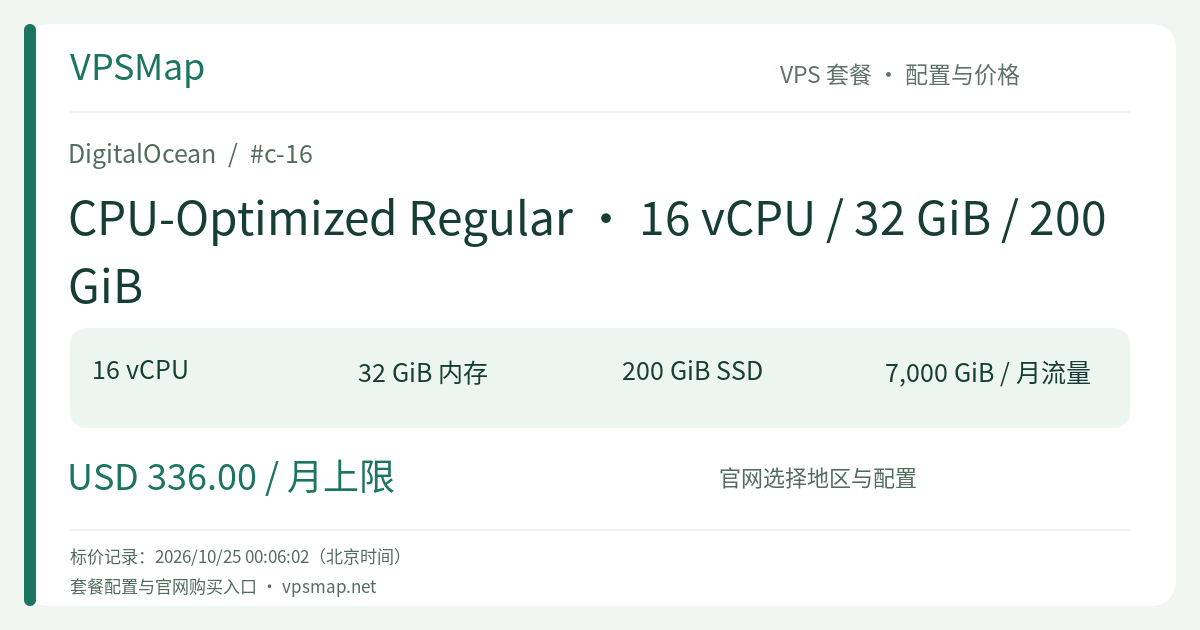
DigitalOcean c-16 Buyer's Guide: 16 Dedicated vCPUs and 32 GiB RAM for Heavy Production Clusters
Updated
Stepping Up to Dedicated 16-Core Power: Challenges Solved by c-16#
As traffic transitions from intermittent spikes to sustained production load, mid-sized servers face critical performance bottlenecks:
- Excessive CPU context switching under heavy concurrency;
- Thread starvation and extended garbage collection (GC) pauses;
- Request queue buildup causing P95 and P99 latency degradation.
DigitalOcean c-16 marks the transition to heavy-duty production infrastructure in the CPU-Optimized Regular tier. It dedicates 16 full hardware hyperthreads exclusively to your virtual machine. With baseline clock speeds exceeding 2.6 GHz, your applications run on deterministic, predictable compute without the noisy-neighbor interference common on shared cloud providers.
Resource Balance: 32 GiB RAM and 200 GiB Local SSD#
When scaling to 16 cores, over-provisioning memory often inflates infrastructure bills unnecessarily. The c-16 maintains a practical 2:1 compute-to-memory ratio, catering specifically to high-throughput systems with moderate per-request memory footprints:
+-------------------------------------------------------------+
|             DigitalOcean c-16 Architecture Model            |
+-------------------------------------------------------------+
|  [16 vCPU Dedicated]  ==> 100% Sustained Compute, Zero Steal|
|  [32 GiB RAM]         ==> Solid JVM Heaps / Multi-Worker RAM|
|  [200 GiB Local SSD]  ==> Low-Latency Direct-Attached Drive |
|  [7,000 GiB Bandwidth]==> Large-Scale Public Egress Pool    |
+-------------------------------------------------------------+
Primary Workload Fits#
- Production Kubernetes Node Pools (DOKS): An ideal worker node capable of packing dozens of microservice pods. 16 dedicated threads comfortably absorb peak traffic, 32 GiB RAM handles runtime overhead, and the 200 GiB drive provides ample local storage for container images and temporary volumes.
- High-Concurrency API & E-Commerce Backends: Provides the multi-core muscle required by Go, Java Spring Boot, Rust, and Node.js cluster processes to deliver responsive, low-latency API performance under continuous load.
- Real-Time Video Ingestion & Transcoding Pipelines: Combined with a 2,000 Mbps physical port and 7,000 GiB of included outbound bandwidth, the c-16 easily handles multiple concurrent live streams, real-time HLS slicing, and media delivery.
Cost and Network Advantage#
For enterprises scaling mission-critical applications, the c-16 offers exceptional cost transparency:
| Metric | Specification | Operational Benefit |
|---|---|---|
| Monthly Cap | $336.00 / month | Capped at 672 hours (28 days) per billing cycle |
| Hourly Rate | $0.50000 / hour | Billed per-second; spin up batch workloads on demand |
| Included Egress | 7,000 GiB / month | Aggregates into team bandwidth pool; overage is just $0.01/GiB |
| Inbound Bandwidth | Free and Unlimited | Ingest logs, datasets, and customer files with zero extra cost |
| VPC Traffic | Free | Secure private networking across Droplets and Managed Databases |
Billing Notice: DigitalOcean Droplets continue to incur charges when powered off, because compute hyperthreads and local storage remain reserved on the physical hardware. For batch processing workloads, take a snapshot and destroy the Droplet when the task completes to stop billing.
Quick Provisioning & Validation#
Launch a c-16 instance in seconds using doctl:
# Verify size availability
doctl compute size list | grep "c-16"

# Deploy the c-16 production droplet
doctl compute droplet create prod-compute-c16 \
  --size c-16 \
  --image ubuntu-24-04-x64 \
  --region nyc3 \
  --ssh-keys <YOUR_SSH_KEY_FINGERPRINT> \
  --enable-monitoring
Verify Multi-Threaded Stability#
# Run a 16-thread benchmark
sudo apt-get update && sudo apt-get install -y sysbench
sysbench cpu --cpu-max-prime=25000 --threads=16 run
No matter how long your stress test runs, CPU utilization stays at 1600% with zero hardware downclocking or hypervisor throttling.
Final Decision Framework#
- Choose c-16: You need reliable 16-core dedicated computing for enterprise APIs, Kubernetes clusters, or multi-tenant workloads, and 200 GiB local disk is sufficient.
- When to Upgrade Storage: If your workloads produce massive build caches or require substantial local database persistence, consider the 400 GiB c2-16vcpu-32gb or the 1,000 GiB (1 TB) c5-16vcpu-32gb.