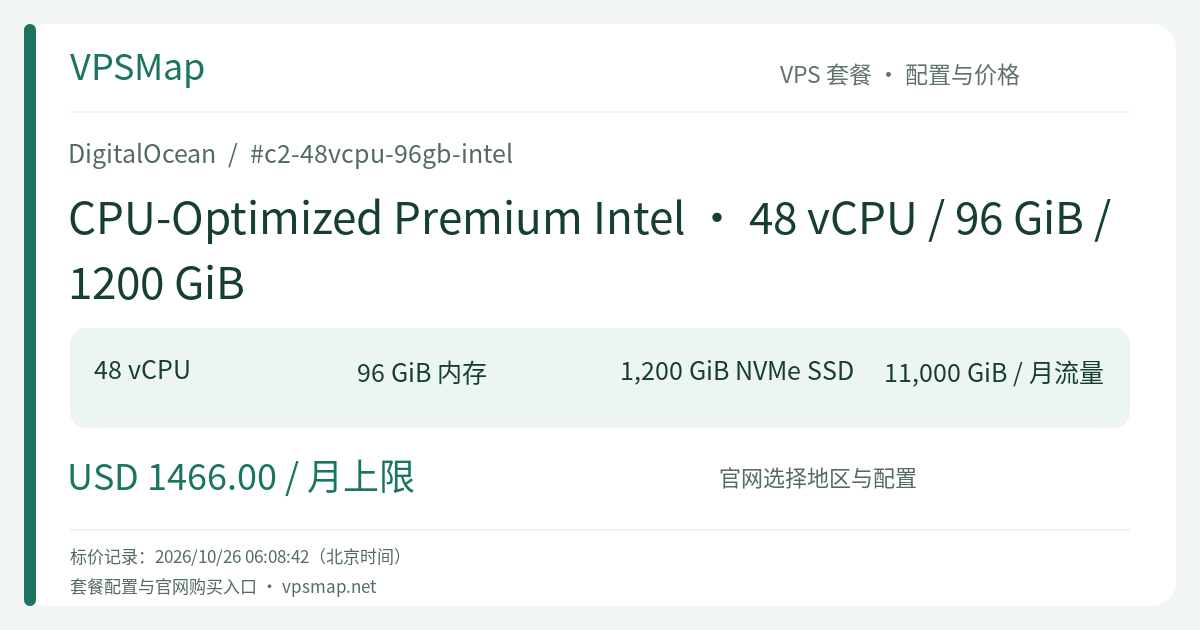
DigitalOcean c2-48vcpu-96gb-intel Review: Dedicated 48-Core Compute with 1.2 TB Local NVMe
Updated
The Dilemma of Compute Density vs. Disk Exhaustion#
For performance-focused engineering teams, 48 dedicated CPU cores offer extraordinary computing power. However, high-throughput teams frequently encounter a frustrating bottleneck: when 48 parallel compilation threads pull multi-layer Docker images, unpack massive SDKs, generate comprehensive debug symbol tables, and dump gigabytes of media cache, standard 600 GiB boot disks can fill up rapidly.
While attaching network block storage (Volumes) adds capacity, its latency and IOPS cannot rival direct hypervisor-attached NVMe. As a result, those 48 high-performance cores waste expensive cycles waiting on disk I/O. c2-48vcpu-96gb-intel solves this exact mismatch by providing 1,200 GiB (1.2 TB) of direct-attached NVMe storage, balancing massive multi-core execution with ample high-speed scratch space.
Key Architectural Advantages#
1. Doubled Hypervisor-Direct NVMe Storage#
Having 1,200 GiB of local NVMe SSD means your operating system and application layers operate directly on local physical hardware. It comfortably handles continuous high-frequency log streams, rapid creation and deletion of temporary build artifacts, and deep dependency caching without triggering frequent emergency disk cleanups. Compared to network-attached block devices, direct NVMe bus latency is an order of magnitude lower.
2. Dedicated 48-Core Intel Xeon Ice Lake#
Powered by 48 guaranteed hyper-threads on 3rd Gen Intel Xeon Scalable processors operating with clock speeds above 2.6 GHz and full AVX-512 support. Dedicated allocation means no virtualization noise from neighboring tenants. Your workloads experience steady, predictable 100% throughput across days of sustained batch processing.
3. Up to 10 Gbps Network Interface#
Being part of the Premium Intel tier grants access to 10 Gbps of outbound bandwidth—5x the throughput of standard configurations. Syncing multi-gigabyte dependency trees or fanning out processed video segments to global distribution points occurs without network queuing.
Ideal Use Cases#
- Large Monorepo Build Engines: Host extensive local build caches (Bazel, ccache, Gradle) where 48 cores compile code simultaneously while 1.2 TB of NVMe accommodates large build artifacts comfortably.
- High-Throughput Media Rendering: Execute parallel 4K video transcoding, multi-track audio mastering, and frame-by-frame rendering where raw assets and rendered masters require hundreds of gigabytes of fast scratch space.
- Local Time-Series & Telemetry Aggregation: Run intermediate ClickHouse, Elasticsearch, or Prometheus staging clusters that ingest and index massive real-time events, fully leveraging local NVMe random write IOPS.
- Microservice Regression Sandboxes: Spin up comprehensive integration environments running dozens of containerized services, microservice dependencies, and local database instances on a single bare-metal-equivalent host.
The Economics: Direct NVMe vs. Network Volumes#
When scaling storage, many teams initially consider adding network Volumes to a base Droplet. From an engineering and cost standpoint, however, native local NVMe offers clear advantages:
- Marginal Upgrade Cost: Moving from the base
c-48-intel(capped at $1,310/mo) to the 1.2 TBc2-48vcpu-96gb-intel(capped at $1,466/mo) represents an incremental difference of approximately $156/month. Provisioning equivalent high-performance storage separately over the network often incurs higher costs while introducing latency. - Zero Storage Network Overhead: Local NVMe eliminates the CPU overhead associated with encapsulating storage I/O across network fabrics, keeping all 48 cores focused strictly on application computations.
- 11,000 GiB Bandwidth & Second-by-Second Billing: Features transparent per-second billing with a 672-hour monthly cap and 11,000 GiB of team-pooled outbound transfer. Inbound transfer remains entirely free.
Operational & Architectural Recommendations#
- Power-Off Charges: Dedicated CPU Droplets continue billing while powered off because the 48 cores, 96 GiB RAM, and 1.2 TB NVMe array remain allocated to your instance on the host hypervisor. For ephemeral batch runs, use automation to push output to Spaces and destroy the Droplet when idle.
- Backup Strategy: For persistent configurations, enable automatic backups (20% of Droplet cost for weekly, 30% for daily). Because backups are incremental after the initial run, snapshots complete swiftly without degrading disk I/O.
- Capacity Verification: Large compute instances depend on physical hardware availability in specific datacenters. Always verify regional stock inside the cloud console before provisioning.
Deploy your instance today via the DigitalOcean Cloud Console.