Evoxt Standard VM-16 In-Depth Analysis: 16 High-Clock Cores, 32 GB RAM, and 10 TB Bandwidth for Heavy Enterprise Stacks
Updated
Core Focus: The Compute and Memory Flagship of the Standard Fleet#
When a digital product scales to hundreds of thousands of daily interactions, database tables reach double-digit gigabytes, or an engineering team needs a centralized cloud host for multi-service operations, lower-tier VPS setups quickly become untenable. At this scale, systems encounter dual pressure on both compute and memory: you need multi-core density to process high thread concurrency, and you need a massive memory buffer to cache datasets and maintain stateful services without disk latency.
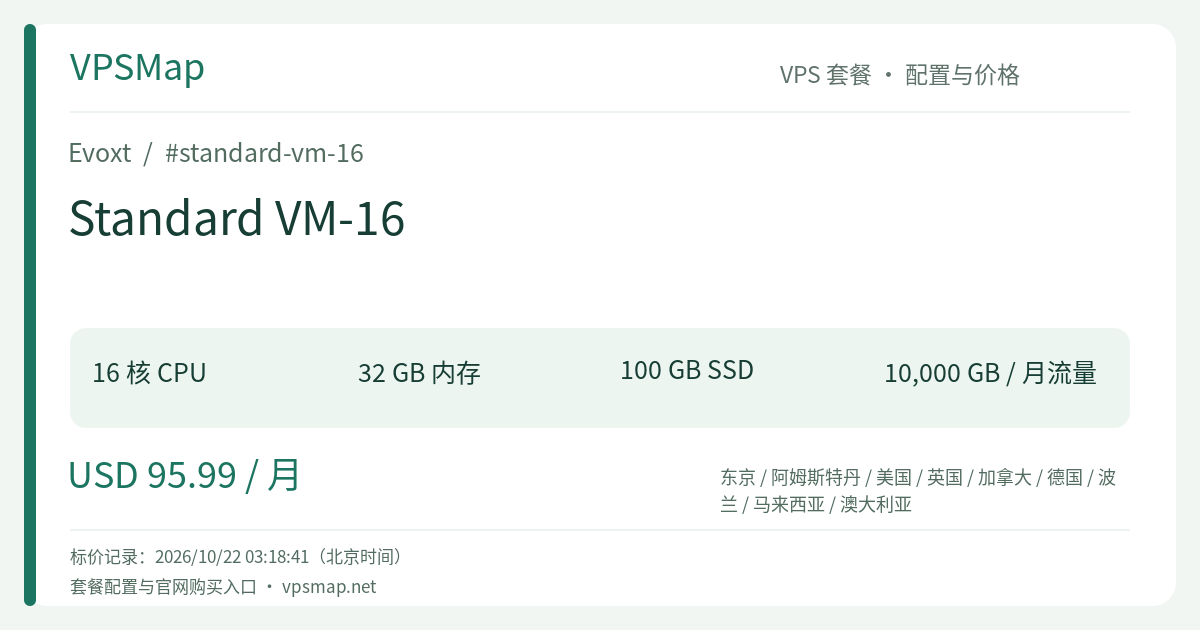
Across traditional cloud providers, a 16-core, 32 GB RAM virtual machine commonly costs $150 to $200+ per month. Evoxt's Standard VM-16 upends this pricing tier, delivering enterprise-scale specifications for $95.99/month:
- 16 High-Clock vCPU Cores (Bursting up to 6.0 GHz)
- 32 GB System Memory
- 100 GB SSD Local Storage
- 10,000 GB (10 TB) Monthly Bandwidth on a 1 Gbps Port
As the flagship offering within Evoxt's Standard Regions, the VM-16 serves as an agile, robust workhorse. It offers teams the resource freedom of an enterprise host without the protracted provisioning cycles or hardware maintenance overhead of physical dedicated servers.
Hardware Profile & Technical Breakdown#
Here is how the Standard VM-16's resource allocation translates to production capability:
| Specification | Details | Production Significance |
|---|---|---|
| vCPU Allocation | 16 Cores (Up to 6.0 GHz Turbo Clock) | Exceptional multi-threaded concurrency coupled with elite single-core frequency to absorb sudden traffic surges |
| System RAM | 32 GB RAM | Massive memory pool to accommodate heavy enterprise JVM heaps, clustered Redis instances, and expansive database buffer pools |
| Local SSD | 100 GB SSD | High-throughput local storage for OS layers, container base images, and core applications |
| Bandwidth Allocation | 10,000 GB / Month (1 Gbps Shared Port) | A 10 TB data allowance providing ample throughput for media-rich portals, high-frequency APIs, and distributed backups |
| Disaster Recovery | Automated Weekly Offsite Backup | Enterprise-grade weekly offsite snapshots included at zero additional cost |
| Investment Level | $95.99 / Month | Transparent pricing with no hidden CPU burst penalties or unexpected egress charges |
Built on enterprise KVM virtualization, the VM-16 leverages high single-core turbo clocks (up to 6.0 GHz). In production, this means complex database queries, cryptographic handshakes, and dynamic page assemblies complete in milliseconds rather than stalling across lower-frequency shared cores.
High-Impact Workloads Tailor-Made for VM-16#
1. Monolithic E-Commerce & Enterprise CMS (Magento, WooCommerce, Discourse)#
High-traffic online stores running WooCommerce or Magento feature dense relational schemas, dozens of third-party plugins, and intense concurrent shopping sessions:
- 32 GB of memory enables allocating 16–20 GB directly to MySQL/MariaDB
innodb_buffer_pool_size, ensuring index lookups and active product catalogs stay in RAM rather than waiting on disk I/O; - The remaining 12–16 GB of memory and 16 high-frequency cores comfortably power dozens of PHP-FPM workers, local Redis object caching, and Elasticsearch indexing without stuttering during flash sales.
2. Centralized Docker Swarm or Lightweight Kubernetes (k3s) Clusters#
For organizations aiming to consolidate dozens of smaller microservices (internal management portals, staging environments, API proxies, documentation tools, and automation bots):
- The VM-16's 16 cores and 32 GB RAM provide the capacity needed to run an entire single-node k3s or Docker Swarm environment;
- Centralizing services onto a single high-spec host simplifies internal DNS networking, cuts maintenance hours, and significantly lowers cumulative cloud expenditures.
3. Java / Spring Boot Microservice Ecosystems#
Enterprise Java stacks (Spring Boot, Quarkus, Micronaut) have defined memory baselines:
- On the VM-16, you can comfortably deploy 8 to 12 production microservices, allocating 2 GB of dedicated heap to each;
- 16 high-frequency cores guarantee that background garbage collection, active message queue consumption, and live reporting tasks never choke incoming HTTP thread requests.
Sizing Trade-Offs & Architecture Recommendations#
When deploying on a flagship instance like the VM-16, proper architectural planning ensures maximum return on investment:
- Storage Decoupling Strategy: The VM-16 provides 100 GB of local SSD. While sufficient for operating systems, application code, container layers, and operational caching, running multi-terabyte media libraries or deep cold storage locally will exhaust disk capacity. The modern best practice is compute/storage decoupling: run compute, application runtimes, and transactional databases on the VM-16, while offloading static media, uploaded files, and historic archives to S3-compatible object storage (e.g., Cloudflare R2, AWS S3). Supplemental local storage can also be attached on-demand via the Evoxt dashboard.
- Cloud Agility vs. Bare-Metal Servers: At ~$96/month, some sysadmins may weigh the option of budget bare-metal hardware. However, the operational benefits of the VM-16 often win out: 2.5-minute automated deployment, zero physical hardware failure liability, integrated Layer 3 web firewalling, floating IP management, automated offsite weekly backups, and instant one-click rescue mode. For engineering teams prioritizing velocity and minimal sysadmin overhead, the VM-16 delivers superior ROI.
Comparison: Standard VM-12 vs. Standard VM-16#
For high-resource requirements, decision-making typically comes down to choosing between VM-12 and VM-16:
VM-12 (16 Cores / 16 GB RAM / 80 GB SSD / 8 TB Bandwidth) ── $60.95/mo
     │
     ├─ +$35.04/mo: Doubles RAM (16 GB ➔ 32 GB), +20 GB Storage, +2 TB Bandwidth
     ▼
VM-16 (16 Cores / 32 GB RAM / 100 GB SSD / 10 TB Bandwidth) ── $95.99/mo (Flagship)- Identical Cores, Doubled Memory: Both VM-12 and VM-16 deliver 16 high-frequency cores. The critical differentiator is RAM allocation and bandwidth headroom.
- When to Choose VM-12 ($60.95/mo): If your workloads are purely CPU-bound (e.g., lightweight scraping scripts, concurrent build pipelines, or async worker pools) and peak memory usage reliably stays below 14–15 GB, VM-12 will save you $35 every month without sacrificing compute cores.
- When to Choose VM-16 ($95.99/mo): If your application stack involves memory-hungry Java runtimes, large in-memory caching layers, or relational databases managing expansive active datasets, 16 GB of RAM will become a crippling bottleneck. Stepping up to VM-16 provides the 32 GB headroom necessary to unlock the full potential of all 16 cores, accompanied by a colossal 10 TB monthly transfer quota.
Enterprise Reliability & Platform Tools#
Hosting critical infrastructure on Evoxt comes with essential management tooling:
- Automated Offsite Weekly Backups: Peace of mind comes standard. Automatic weekly snapshots are preserved offsite, enabling rapid full-system recovery should software errors occur.
- Layer 3 Security Management: Harden host security using web-configurable Layer 3 firewall policies, shielding exposed ports from external scanning and brute-force attempts without complicated local iptables rules.
- Floating IP Management: Allocate or order additional floating IPs ($3/month) to facilitate high-availability failover architectures and zero-downtime server migrations.
- Rescue Environment: In the event of an unbootable kernel or damaged networking configuration, boot into the single-click web rescue mode to inspect filesystem partitions and recover files effortlessly.
Step-by-Step Deployment Guide#
Launching your Standard VM-16 instance takes only a few minutes:
- Open the Portal: Log in or create your profile on the Evoxt Console.
- Choose Your Datacenter: Under the Standard Regions tab, select the facility best positioned for your audience (e.g., Frankfurt, London, or Amsterdam for Europe; Los Angeles or New York for North America; Tokyo, Sydney, or Kuala Lumpur for APAC).
- Select Operating System: Choose a clean Linux distribution (Ubuntu 22.04/24.04, Debian 12, AlmaLinux), Windows Server, or a pre-configured template like Docker, OpenLiteSpeed, or CyberPanel.
- Verify VM-16 Selection: Ensure the Standard VM-16 configuration is active (16 Cores, 32 GB RAM, 100 GB SSD, 10,000 GB Transfer).
- Select Billing Term & Payment: Choose your billing interval (monthly up to 3 years) and checkout with credit/debit cards, PayPal, or major cryptocurrencies (Bitcoin, USDT-TRON).
- Ready for Production: Your 16-core, 32 GB RAM cloud instance will be automatically provisioned within approximately 2.5 minutes, complete with root access and ready for immediate deployment.