
Saily Global eSIM Guide: Choosing Multi-Country Plans, Activation Rules, and Setup
This plan works best for travelers flying through multiple countries or frequent business trips who want immediate data on landing without juggling local SIMs. The most common purchasing mistake is assuming the 20GB or 50GB options give you that data every month; in reality, that is the total pool for the entire 365 days. If you are staying in a single country for a week or two, a local SIM or single-destination package is usually cheaper. The global tier pays off when you hop borders or need long-lasting standby data.
What works well
- No need to swap cards across borders; a single eSIM profile connects to local networks across 121 covered destinations.
- The 10GB, 20GB, and 50GB packages run for 180 to 365 days, letting you save leftover data for trips months later.
- You can install the profile over home Wi-Fi before departure without triggering the validity timer until you land and roam.
Before you buy
- Data only with no phone number for cellular voice calls or SMS, so real-time calls must rely on messaging apps.
- Coverage is limited to 121 destinations rather than Saily's broader 200+ single-country catalog, excluding certain regions.
Choose a plan for your trip
| Your use case | Start with | Why it fits |
|---|---|---|
| Multi-country trip across Europe or Southeast Asia spanning 2 to 3 weeks | Choose the 5GB (60-day) plan | A 60-day window easily covers the vacation for maps and rides without wasting time hunting for physical SIM kiosks at every border. |
| Frequent short business trips throughout the year, staying a few days each time | Choose the 20GB (365-day) plan | The 365-day validity gives instant connectivity whenever you land, keeping remaining gigabytes ready for the next departure without repeat purchases. |
| Staying in a single country for vacation or remote work for over a month | Skip the global plan and buy a Saily single-country package or a local physical SIM | Global roaming costs more per gigabyte; purchasing a dedicated destination plan or local card delivers significantly more data for less money. |
| International layover of 8 to 12 hours needing light data around the airport | Choose the 1GB (7-day) plan | The lowest-cost option covers essential map lookups, taxi hailing, and check-in texts when public airport Wi-Fi fails. |
Plans and pricing
| Package option | Listed price |
|---|---|
| 1GB / 7 days | EUR 7.99 |
| 2GB / 15 days | EUR 14.49 |
| 5GB / 60 days | EUR 30.49 |
| 10GB / 180 days | EUR 50.49 |
| 20GB / 365 days | EUR 59.49 |
| 50GB / 365 days | EUR 115.99 |
The following reference prices were recorded at the last check. Please visit the official website for current pricing. Prices updated on · Prices retain their original currencies. Check taxes, shipping and initial activation charges at checkout.
Understanding the 121 Destination Footprint Before You Fly
Saily marketing materials often highlight coverage across 200+ destinations, but that refers to their entire catalog of individual country plans. The Global eSIM plan actually covers 121 specific destinations. Major travel hubs across Europe, North America, East and Southeast Asia, and Oceania are included, but certain remote island nations and niche transit points are absent. Always search for every destination and layover stop inside the app's Global plan details before checking out rather than assuming worldwide universality.
When moving between these covered territories, your handset automatically searches for partner networks, a registration step that usually takes three to five minutes. Seeing a brief No Service indicator upon exiting the cabin does not mean the profile failed; your modem is negotiating roaming handshakes. If you frequently cross borders, keep network selection on Automatic in your cellular settings so your device reliably locks onto the strongest available partner signal.
Plan Durations and Allowances: Total Data Pool Versus Monthly Reset
Saily Global plans are structured into distinct tiers: 1GB for 7 days, 2GB for 15 days, 5GB for 60 days, 10GB for 180 days, and 20GB or 50GB for 365 days. The critical distinction is the balance between duration and usage. When buying the 20GB 365-day plan, that 20GB is your total shared pool for the entire calendar year. If you consume 15GB during an intensive week, you have 5GB remaining for the remaining months; it does not reset at month-end.
Standard prepaid purchases provide a 180-day activation window from the transaction date. Your usage validity timer stays frozen until you land in a covered country and switch on data roaming, but exceeding 180 days without connection will cause the timer to start automatically. If your travel plans change, unactivated packages can be submitted for a refund within 30 days of purchase through customer support, while activated profiles that have consumed data are subject to restrictive policy terms without unconditional guarantees.
Device Compatibility: Checking Hardware and Carrier Unlocks
Using an eSIM requires compatible hardware and a carrier-unlocked handset. You cannot generalize that all new phones work or that any single brand is entirely excluded. For instance, most iPhones manufactured for mainland China feature dual physical SIM slots and lack eSIM software menus altogether, whereas models from other regions support digital profiles. The definitive verification method is opening phone Settings, navigating to Cellular or Mobile Data, and verifying whether an Add eSIM or Add Cellular Plan option is present.
The handset must also be network unlocked. Phones purchased under carrier financing contracts often restrict modem firmware to the original provider, causing Saily installation to fail with carrier lock errors. When upgrading to a new phone, Saily allows re-downloading the profile onto your new device using the same login credentials inside their official app, but one eSIM profile cannot remain active across two handsets simultaneously. Follow the in-app transfer steps carefully during hardware changes.
Dual SIM Daily Routine: Roaming Settings and Hotspot Cautions
The ideal travel arrangement keeps two lines active concurrently: your physical home SIM receiving bank verification texts, and the Saily eSIM handling all data. In settings, set Cellular Data exclusively to Saily, and turn off Allow Cellular Data Switching. Leaving that switch on allows the phone to silently fall back onto your domestic carrier whenever the eSIM signal dips, generating steep international roaming fees. Enable Data Roaming for Saily while leaving roaming strictly disabled on your primary home line.
Personal hotspot tethering is supported, but sharing connections with laptops or tablets requires caution. Laptops connected to mobile hotspots frequently trigger background operating system updates, cloud drive synchronizations, and heavy asset preloading that can burn several gigabytes within an hour. Configure your computer connection as a metered network and pause background cloud sync. Note that mobile roaming exits route IP traffic but do not override internal device GPS coordinates for mapping tools.
Troubleshooting No-Connection Scenarios: What to Check Before Deleting
When landing without signal, many users panic and delete the eSIM profile from settings, which causes severe complications. Removing an active eSIM profile typically burns the installation token, preventing you from scanning the original QR code and forcing a manual recovery through customer support. If your device fails to connect, verify first that Data Roaming is turned on for Saily. Next, toggle Airplane Mode on and off to restart cellular negotiation. Finally, toggle manual network selection if automatic mode fails to lock onto local carriers.
Another critical inspection point is the Access Point Name (APN). Modern operating systems configure APN values automatically upon eSIM installation, but if your phone shows signal bars without loading webpages, inspect the Cellular Data Network menu to ensure the APN field is properly populated according to Saily app instructions. Saily maintains 24/7 in-app support; capture screenshots of your cellular status and contact an agent rather than deleting the profile prematurely.
When to Consider Alternative Connectivity Options
If your itinerary centers on a single destination such as a week in Japan or Thailand, Saily's Global plan offers poor value per gigabyte compared to targeted options. Buying a dedicated single-country package from Saily or a tourist physical SIM at your destination gives you two to three times the data allowance for the same money. The pricing premium of the Global tier pays for cross-border transit; paying that overhead for a stationary vacation makes little financial sense.
If your journey demands receiving local voice calls, authenticating overseas bank SMS codes, or registering regional food delivery services that require local phone numbers, Saily Global cannot fulfill that need. It is strictly a cellular data provider. While Saily sells virtual US application numbers separately, it does not issue local telephone numbers in visited nations. Travelers needing phone numbers should purchase a prepaid voice-and-data SIM upon arrival with passport registration.
From purchase to arrival: four steps
Install the eSIM over Home Wi-Fi Before Departure
Download the Saily app, register your account, and complete checkout for your chosen Global package. Connected to stable home Wi-Fi, tap the in-app Install eSIM prompt. iOS will display an Activate eSIM prompt; tap Continue and wait for the installation progress bar to finish. Android devices follow a similar Add Carrier dialog. Once added, rename the label in your cellular settings to Saily. Leave roaming turned off until you travel; your plan countdown remains completely untouched while you are at home.
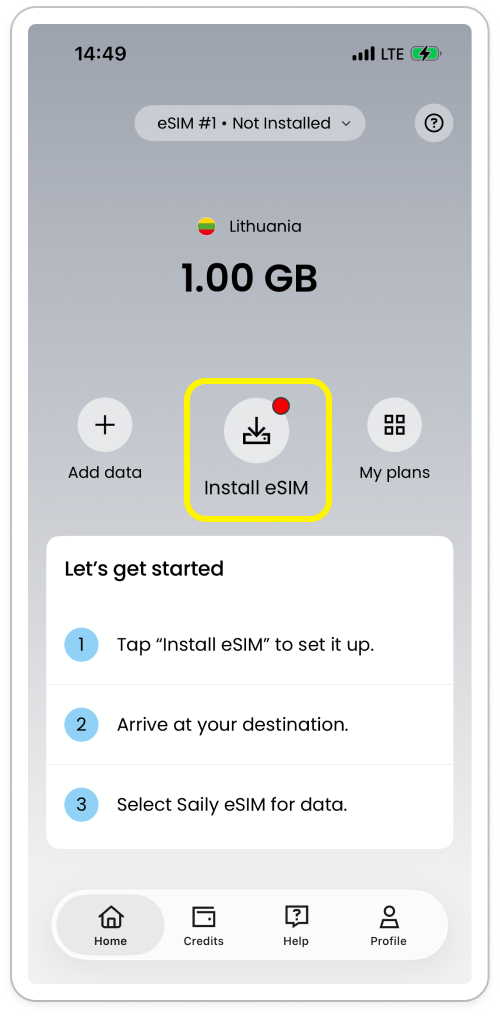
Tap Install eSIM to start. 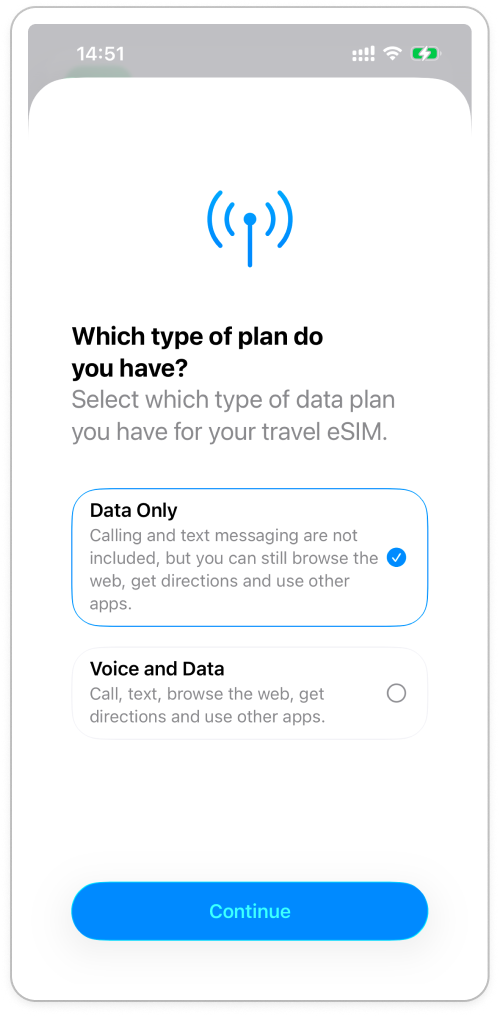
During iPhone installation, choose Data Only and continue. Configure Dual SIM Settings Before Boarding to Prevent Leakage
Before takeoff or mid-flight, open Cellular in phone Settings. Set Cellular Data to your Saily profile, and ensure Allow Cellular Data Switching is turned off. Tap your primary domestic SIM, verify that its Data Roaming switch is disabled, but keep the line turned on so essential verification SMS can still arrive. Roaming voice and messaging rates are billed entirely separately by your home carrier; incoming texts are generally free as long as you do not answer calls or send outbound messages.
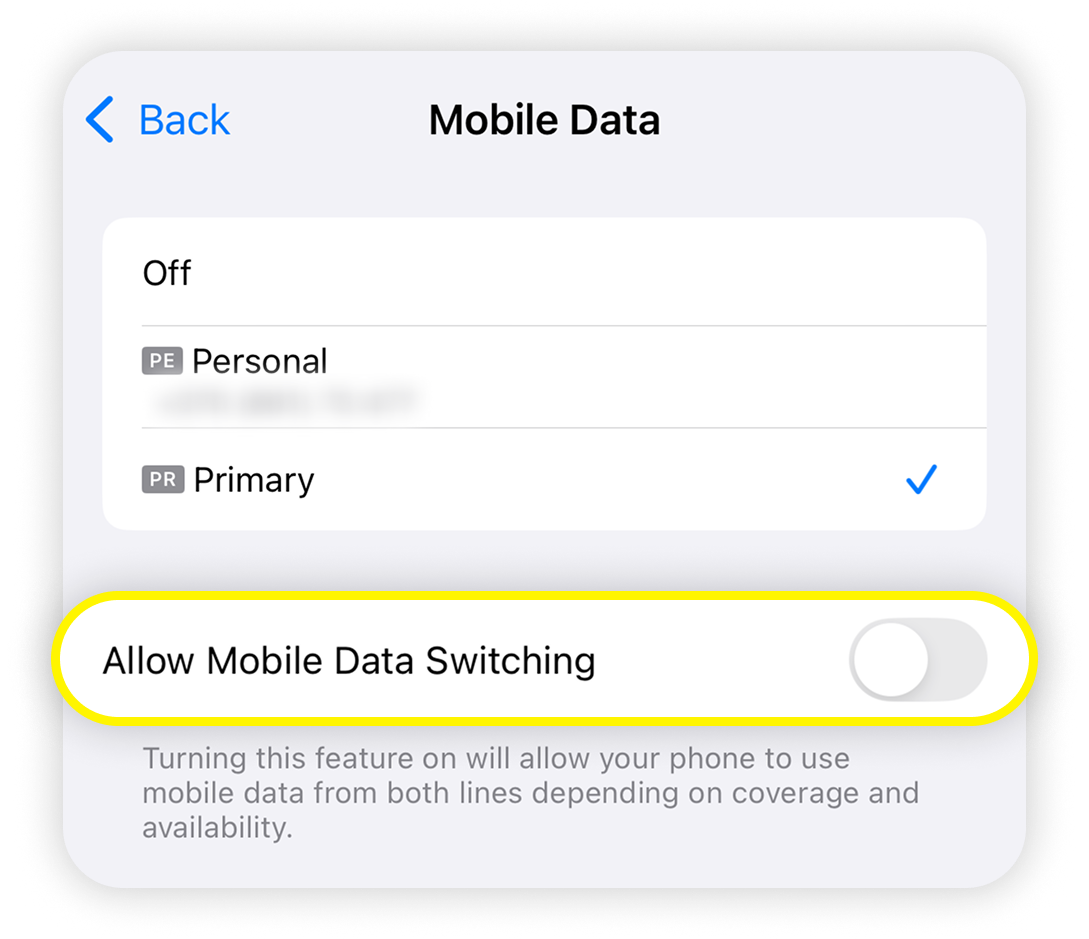
Turn off Allow Mobile Data Switching to prevent fallback to your home SIM. Turn on Saily Data Roaming Upon Landing and Await Registration
When the plane lands, turn off Airplane Mode, open your phone Settings, select Saily, and toggle Data Roaming to On. The signal indicator will cycle through search states. Within two to five minutes, signal bars will settle alongside LTE, 4G, or 5G icons showing connection to the local roaming partner. Open a browser or navigation app; once pages render smoothly, your plan is active and operating.
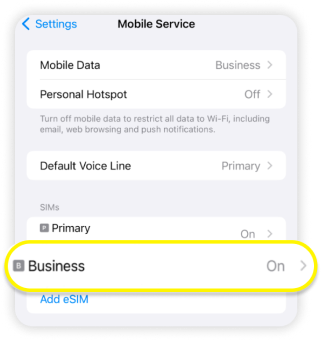
In Cellular settings, find your Saily line; it is labelled Business in the image. 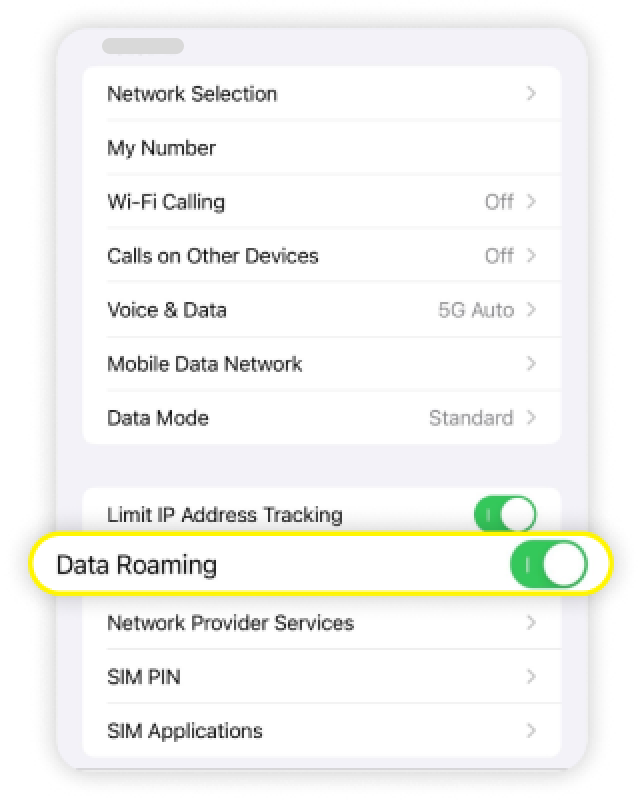
iPhone: enable Data Roaming on the Saily line, not your home SIM. 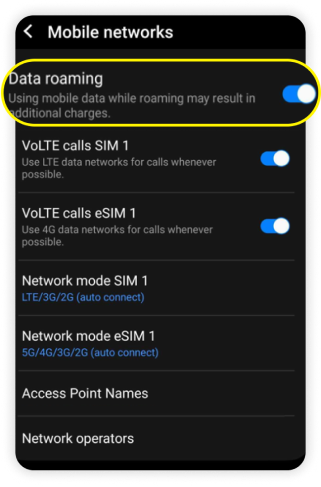
Android: select the Saily line and enable Data roaming. Monitor Remaining Gigabytes and Add Top-Ups via the App
During your trip, launch the Saily app to view your remaining data balance and expiration date on the dashboard. If you run low, tap Top Up directly within the app to purchase additional gigabytes without removing or reinstalling the eSIM profile. The newly bought data attaches automatically to your existing profile. Check validity terms carefully during top-up, as added days adhere to Saily's current bundle rules.
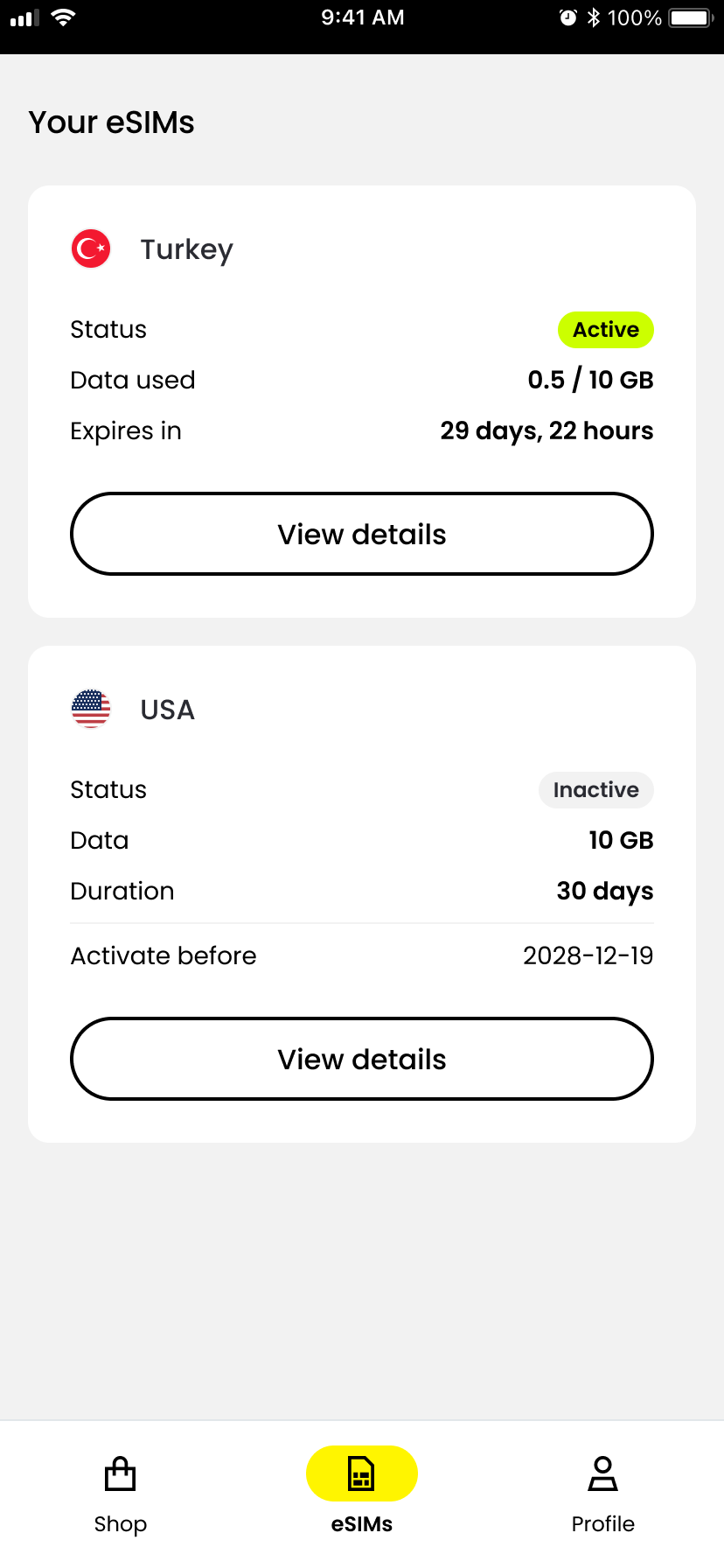
Active means the plan is activated, Data used shows consumption, and Expires in shows the remaining validity. 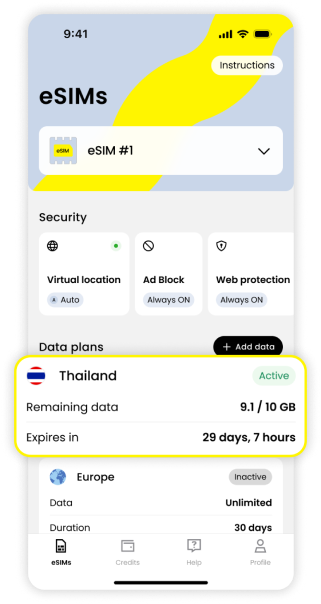
Remaining data shows your data balance; Expires in shows the remaining validity. 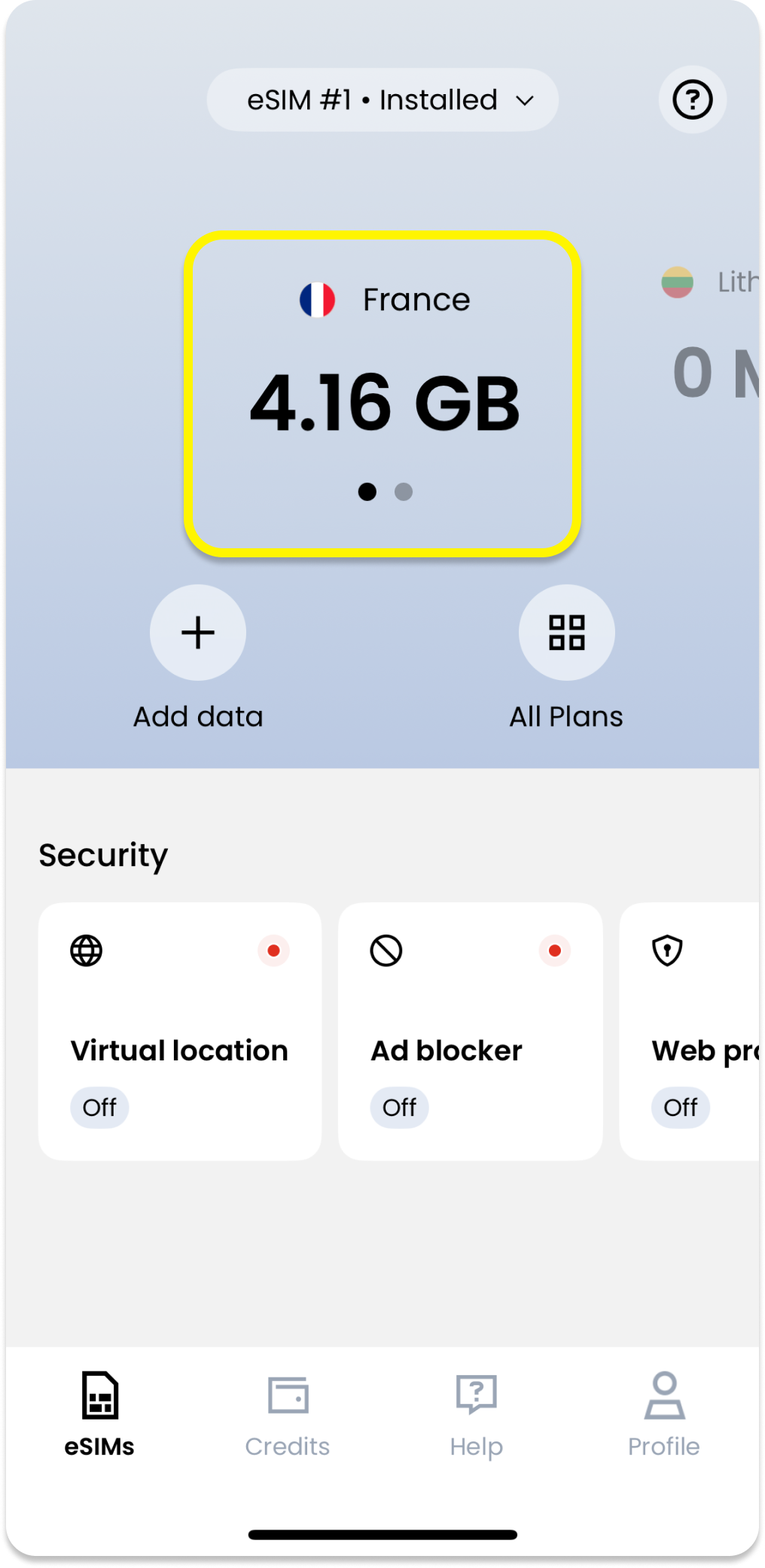
Select your current plan on the app’s Home screen to see remaining data.
Questions and answers
Why Am I Unable to Receive Bank or App Verification Codes on Saily?
Saily Global is a data-only eSIM without an assigned cellular telephone number, meaning it has no cellular voice or SMS reception capabilities. Domestic banking or authentication codes must be received via your primary home SIM kept active in dual-SIM mode. For local foreign apps requiring regional phone numbers, Saily cannot receive those messages. Saily does offer separate virtual US numbers for specific online services, but these operate independently from traditional mobile networks.
Why Does My Phone Show No Service Even After Enabling the eSIM in Settings?
Toggling the line on in settings merely powers up the eSIM profile inside your device storage; it does not mean your handset has established a link with local cell towers. The modem must still exchange roaming handshakes with partner operators. If it remains stuck on No Service, verify that Data Roaming is enabled specifically for Saily, test manual network selection against major local operators, and verify that your current country is genuinely part of the 121 covered destinations.
Can I Transfer My Remaining Data If I Upgrade or Lose My Phone Mid-Trip?
Yes. Your Saily data balance attaches to your account profile rather than being permanently locked to one piece of hardware. Install the Saily app on your replacement device, sign into your original account, and follow the app instructions to download the profile anew. Keep in mind that one eSIM profile cannot function simultaneously across two phones. As long as your account remains intact, your remaining data and validity carry over upon re-installation.
What Happens If I Accidentally Delete the eSIM Profile with Active Validity Left?
Avoid repurchasing immediately. If you deleted the profile by mistake in phone settings, open the Saily app and check the support or plan management screen for reinstallation options. If the phone states that the installation code has already been redeemed, open a live chat ticket with Saily's 24/7 customer support. After verifying your order details, agents can reset the download credentials for your account. Treat profile deletion as a last resort rather than a troubleshooting shortcut.
Making your choice
The Saily Global eSIM excels as a dependable, multi-destination roaming solution for frequent international flyers. If you transit across multiple borders annually, take multi-stop flights, or need a persistent pool of standby mobile data ready upon landing, the 180-day and 365-day packages eliminate the frustration of buying local SIMs repeatedly. However, for extended single-country vacations or travelers needing an inbound cellular phone number, its price per gigabyte and data-only design offer little advantage. Always verify your destinations against the 121-country list and remember that the data pool is shared across the entire validity period.