
Is Saily Ultra Worth It? How to Use the 30GB Monthly Data and Airport Perks Without Mistakes
If you fly across borders every month and hate buying a new data pack before every trip, Saily Ultra is built for you as an all-in-one subscription. Just remember one crucial detail before pulling out your card: standard Saily passes give you 180 days to activate, but Ultra is an active subscription that starts running the exact second you pay. Never buy it months in advance.
What works well
- Covers over 121 destinations, sparing you from searching, buying, and setting up a new eSIM profile each time you touch down.
- Includes airport lounge access and airport fast track passes, with unused benefits rolling over for up to three months while your plan is active.
- Grants 8% back in in-app store credits whenever you purchase eligible add-on data packages.
Before you buy
- High-speed data is capped at 30GB per month before dropping to at most 1Mbps, which cannot reliably handle data-heavy remote work or heavy cloud backups.
- It auto-renews by default, and canceling does not trigger a refund; you must cancel at least two days before the renewal date to avoid being billed for the next cycle.
Choose a plan for your trip
| Your use case | Start with | Why it fits |
|---|---|---|
| Taking only one or two short vacations a year, or staying in a single country | Buy standard prepaid on-demand Saily data packs | Standard packs offer a 180-day activation window that only starts when you land and turn on roaming, saving you from recurring monthly charges. |
| Frequent regional or global business travel requiring reliable transit and airport convenience | Choose the Saily Ultra monthly or quarterly plan | Ready to browse across 121+ countries without re-ordering eSIMs, and the bundled lounge access and fast track passes easily offset subscription costs if planned ahead. |
| Needing to upload heavy video footage, sync large engineering codebases, or tether laptop video conferences all day | Pair local high-capacity SIMs or hotel Wi-Fi with an eSIM as a backup | Ultra only provides 30GB of high-speed data each month; computer updates and hotspot syncing can drain that in hours, leaving you with 1Mbps which only handles light browsing and text messaging. |
| Needing to receive bank OTP SMS messages or make traditional voice phone calls abroad | Keep your domestic primary SIM active for incoming SMS and use Saily Ultra strictly for cellular data | Saily data packages are data-only and do not include a local phone number; Saily US app numbers are sold separately, so your primary SIM is still needed for critical banking codes. |
Plans and pricing
See subscription price on the official site
The following reference prices were recorded at the last check. Please visit the official website for current pricing. Prices updated on · Prices retain their original currencies. Check taxes, shipping and initial activation charges at checkout.
121+ Destination Coverage and Real-World Roaming Performance
Saily Ultra covers over 121 destinations worldwide. As long as your destination is supported, crossing borders or stopping over for a layover requires no new eSIM profile or manual QR code scanning. Under a single account, your phone registers on local partner networks automatically.
Keep in mind that connection quality depends heavily on local cell towers and roaming agreements. As noted by a TechRadar reporter during testing in India, speeds and responsiveness varied noticeably between different cities. Moreover, seeing a 4G or 5G indicator does not guarantee ultra-low ping or corporate VPN compatibility, so avoid relying entirely on a single roaming eSIM for mission-critical company tasks.
30GB Data Cap, Airport Perks, and Auto-Renewal Billing Details
When weighing the cost, avoid adding up the theoretical retail value of bundled perks; focus instead on what you actually utilize. Ultra delivers 30GB of full-speed data per month—not a 5GB daily allowance—dropping to a maximum of 1Mbps once depleted. The monthly plan grants one lounge visit and one fast track pass per month; quarterly grants three of each; annual grants eight. As long as your subscription is active, unused passes roll over for up to three months before expiring.
The promised 8% cashback is credited as in-app store credits rather than withdrawable cash, which can only be applied toward future eligible data pack purchases. Furthermore, the plan renews automatically; if you are staying home next month, cancel your subscription at least two days before the billing date. Keep in mind that canceling merely prevents future charges and does not issue a refund for the current cycle.
Device Compatibility Checks and Reinstalling Without Losing Your eSIM
Before paying, check two hardware essentials: eSIM capability and carrier lock status. Hardware differs drastically by region even for the exact same device model, so you cannot assume all devices from a certain region lack eSIM or that every new iPhone supports it. The safest check is dialing *#06# on your keypad to see if an EID number appears, or looking under your cellular settings for an option to add an eSIM.
Saily permits reinstalling an eSIM or migrating it to a new phone under the same registered account, but an individual eSIM profile cannot be actively installed across two phones simultaneously. If your data fails to connect abroad, check your cellular settings first and never delete the eSIM profile out of frustration, as deleting it may purge configuration credentials and complicate support troubleshooting.
Hotspot Data Limits and How to Redeem Airport Fast Track and Lounges
In everyday travel, 30GB is ample for navigation, ride-hailing apps, social messaging, and checking work emails. However, if you share your connection via personal hotspot to a laptop, make sure to disable automatic OS updates, background cloud backups, and high-res video caching. A desktop operating system can burn through gigabytes in the background, and once you drop to the 1Mbps throttle, streaming video or transferring large files will crawl.
Airport fast track passes cannot be claimed on a whim; you must book them through the app at least 24 hours in advance, and only at participating airports. The flight delay lounge benefit applies to delays exceeding two hours and requires uploading your boarding pass and flight details for verification before entry. Also remember that cellular IP routing does not alter your phone hardware GPS location.
Step-by-Step Offline Troubleshooting and Why You Should Never Delete the eSIM
If your phone shows no internet after landing, the issue is almost always a configuration mismatch rather than a broken eSIM. Open your cellular settings, ensure Saily is selected for Cellular Data, and verify that Data Roaming is toggled on within the Saily profile. At the same time, check your primary SIM to turn off its data roaming and disable cellular data switching to prevent accidental carrier roaming charges.
If signal bars appear but websites fail to load, toggle Airplane Mode on for 15 seconds and turn it back off to force a network reconnect. If that fails, toggle off automatic network selection in your cellular menu and manually try each available local carrier. Once again, do not delete the eSIM profile while troubleshooting; connect to airport Wi-Fi and reach out to Saily 24/7 customer support via the app instead.
Comparing Saily Ultra with Standard Prepaid Packs and Local SIMs
If your travels are sporadic—say, a single one-week holiday every six months—standard prepaid Saily data packs make far more sense. Standard packs carry a 180-day activation window that only begins ticking down once you arrive and connect to a local roaming network, saving you from recurring monthly commitments and the chore of remembering cancellation deadlines.
If you stay in a single country for an entire month or need to move tens of gigabytes daily, picking up a local prepaid physical SIM at the destination is often much cheaper with larger data caps. Furthermore, Saily data packs do not include traditional phone numbers or voice and SMS capabilities; if you require a phone number for banking SMS, keep your home SIM roaming or consider purchasing Saily standalone US app numbers.
From purchase to arrival: four steps
Install the eSIM profile on stable Wi-Fi before departure
After purchasing, open the Saily app, navigate to your plan, and follow the direct installation prompts to write the profile to your device, or open your phone Cellular settings, tap Add eSIM, and scan the provided QR code. Label this line as Saily for easy reference. Your device now holds the profile; it will not connect to a network until you arrive at your destination, so leave it enabled and do not delete it.
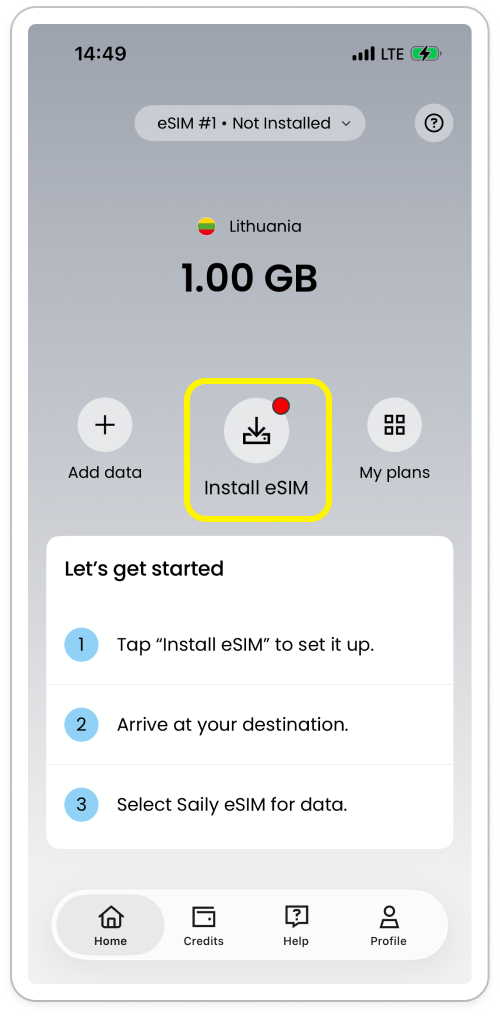
Tap Install eSIM to start. 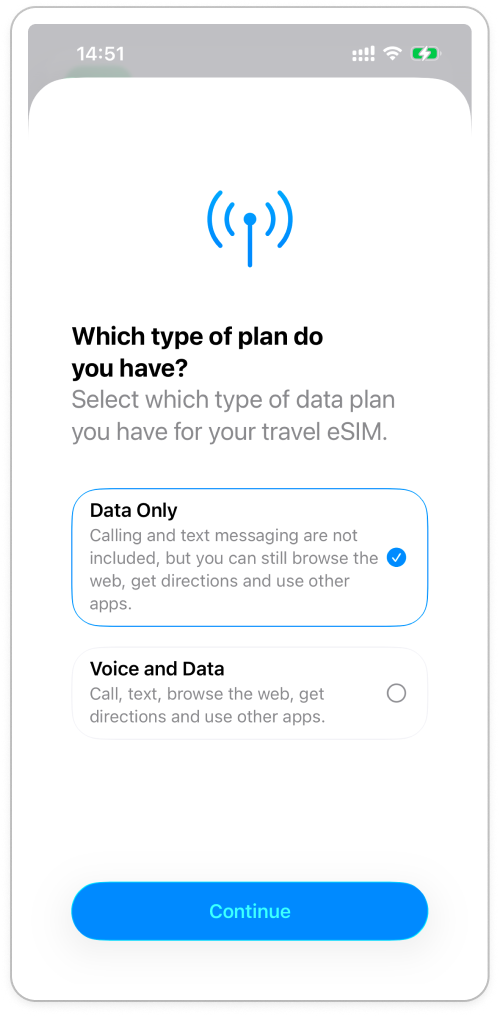
During iPhone installation, choose Data Only and continue. Book airport fast track in advance and review benefit balances
If traveling through a participating airport, open the Ultra perks section in the Saily app at least 24 hours prior to flight departure, select your airport terminal, and generate your fast track pass. Monthly subscribers receive one fast track pass and one lounge visit each cycle; unused passes roll over for up to three months while your subscription remains active. If your flight is delayed by two or more hours, retain your boarding pass to redeem lounge access.
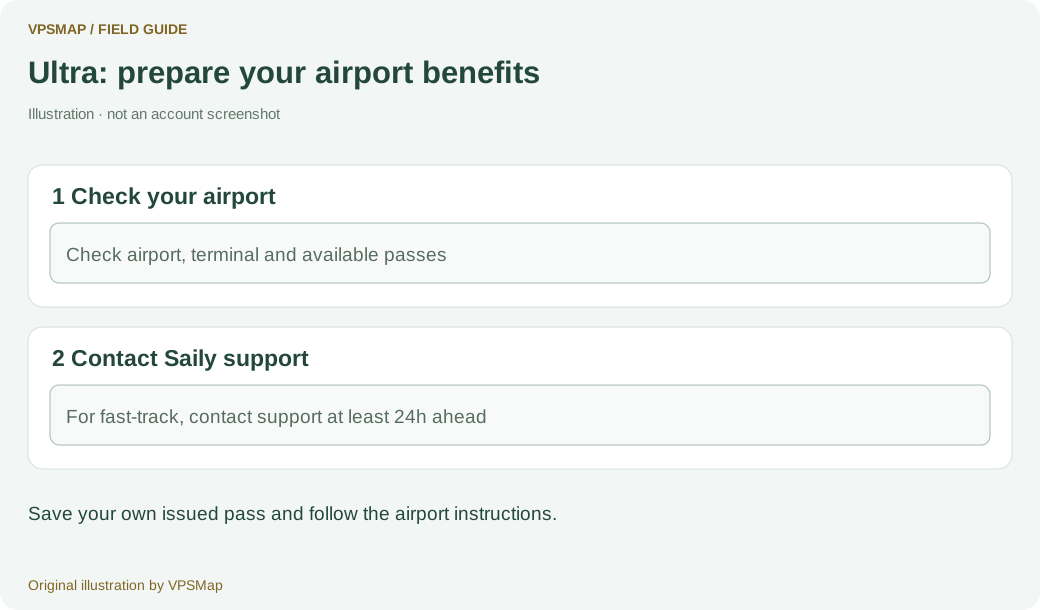
Ultra airport benefits: check eligibility, contact support and keep your own pass. Switch cellular data and turn on roaming upon arrival
As the plane lands, go to Settings and tap Cellular. Set Cellular Data to your Saily profile, tap into the Saily line, and turn Data Roaming on. Next, tap your primary domestic SIM to ensure its data roaming is toggled off and cellular data switching is disabled. Wait a couple of minutes until signal bars and a 4G or 5G indicator appear at the top, then open a browser to confirm data is flowing.
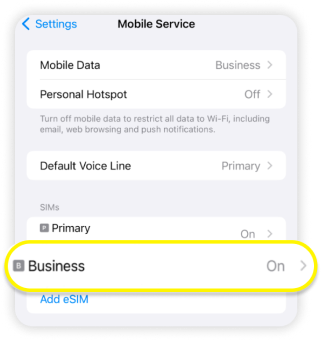
In Cellular settings, find your Saily line; it is labelled Business in the image. 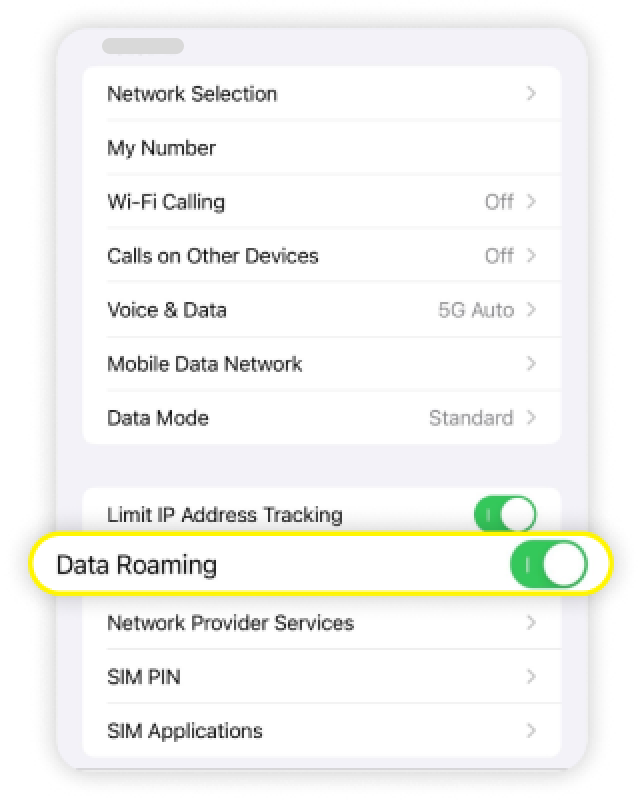
iPhone: enable Data Roaming on the Saily line, not your home SIM. 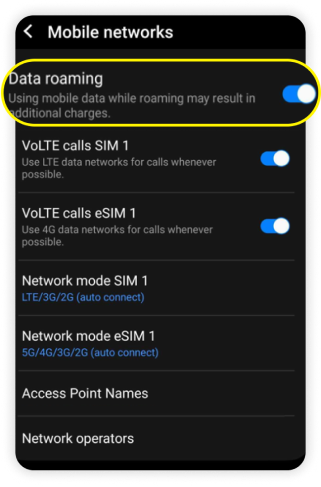
Android: select the Saily line and enable Data roaming. Monitor data usage and manage auto-renewal settings
Check the Saily app home screen to track your remaining 30GB high-speed data balance. If you do not plan to travel next month, go to the account subscription settings and tap cancel subscription at least two days before the renewal date. Canceling stops future charges while allowing you to use the remaining days of your current cycle, but it does not trigger a refund for the period already paid.
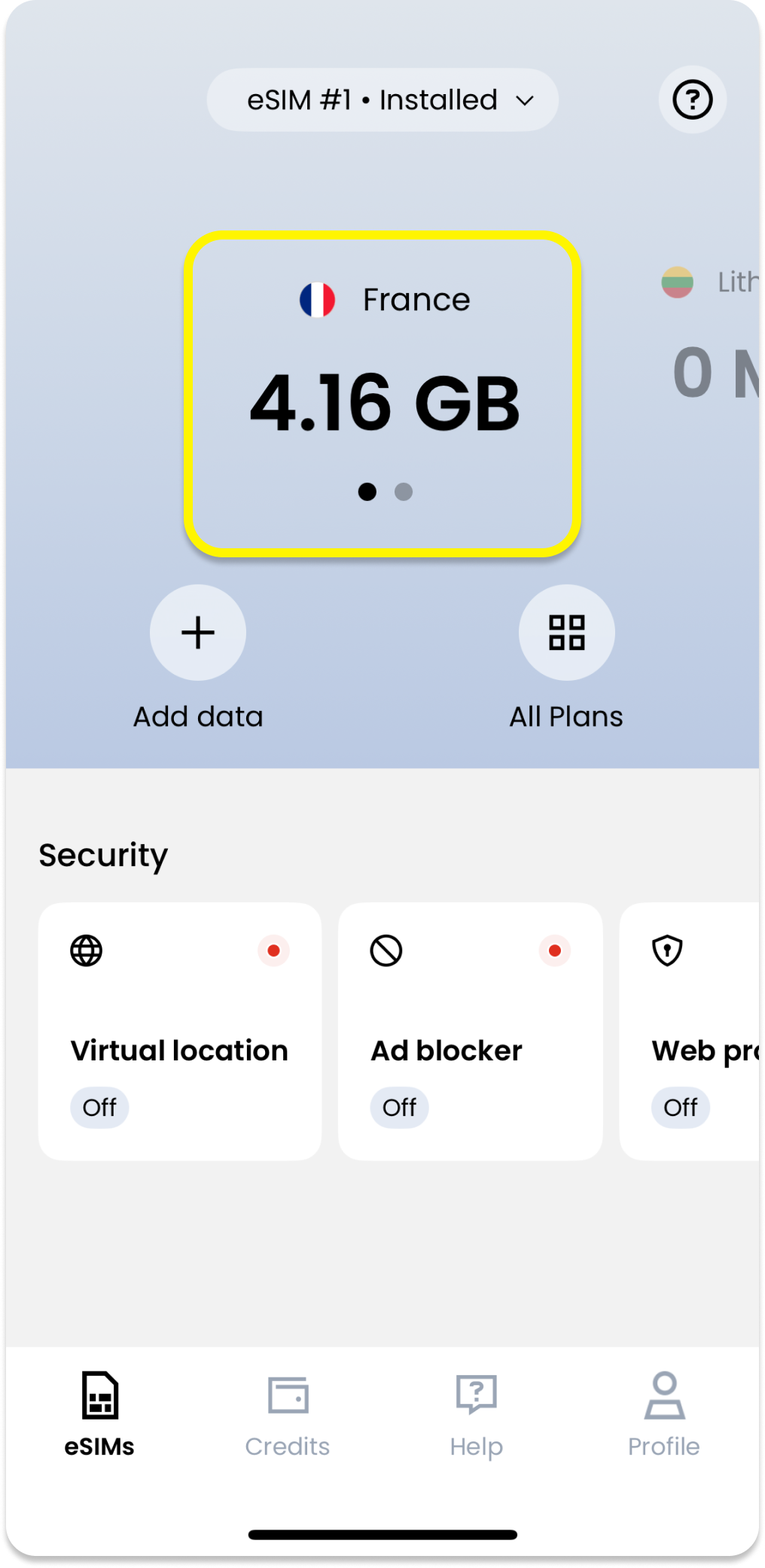
Select your current plan on the app’s Home screen to see remaining data.
Questions and answers
Why can my home SIM receive ordinary text messages abroad but fail to receive some bank OTP codes?
Saily Ultra is a data-only eSIM without a phone number; any incoming verification texts are sent to your primary domestic SIM. If OTPs fail to arrive, the issue stems from your primary carrier: some banks block OTP delivery across international roaming channels due to fraud prevention, or local roaming networks delay SMS delivery. Ensure your primary SIM line remains active for incoming SMS without enabling its data roaming.
Where does my money go if I top up inside the app after buying Ultra? Does it pay the monthly subscription?
Purchasing additional country-specific data packages inside Saily creates separate one-off add-on allowances and will not count toward your Ultra monthly subscription fee. Ultra is billed via recurring credit card charges. The 8% cashback earned on qualifying purchases is stored as in-app account credit that can be applied to future eligible package orders, but cannot be withdrawn as cash.
What should I do if I change my phone or accidentally delete the eSIM profile?
Saily allows re-downloading or migrating your eSIM to another supported phone under the same user account. Simply log into the Saily app on your new phone to retrieve your profile. However, an individual eSIM profile cannot be simultaneously active on two phones. If you experience connection issues abroad, never delete the eSIM profile without stable Wi-Fi; toggle airplane mode first, and contact 24/7 customer support if connectivity is not restored.
Can I get a refund for Saily Ultra at any time, and what is the difference between canceling and refunding?
Canceling your subscription is not the same as requesting a refund. Tapping cancel subscription in the app simply stops automatic renewal for the following cycle; the fee already paid for the current month is non-refundable. While standard unactivated prepaid data packages may be refunded within 30 days of purchase, Ultra is a subscription that takes effect the instant you pay. Saily does not offer unconditional refunds on Ultra, and technical disputes must be evaluated case-by-case by customer support.
Making your choice
Saily Ultra is well-suited for high-frequency business travelers who fly between multiple countries every month. If you actively use the airport lounge passes, book fast track passes in advance, and stay within the 30GB monthly limit, it streamlines border crossings and airport transits significantly. But for occasional holidaymakers or remote workers needing heavy hotspot data, standard on-demand prepaid packs or local SIM cards remain the more economical and flexible route.