
How to Use Saily Hong Kong eSIM: Setup, Plan Selection, and Common Traps
If your phone supports eSIM, Saily lets you prepare your cellular data before heading to Hong Kong for a concert, shopping, or meetings. Before buying, understand the biggest catch: it is strictly a data package without a local Hong Kong phone number, meaning no incoming local calls and no bank SMS verification, and service stops the second you cross into Shenzhen or board the ferry to Macau.
What works well
- You can install it over home Wi-Fi via QR code or app before departure, so you connect immediately on arrival without hunting for SIM ejector tools or waiting in line at the border.
- It runs on the local HKT partner network and supports personal hotspot sharing, making it simple to tether a laptop or help out a travel companion in a pinch.
- Standard prepaid packages come with a 180-day activation window, so rescheduling your trip will not cause the plan to expire prematurely.
Before you buy
- Because it lacks a phone number, you cannot register local services requiring an 852 number or receive voice calls from delivery couriers and restaurant waitlists.
- Coverage is strictly confined to Hong Kong, so commuting across the border to Shenzhen or taking a day trip to Macau requires purchasing separate data plans.
Choose a plan for your trip
| Your use case | Start with | Why it fits |
|---|---|---|
| A 2 to 3 day weekend trip for shopping, dining, and sightseeing | Choose the 1GB (7 days) or 3GB (30 days) plan | For daily navigation, digital payments, and messaging, 1GB to 3GB easily lasts a short weekend without overpaying for unused gigabytes. |
| A 4 to 5 day business trip requiring email attachments and laptop tethering | Choose the 5GB or 10GB (30 days) plan | Laptops consume data far faster than phones due to background sync, so having a 5GB or 10GB cushion prevents unexpected dropouts during meetings. |
| A multi-stop itinerary covering Shenzhen, Hong Kong, and Macau | Skip the single-destination Hong Kong plan and buy a regional plan or separate destination packs | The single-destination Hong Kong plan does not roam into mainland China or Macau, leaving you stranded without internet the moment you cross the boundary. |
| Opening a Hong Kong bank account, handling investments, or keeping a number for local SMS codes | Pick local Hong Kong SIM options like Club Sim or SoSIM that provide local numbers | Local banking and official accounts require an authentic verified Hong Kong phone number, which a travel roaming data eSIM cannot provide. |
Plans and pricing
| Package option | Listed price |
|---|---|
| 1GB / 7 days | USD 3.99 |
| 3GB / 30 days | USD 8.99 |
| 5GB / 30 days | USD 11.99 |
| 10GB / 30 days | USD 19.99 |
| 20GB / 30 days | USD 36.99 |
The following reference prices were recorded at the last check. Please visit the official website for current pricing. Prices updated on · Prices retain their original currencies. Check taxes, shipping and initial activation charges at checkout.
Carrier Partner and Roaming Boundaries: Does It Work in Shenzhen or Macau?
Saily connects through HKT in Hong Kong. Across downtown shopping areas, office hubs, restaurants, and main thoroughfares, mapping, browsing, and messaging run reliably. However, all wireless signals depend on local cell towers; experiencing momentary dips or slowdowns inside packed subway tunnels or remote hiking trails is completely normal, and no card guarantees unbroken maximum speeds in underground dead spots.
Travelers frequently get confused about cross-border roaming in neighboring cities. Saily's Hong Kong package is strictly limited to Hong Kong territory. The moment you enter Shenzhen across the Shenzhen Bay Bridge or take a ferry into Macau waters, the card loses connection to HKT towers and your phone shows no service. If your itinerary involves hopping between these cities, plan ahead instead of expecting one local card to cover the whole region.
Plan Sizes and Activation Rules: Installing Is Not Starting the Clock
Saily offers single-destination Hong Kong plans in 1GB (7 days validity) as well as 3GB, 5GB, 10GB, and 20GB (30 days validity). Many first-time users worry that their 7-day or 30-day countdown begins immediately once the eSIM profile finishes downloading at home. Installing merely saves the carrier profile onto your device; standard prepaid plans have a 180-day activation window from purchase. The timer starts ticking only when you arrive in Hong Kong, connect to the local partner network, and begin transmitting data. If your trip is delayed, it remains valid within 180 days, but if left unused, the system auto-activates it on day 180.
Regarding refunds, you can request your money back via in-app support within 30 days of purchase provided the eSIM has never been activated. Once the card connects to a tower in Hong Kong and transmits data, it is officially active, and unused portions are not refundable simply because your schedule changed. Additionally, if you opted into an Ultra-tier subscription, canceling your subscription simply stops future renewals; it does not automatically refund the charge for the active billing period.
Device Checks and Carrier Locks: Not Every Phone Is Compatible
Using Saily requires compatible hardware: your phone must support eSIM and be carrier-unlocked. Many travelers assume that any modern iPhone or flagship Android works out of the box. In reality, most iPhones manufactured for mainland China feature dual physical nano-SIM trays and lack an eSIM chip entirely; several larger iPhone models sold in Hong Kong and Macau also use dual physical trays. Conversely, unlocked models sold in North America, Europe, or Japan support eSIM, with recent US versions dropping the physical SIM tray completely.
Android devices follow a similar pattern: hardware varies significantly by regional variant even under the exact same marketing name. The quickest way to verify compatibility before spending money is checking your system menus directly. On an iPhone, go to Settings, tap Cellular or Mobile Data, and see if Add eSIM or Add Cellular Plan appears. On Android, open Settings, navigate to Network and internet or SIM Manager, and look for an option to add an eSIM or download a SIM. If those options are missing from your menus, the device cannot run eSIMs.
Pre-departure Setup and Arrival Settings: Avoiding Main SIM Roaming Fees
The best time to install the eSIM is the night before departure or before heading to the airport while connected to stable home or hotel Wi-Fi. Follow the in-app prompts or scan the QR code received by email. Your phone connects to remote servers to download the profile, which usually takes a couple of minutes. Once added, a new cellular line appears in your settings; rename it to Saily HK for easy identification, but leave your regular primary line selected for cellular data until you actually depart.
Upon landing in Hong Kong or crossing border control, follow three precise steps: First, go to Settings and tap Cellular, then set Cellular Data to Saily HK. Second, tap into the Saily HK line and toggle Data Roaming to ON. Third, tap on your home primary SIM, ensure its Data Roaming toggle is switched OFF, and return to the main Cellular screen to disable Allow Cellular Data Switching. This configuration allows your original line to receive incoming SMS and urgent phone calls while preventing it from running up expensive roaming data in the background.
What to Do If Connection Fails on Arrival: Do Not Delete the eSIM
If your phone fails to load web pages after arriving, do not delete the eSIM profile from your device. Unlike a physical card, once an eSIM profile is erased from system memory, you cannot simply rescan the original QR code to recover it without reaching out to support. Instead, check three things calmly: confirm that Data Roaming is switched ON inside the Saily profile; ensure Saily is selected as the active line for Mobile Data; and toggle Airplane Mode on for 15 seconds or restart your device entirely to force it to re-authenticate with the nearest HKT tower.
If basic checks do not resolve the issue, hop on airport or hotel Wi-Fi and open the Saily app to message their 24/7 support team. Saily officially supports reinstalling or transferring a profile to a new device under the same account, but a single eSIM cannot be active on multiple phones at the same time. Also keep in mind that a 4G or 5G status icon only indicates a local tower connection; it does not promise low latency or compatibility with strict corporate internal VPNs, nor does it spoof your physical GPS coordinates, so mapping apps will continue tracking your actual location in Hong Kong.
Comparing with Club Sim and SoSIM: When to Pick a Local Physical SIM?
Frequent travelers often weigh Saily against local options like Club Sim or SoSIM. The defining difference is not raw speed, but whether you require an authentic Hong Kong telephone number. Saily is designed purely for travel data roaming, offering unmatched convenience: you do not need to upload passport details or fill out local identity verification forms, and setup takes just minutes on Wi-Fi. It is tailored for visitors spending a few days who simply want internet access without bureaucracy.
Conversely, if you are visiting to open accounts with HSBC, Bank of China, or need ongoing communication with local agencies, Saily will not suffice. Hong Kong regulations mandate formal real-name registration for local telecom services, and financial institutions require a permanent 852 number capable of receiving calls and SMS. In those scenarios, purchase a physical Club Sim or SoSIM from a local convenience store and complete the required identity verification to secure an authentic local number that can be maintained long-term.
From purchase to arrival: four steps
Install the eSIM Profile on Wi-Fi Before Departure
Connect to home or airport Wi-Fi before traveling. Open the Saily app or your order email, go to your phone's Cellular settings, tap Add eSIM, and scan the QR code or follow the in-app setup. Once installation finishes, rename the new line to Saily HK. Keep data roaming off and leave your main data line untouched for now.
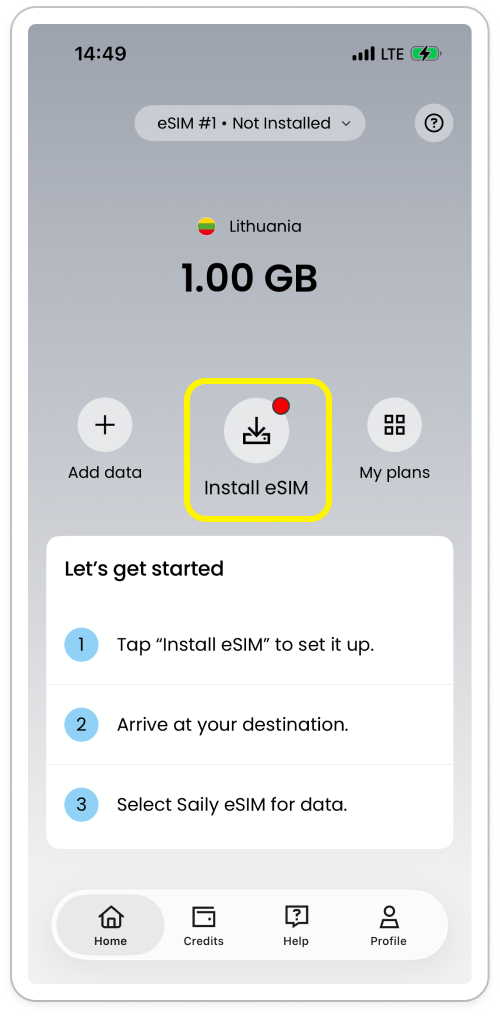
Tap Install eSIM to start. 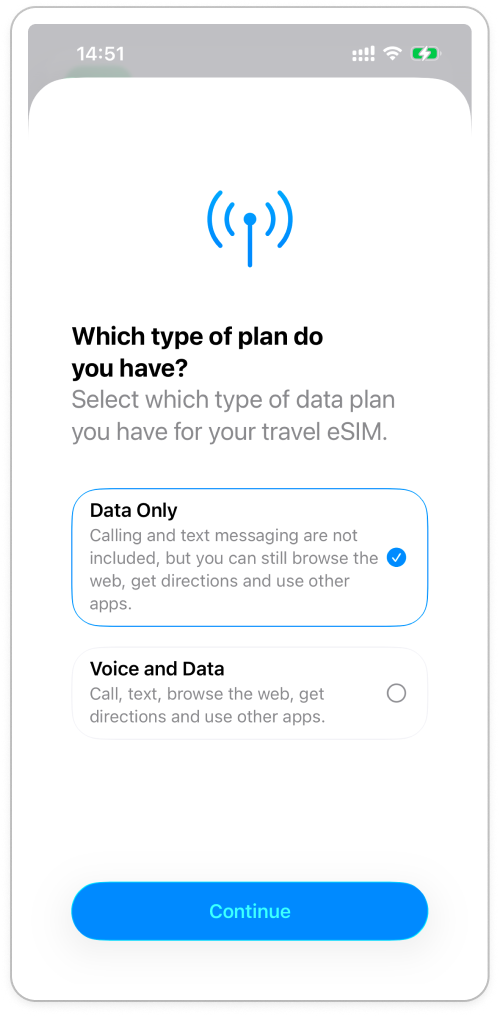
During iPhone installation, choose Data Only and continue. Disable Data Roaming on Your Primary SIM
In your Cellular settings, tap on your everyday primary SIM and toggle Data Roaming to OFF. Back on the main Cellular screen, turn off Allow Cellular Data Switching. This guarantees your regular phone number can still receive verification texts and calls without accidentally leaking expensive data roaming fees.
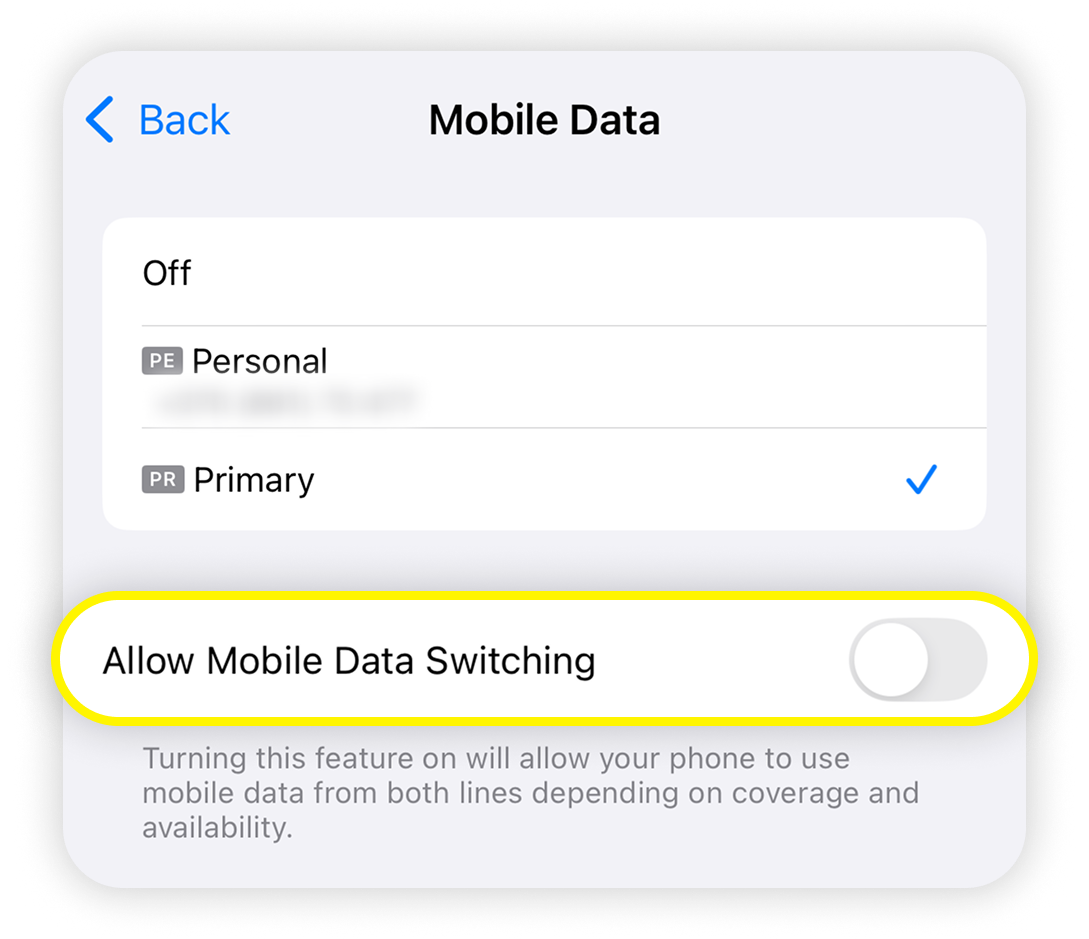
Turn off Allow Mobile Data Switching to prevent fallback to your home SIM. Switch Mobile Data to Saily and Turn On Roaming Upon Landing
Upon arriving in Hong Kong, go to Settings and Cellular, switch Cellular Data to Saily HK, then tap on the Saily HK line and switch Data Roaming to ON. Wait about fifteen seconds for the signal bars to register, and your phone will attach to the local HKT network.
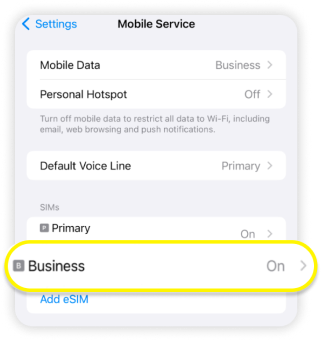
In Cellular settings, find your Saily line; it is labelled Business in the image. 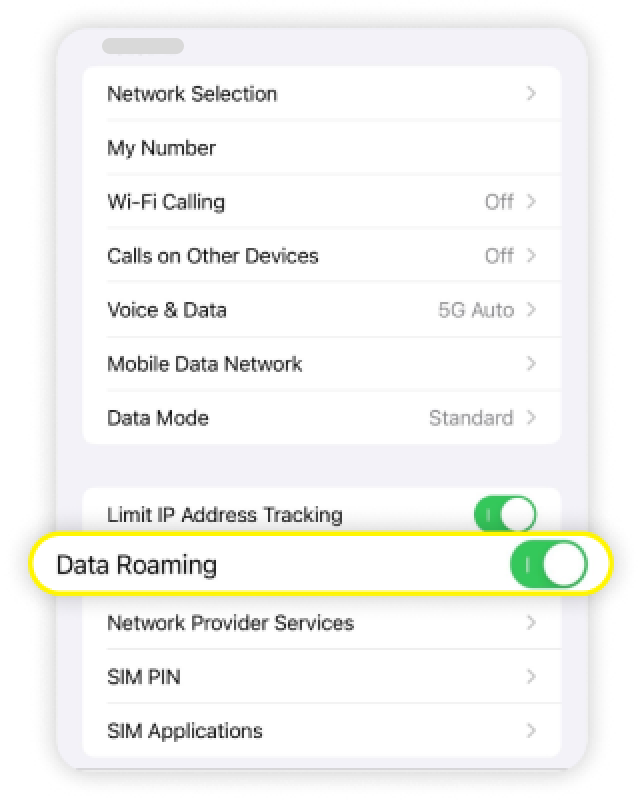
iPhone: enable Data Roaming on the Saily line, not your home SIM. 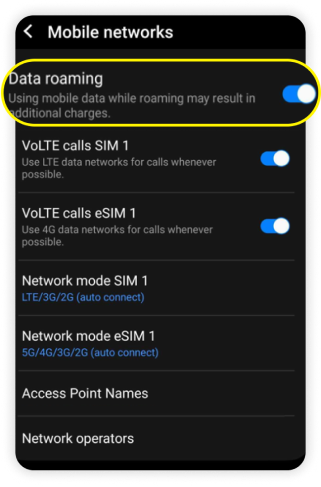
Android: select the Saily line and enable Data roaming. Turn On Hotspot as Needed and Monitor Usage
If you need to share internet with a laptop or companion, turn on Personal Hotspot in your settings. Remember that computer cloud sync and background operating system updates consume data very quickly and drain phone battery faster. Enable metered connection mode on your laptop and check your balance in the Saily app regularly.
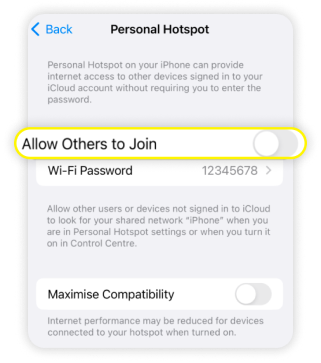
iPhone: turn on Allow Others to Join in Personal Hotspot, then share the password with your own devices. 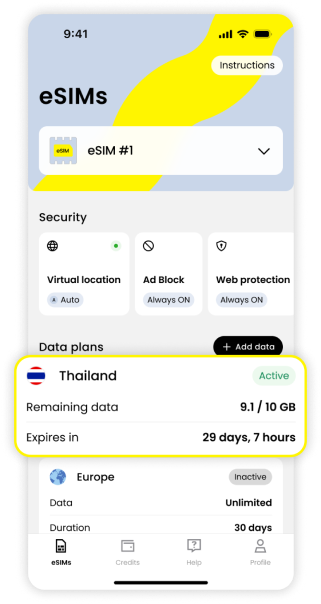
Remaining data shows your data balance; Expires in shows the remaining validity.
Questions and answers
Why do WeChat and Google Maps work fine, but some corporate VPNs or bank apps fail to load?
Saily routes data through an international roaming gateway. While general browsing, messaging, and navigation function normally, certain strict corporate internal networks and financial platforms monitor connecting IP origins and may block foreign roaming exits as a security precaution. This is an application-level firewall policy rather than a network outage.
If I accidentally sign out or switch to a new phone, can I continue using this eSIM?
Saily officially supports reinstalling or transferring an eSIM to a new phone under the same user account. However, a single eSIM profile can never be active on two phones simultaneously. If you encounter network troubles, never delete the profile from your settings; connect to local Wi-Fi and message their 24/7 in-app support first.
If I bought a standard prepaid plan but canceled my Hong Kong trip, can I get a refund?
If it is within 30 days of purchase and the eSIM has never attached to a local tower or consumed any data, you can request a full refund via in-app customer support. However, once activated or beyond 30 days from purchase, refunds are no longer unconditional and are evaluated strictly on a case-by-case technical basis.
Can this Saily Hong Kong plan receive SMS verification codes from home or local Hong Kong institutions?
No. Saily's Hong Kong package is strictly a data-only eSIM without an assigned phone number of any kind. Your home bank verification codes must still be received through your original primary SIM card, and any service demanding an authentic local 852 number for SMS verification cannot be fulfilled by Saily.
Making your choice
The Saily Hong Kong eSIM is ideal for travelers with eSIM-capable phones heading to Hong Kong for a few days who just want reliable data for maps and messaging. There is no queueing for plastic cards at the border and no lengthy identity registration—install it in two minutes before leaving and you are online as soon as you touch down. However, if your trip demands a local Hong Kong phone number for banking, or spans across Shenzhen and Macau, do not expect this single-destination data package to cover those needs; opt for a local physical SIM or a multi-region plan instead.