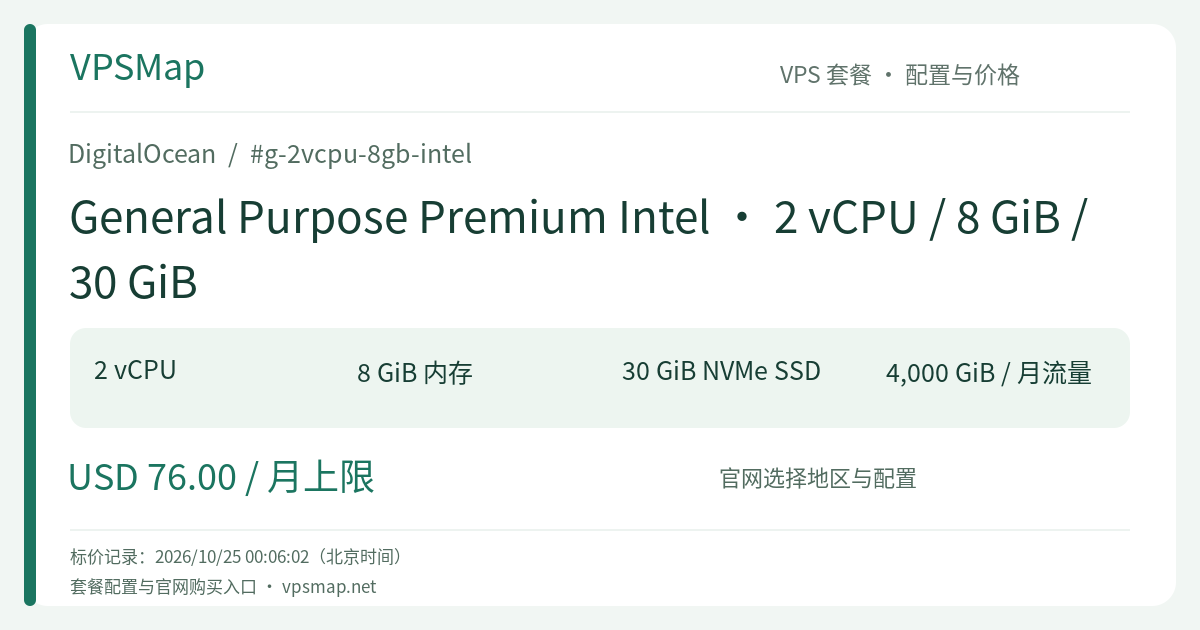
DigitalOcean 2 vCPU 8 GiB Premium Intel Droplet: Dedicated Compute and 10 Gbps Throughput for Production
Updated
Why Mission-Critical Workloads Require Dedicated CPU#
Many engineering teams begin their cloud journey on shared CPU virtual machines. Shared instances offer great value for testing environments, small staging setups, or personal blogs where traffic spikes are rare and latency tolerances are forgiving. However, in production, shared CPU instances expose your applications to the "noisy neighbor" phenomenon: if other tenants sharing the same physical host run heavy compilation tasks or background processing, your instance experiences CPU starvation, latency spikes, and intermittent timeout errors.
DigitalOcean General Purpose Premium Intel (Slug: g-2vcpu-8gb-intel) solves this fundamental bottleneck. Built on a Dedicated CPU virtualization model, the hypervisor assigns full, physical hyper-threads exclusively to your virtual machine. Regardless of external workload fluctuations on the physical hardware, your 2 vCPUs deliver 100% sustained computing power around the clock without artificial throttling.
Architecture and Hardware Advantages#
1. 3rd Gen Intel Xeon Scalable Processors & High-Frequency RAM#
This Droplet runs on 3rd Generation Intel Xeon Scalable processors (Ice Lake), offering robust single-thread performance and rich enterprise instruction sets. Paired with 2,933 MHz high-frequency system memory, your services maintain predictable millisecond latency across SSL/TLS handshakes, high-frequency JSON parsing, and intricate business logic execution.
2. The Golden 1:4 Compute-to-Memory Ratio (2 vCPU / 8 GiB RAM)#
System architects often struggle with unbalanced instances: CPU-Optimized plans (1:2 ratio) tend to run low on memory under concurrent load, triggering Linux kernel Out-Of-Memory (OOM) kills; Memory-Optimized plans (1:8 ratio) often leave compute power underutilized. General Purpose Droplets strike the sweet spot with a balanced 1:4 ratio. 2 dedicated cores paired with 8 GiB of RAM effortlessly support:
- Multiple concurrent worker processes (Node.js cluster mode, Gunicorn/Uvicorn workers, Ruby Puma, Go microservices).
- Healthy room for operating system page cache and in-memory operational buffers, significantly reducing disk read frequency.
3. Native 10 Gbps Backbone Networking#
A standout feature of the Premium Intel tier is its upgraded networking pipeline. Compared to the 2 Gbps standard networking cap on regular CPU instances, Premium Intel Droplets provide up to 10 Gbps of network throughput. Whether your service is streaming data, executing large-scale analytical exports, or serving thousands of simultaneous client connections, data moves up to 5x faster, preventing networking I/O bottlenecks.
4. Direct NVMe SSD Storage#
The configuration includes a 30 GiB NVMe SSD boot disk. Utilizing parallel PCIe storage channels, NVMe drives deliver microsecond-level access times compared to legacy SATA SSDs, ensuring brisk operating system boots, fast package loading, and low-latency disk operations.
Recommended Use Cases#
This configuration serves as the foundational building block for growing web services:
- Production Web APIs & Backend Microservices: Handling steady customer traffic with strict SLA guarantees and minimal response jitter.
- High-Traffic E-commerce & CMS Platforms: Hosting WooCommerce, Magento backends, or headless CMS nodes that need reliable CPU cycles during promotional traffic surges.
- Stateless Container Nodes: Running Docker or lightweight K3s worker instances where application state is offloaded to managed database clusters and block volumes.
- Internal Business Systems: Running mission-critical ERPs, CRMs, and queue workers where stable execution speed directly impacts business efficiency.
Architectural Considerations: Storage Strategy#
The 30 GiB NVMe boot disk offers speed and reliability, but sizing requires careful architectural planning based on your storage model:
- Stateless Workloads: Perfect out of the box. 30 GiB is plenty for the Linux operating system, Docker layers, system packages, and logs.
- Growing Persistent Data: For database storage or media libraries, attach DigitalOcean Volumes (network-attached block storage) for elastic capacity, or offload assets to DigitalOcean Spaces object storage.
- Larger Local Storage Needs: If your application demands significant local NVMe space on the boot disk itself without attaching external volumes, consider the 60 GiB (
gd-2vcpu-8gb-intel) or 165 GiB (g5_5-2vcpu-8gb-intel) configurations within the same family.
Billing Mechanics & Network Bandwidth Pooling#
DigitalOcean keeps cloud infrastructure costs predictable and transparent:
- Per-Second Billing with a 672-Hour Monthly Cap: Droplets are billed per second with a 672-hour (28 days) cap per monthly billing cycle. Once an instance reaches 672 hours in a calendar month, usage beyond that point incurs no additional base compute charge.
- Billing While Powered Off: Keep in mind that powered-off Droplets continue to accrue charges because dedicated CPU hyper-threads, memory, and NVMe disk space remain reserved on the physical hypervisor. To stop billing permanently, destroy the Droplet from the control panel.
- 4,000 GiB Outbound Bandwidth Pool: Every instance includes 4 TB of free outbound data transfer, while inbound traffic is always free. DigitalOcean pools transfer allowance cumulatively across all Droplets at the team account level. This allows low-traffic droplets to subsidize active nodes, with overages billed at a flat $0.01 per GiB.
- Complimentary VPC Networking: Inter-Droplet traffic over the private Virtual Private Cloud (VPC) network is free and does not consume your public outbound data allowance.
Deployment Summary#
When your application transitions from experimental prototype to revenue-generating production, predictable compute and low network latency become non-negotiable. The g-2vcpu-8gb-intel Droplet offers the dedicated reliability and speed necessary to scale with confidence.
Capacity Note: Server hardware availability varies by region. Real-time capacity is confirmed directly in the DigitalOcean console during deployment.