BandwagonHost 160G KVM PROMO VPS Review: The 8GB RAM & 4TB High-Spec Multi-Datacenter Powerhouse
Updated
When selecting an overseas virtual private server, developers and engineering teams frequently find themselves trapped in a dilemma: entry-level plans are budget-friendly but usually capped at 1GB or 2GB of RAM—quickly crashing against Linux out-of-memory (OOM) errors once multi-container stacks, relational databases, or modern development toolchains are launched. On the other hand, upgrading to premium enterprise transit routes with matching high-memory capacities often escalates annual expenses to thousands of dollars, far exceeding the budget requirements of compute- and memory-centric workloads.
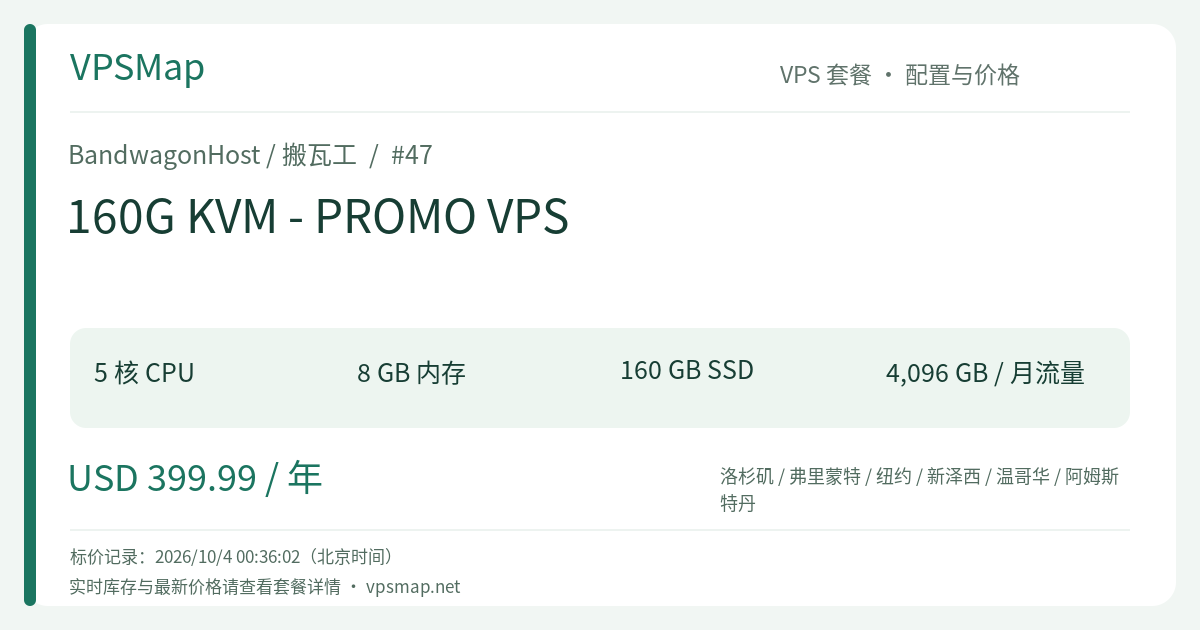
BandwagonHost's 160G KVM - PROMO VPS (Plan ID #47 [Buy direct ↗]) is engineered specifically to bridge this gap. Designed for workloads that demand significant RAM, spacious enterprise solid-state storage, and massive monthly bandwidth without incurring exorbitant premium transit surcharges, this plan combines 8GB of system memory, 160GB SSD storage, 4096GB (4TB) of monthly transfer, and seamless cross-datacenter mobility across six prime locations in North America and Europe.
Hardware & Network Technical Specifications#
Part of BandwagonHost’s battle-tested KVM PROMO tier, Plan #47 is built on KVM full virtualization and deployed exclusively on enterprise-grade server infrastructure owned and managed by IT7 Networks Inc.:
| Specification Dimension | Detailed Allocation |
|---|---|
| Plan ID | #47 (160G KVM - PROMO VPS) |
| CPU Cores | 5 vCPU Cores |
| System Memory | 8192 MB (8 GB RAM) |
| Storage Capacity | 160 GB Enterprise SSD (RAID-10 Protected) |
| Monthly Bandwidth | 4096 GB (4 TB Transfer Quota) |
| Uplink Network Port | 1000 Mbps (1 Gbps) Full Duplex Port |
| Available Datacenters | Los Angeles (USCA), Fremont, New York, New Jersey, Vancouver (Canada), Amsterdam (Europe) |
| Virtualization & Panel | KVM / In-House KiwiVM Control Panel |
| Billing Cycle | $399.99 USD Annually (Subject to dynamic checkout validation) |
[!NOTE] This plan supports dynamic cross-datacenter migration via KiwiVM. When selecting the Los Angeles nodes, connections benefit from China Telecom CN2 routing options, offering enhanced stability compared to the standard, heavily congested 163 backbone.
Key Architectural Advantages: What Problems Does It Solve?#
1. Eliminates Memory Bottlenecks in Modern Container Stacks#
Modern application development relies heavily on containerized microservices. Running a single lightweight web reverse proxy might require modest memory, but pairing it with PostgreSQL or MySQL databases, Redis cache layers, lightweight Elasticsearch nodes, and self-hosted CI/CD automation workers pushes 2GB or 4GB setups past their limits.
Plan #47 supplies 8GB of RAM paired with 5 vCPU cores, granting ample capacity to deploy multifaceted staging and production clusters. You can comfortably host Docker Compose workflows, private code collaboration suites (such as GitLab or Gitea), cloud file repositories (Nextcloud), and telemetry monitoring without having to monitor swap usage continuously.
2. High-Throughput 4TB Bandwidth and 160GB Storage Space#
For teams regularly moving data archives, synchronizing off-site server images, hosting media assets, or routing regional API traffic, 1TB or 2TB monthly allowances can be exhausted rapidly. With 4096 GB (4TB) of included monthly transit and a generous 160GB SSD footprint, you maintain substantial operating room for continuous compilation, heavy database snapshots, and sustained high-volume data exchanges.
3. Multi-Datacenter Flexibility Across North America and Europe#
Your server is never locked to a single geographical facility. KiwiVM’s integrated “Datacenter Migration” tool allows you to shift live workloads between six major regional hubs:
- US West Coast (Los Angeles / Fremont): Optimal trans-Pacific connectivity bridging Asia and western North America.
- US East Coast (New York / New Jersey): Low-latency access to the East Coast business corridor and fast transatlantic links to Western Europe.
- Canada West (Vancouver): Local Canadian jurisdictional compliance and Northwest American coverage.
- Western Europe (Amsterdam): Direct access to premier European internet exchanges, ensuring sub-20ms hops across the continent.
The underlying disk migration is managed automatically at the block level. Upon completion, a clean IP from the destination datacenter is assigned, preserving your operating system state without manual reinstallation (provided the origin IP has no active abuse or blacklist entries).
Fair Share Policy & Terms of Service Transparency#
BandwagonHost operates under an unambiguous, transparent Terms of Service (ToS). Understanding these parameters guarantees smooth and predictable operations:
- CPU Fair Share Guidelines: Under BandwagonHost's Fair Share Policy for the 160G plan, short bursts of 100% CPU capacity across all five cores are fully supported. Over rolling one-hour averages, CPU utilization is allocated up to 100% of 1 core plus 50% of a second core. If long-term computational jobs exceed this threshold, the host automatically scales available execution cycles back to the permitted rate rather than terminating or suspending your VPS; once computation subsides, full burst potential restores immediately.
- Storage I/O Sustainability: To safeguard overall I/O performance across enterprise SSD arrays, sustained write/read activity exceeding 100 MiB/s for extended windows (4+ hours) may trigger an email notification followed by temporary throttling if unresolved. Standard tasks such as compilation, software setup, and database transactions operate well within standard ranges.
- Self-Managed Responsibility: All servers are self-managed. BandwagonHost guarantees underlying server hardware, redundant power, network availability, and host-level hypervisor integrity 24/7. Operating system management, network firewall hardening, application updates, and data backup policies remain the user's sole responsibility. KiwiVM includes complimentary snapshot and automated backup tools that should be utilized proactively.
Tiered Comparison: Choosing the Right KVM PROMO Plan#
Evaluate the resource hierarchy within the KVM PROMO series to pinpoint the exact tier your project requires:
| Plan Identifier | CPU / RAM | Disk / Traffic | Uplink Port | Annual Cost | Ideal Use Case Profile |
|---|---|---|---|---|---|
| 20G KVM (#44) | 2 Cores / 1024 MB | 20 GB / 1024 GB | 1 Gbps | $49.99 | Entry-level tooling, utility scripts, light exploration |
| 40G KVM (#45) | 3 Cores / 2048 MB | 40 GB / 2048 GB | 1 Gbps | $99.99 | Personal websites, lightweight WordPress, modest APIs |
| 80G KVM (#46) | 4 Cores / 4096 MB | 80 GB / 3072 GB | 1 Gbps | $199.99 | Standard staging environments, active web applications |
| 160G KVM (#47) | 5 Cores / 8192 MB | 160 GB / 4096 GB | 1 Gbps | $399.99 | Complex container matrices, dedicated CI/CD builders, heavy-traffic nodes |
If your service demands run lean on memory, #45 [Buy direct ↗] or #46 [Buy direct ↗] represent cost-effective starting points. If your workload involves multifaceted services or data pipelines where 8GB RAM is non-negotiable, #47 delivers an all-in-one powerhouse solution.
Getting Started: Ordering & Initial Deployment#
- Visit the official order gateway: 160G KVM PROMO (#47) Order Page.
- Select your desired initial datacenter location based on primary geographic traffic (datacenter migrations remain available anytime inside KiwiVM).
- Pick your preferred Linux distribution (AlmaLinux, Rocky Linux, Debian, Ubuntu, and CentOS Stream are all supported with clean, single-click automated installation).
- Proceed to checkout and complete payment via credit card, PayPal, or Alipay.
- Log into the Client Area, access KiwiVM under “My Services,” retrieve your dedicated IP and root credentials, and begin configuring your server via SSH.