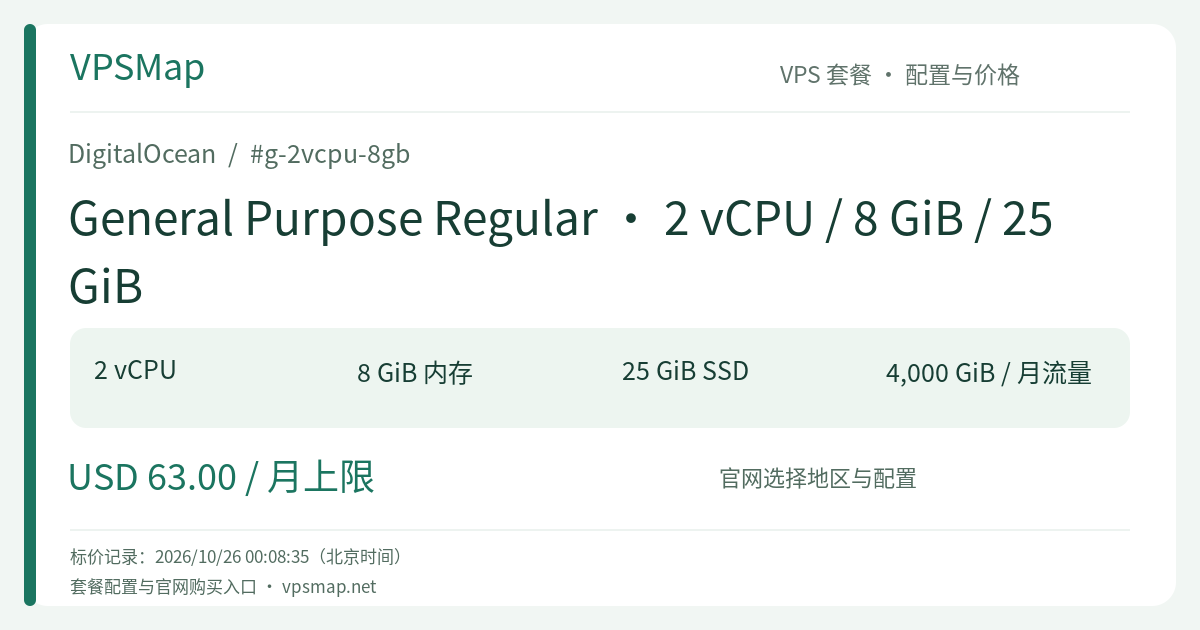
DigitalOcean g-2vcpu-8gb Review: Dedicated Compute for Stateless Services and Cloud-Native Backends
Updated
Why Dedicated CPU Matters in an Era of Cheap Shared Hosts#
When deploying mission-critical applications, the most common pitfall is opting for budget shared-CPU instances. During quiet off-peak hours, performance feels adequate. But the moment traffic spikes hit—or noisy neighbors on the physical hypervisor start compiling packages or crunching batch jobs—API latencies swing from 30ms to several hundred milliseconds, triggering timeouts, dropped sockets, and clogged request queues.
DigitalOcean g-2vcpu-8gb (General Purpose Regular) completely eliminates this unpredictability. It provisions 2 fully dedicated vCPUs (hyper-threads reserved 100% for your workloads). Regardless of the load generated by other tenants on the hypervisor, your clock cycles are guaranteed.
Coupled with 8 GiB of system RAM, it satisfies the industry-standard 4:1 memory-to-vCPU ratio. Whether running multi-threaded JVM applications, concurrent Go microservices, or high-process Python/Ruby web servers, this Droplet maintains a smooth, consistent latency profile under sustained pressure.
The 25 GiB Storage Design: Lean Architecture for Cloud-Native Stacks#
At first glance, a 25 GiB boot disk might raise questions for those accustomed to cramming databases, build artifacts, logs, and user media onto a single VPS. However, this specification embodies an intentional architectural pattern: optimized for modern decoupled stacks without forcing you to pay for unused local storage.
In contemporary cloud environments, separating compute from state is best practice:
- Persistent State in Managed Services: Offload PostgreSQL or MySQL to DigitalOcean Managed Databases for automated failover, maintenance, and automated backups without eating up local drive space.
- Static Assets in Object Storage: Route user uploads and media directly to DigitalOcean Spaces backed by an integrated global CDN.
- Clean Local Boot Environment: 25 GiB of fast SSD storage is ample for Linux OS packages, runtime binaries, container images, and active execution buffers.
If you are setting up an API gateway, stateless microservices, async queue workers, or worker nodes in a DigitalOcean Kubernetes (DOKS) cluster, this compute-centric configuration ensures your cloud spend goes directly toward raw processing capacity.
Recommended Workloads#
- Stateless API Gateways & Proxies: Ideal for high-throughput Traefik, Kong, or Nginx ingress nodes handling SSL termination and request routing;
- Production Microservices: Serving production backends built on Spring Boot, NestJS, Go, FastAPI, or Laravel Octane where 8 GiB of memory provides generous breathing room for concurrency and garbage collection;
- Real-Time Communication Nodes: Hosting WebSocket brokers, Socket.io daemons, or MQTT brokers where scheduling jitter from shared cores cannot be tolerated;
- DOKS Container Worker Nodes: Operating as predictable compute engines inside Kubernetes clusters, relying on Volumes block storage for stateful pods when needed.
Team Bandwidth Pooling and Network Advantages#
Equipped with a 2000 Mbps (2 Gbps) network port, this Droplet comes packaged with 4000 GiB of included outbound data transfer. DigitalOcean's bandwidth billing provides significant collective advantages:
- Team-Level Bandwidth Pooling: The 4000 GiB allowance accrues per second into your team's collective account-level transfer pool. If this particular Droplet consumes only 1000 GiB, the remaining 3000 GiB automatically offsets heavy usage from other Droplets in your fleet;
- Completely Free Inbound Traffic: Incoming requests, file ingestion, and data downloads never consume your bandwidth pool;
- Zero-Cost Private VPC Networking: Droplet-to-Droplet communication within the private VPC interface is fast, secure, and unmetered.
Operational Best Practices & Billing Considerations#
- Monthly Caps and Per-Second Billing: Usage is billed per second up to a 672-hour (28-day) cap per month. Continuous operation through a 31-day month will never exceed the specified monthly cap. However, note that powering off a Droplet does not pause billing, as hypervisor CPU and RAM remain allocated to your instance. To end billing entirely, you must destroy the Droplet.
- Log Hygiene: With a 25 GiB system disk, configure strict
logrotateschedules and configure Docker logging limits (e.g., max-size 50m, max-file 3) to keep system disks clean. - Disaster Recovery: Enable DigitalOcean automated backups at provisioning. Weekly automated snapshots cost just 20% of the Droplet baseline, running incrementally in the background to ensure effortless recovery.
For teams demanding guaranteed CPU execution and rock-solid latency without paying for superfluous local disk, deploy the DigitalOcean g-2vcpu-8gb today.