DigitalOcean 512MB Droplet Review & Practical Guide: What Can You Run for $4/Month?
Updated
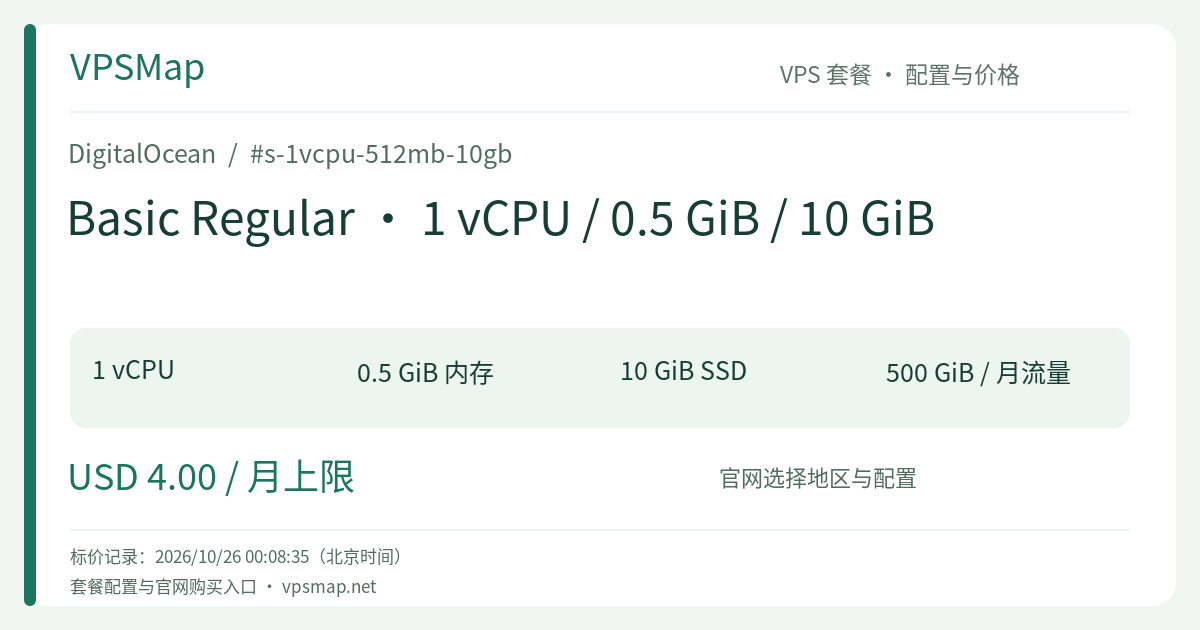
In a cloud hosting landscape where 1GB RAM has increasingly become the baseline, DigitalOcean still offers the classic 512MB Basic Droplet capped at just $4/month (approximately $0.00595 per hour). For less than the price of a cup of coffee, you secure more than just a Linux virtual machine with a dedicated public IPv4 address—you get seamless access to DigitalOcean's enterprise-grade cloud ecosystem.
Faced with 512MB of RAM and a 10GB SSD, many developers wonder whether modern workloads can genuinely survive on such tight constraints. The answer depends on workload architecture and knowing precisely what this tier is designed to do.
What You Get for $4/Month: The Value Proposition#
- Full Cloud Platform Integration: This entry-tier Droplet uses the exact same intuitive Cloud Console, REST APIs, and
doctlCLI as instances costing hundreds of dollars. You benefit from private VPC networking, free cloud firewalls, reverse DNS (PTR) management, and per-second billing with zero upfront commitments. - Generous Network Bandwidth with Team-Level Pooling: The plan includes 500 GiB of monthly outbound transfer, while all inbound transfer is completely free. Crucially, DigitalOcean pools bandwidth across your entire team account. Running a 512MB Droplet contributes an extra 500 GiB into your team's collective data pool, giving your overall infrastructure added breathing room against traffic spikes.
- Granular Per-Second Billing: Usage is calculated per second with a 60-second ($0.01) minimum threshold and capped at 672 hours per billing cycle ($4/month). If you need an isolated test environment for two hours to validate a deployment script or fetch data, spinning it up and destroying it will cost merely a few cents.
4 Ideal Real-World Use Cases#
1. Uptime Monitoring Probes and Alert Relays#
Hosting your monitoring infrastructure inside the exact same network as your primary production servers creates a dangerous blind spot. This 512MB instance serves as an ideal external sentinel. Running Uptime Kuma with an embedded SQLite database, or running Prometheus Node Exporter alongside lightweight Python polling scripts hooked into Telegram or Slack webhooks, consumes roughly 150MB-250MB of RAM—leaving plenty of headroom.
2. Bastion Jump Hosts and Private VPN Endpoints#
With a physical 2000 Mbps port and reliable global routing, this tiny node is perfect as a secure gateway into your private infrastructure. Running a WireGuard server or a hardened SSH jump host with fail2ban lets you isolate production databases and backend nodes behind private VPC subnets, restricting external access exclusively through this single low-cost entry point.
3. High-Performance Static Sites and Reverse Proxies#
Paired with Caddy or a carefully tuned Nginx setup, 512MB of memory can easily handle tens of thousands of static requests daily. It is a fantastic host for static assets, blogs built with Hugo, Astro, or VitePress, complete with automated Let's Encrypt SSL/TLS certificates. Without memory-hungry PHP runtime engines or application servers, idle memory consumption stays safely below 100MB.
4. Compiled Microservices in Go or Rust#
Modern compiled languages like Go and Rust produce compact binaries with minimal runtime overhead. A custom webhook handler, URL shortener, or data-collection microservice built with Go/Gin or Rust/Axum typically requires only 30MB-50MB of resident memory, running reliably for months without memory leaks or crashes.
Essential Setup and Survival Optimizations#
To ensure rock-solid stability on 512MB of memory, implement these foundational practices:
- Configure a 1GB Swap File Immediately
While 10GB of SSD storage is compact, setting aside 1GB for swap memory prevents kernel Out-Of-Memory (OOM) kills during routine package updates (
apt update && apt upgrade) or temporary traffic spikes:fallocate -l 1G /swapfile chmod 600 /swapfile mkswap /swapfile swapon /swapfile echo '/swapfile none swap sw 0 0' >> /etc/fstab - Choose a Lean Operating System Select a minimal Debian 12 image. A bare Debian installation consumes around 60MB-80MB of RAM at boot, preserving more than 400MB of genuine physical memory for your workload—vastly leaner than heavyweight distributions shipping background telemetry and daemon bloat.
- Workloads to Avoid Do not attempt to run untuned monolithic stacks like default MySQL/LAMP configurations (which can easily swallow 400MB+ upon initialization), Java/Spring Boot microservices, self-hosted GitLab, or heavy container clusters directly on this machine.
Operational Caveats and Seamless Upgrades#
- Powering Off Does Not Stop Billing: Keep in mind that executing
Power Offin the console leaves CPU, RAM, and storage reserved on the hypervisor. Billing continues until you execute a full Destroy on the Droplet. - Frictionless In-Place Scaling: When your prototype gains traction and requires more resources, you do not need to rebuild from scratch. DigitalOcean's Resize feature allows seamless upgrades to a 1GB or larger plan within minutes directly from the management console (note that while disk size can be increased, it cannot be downsized later).
If you need a reliable, cost-effective edge machine backed by enterprise-grade transit and tooling, deploy your 512MB Droplet on DigitalOcean today.