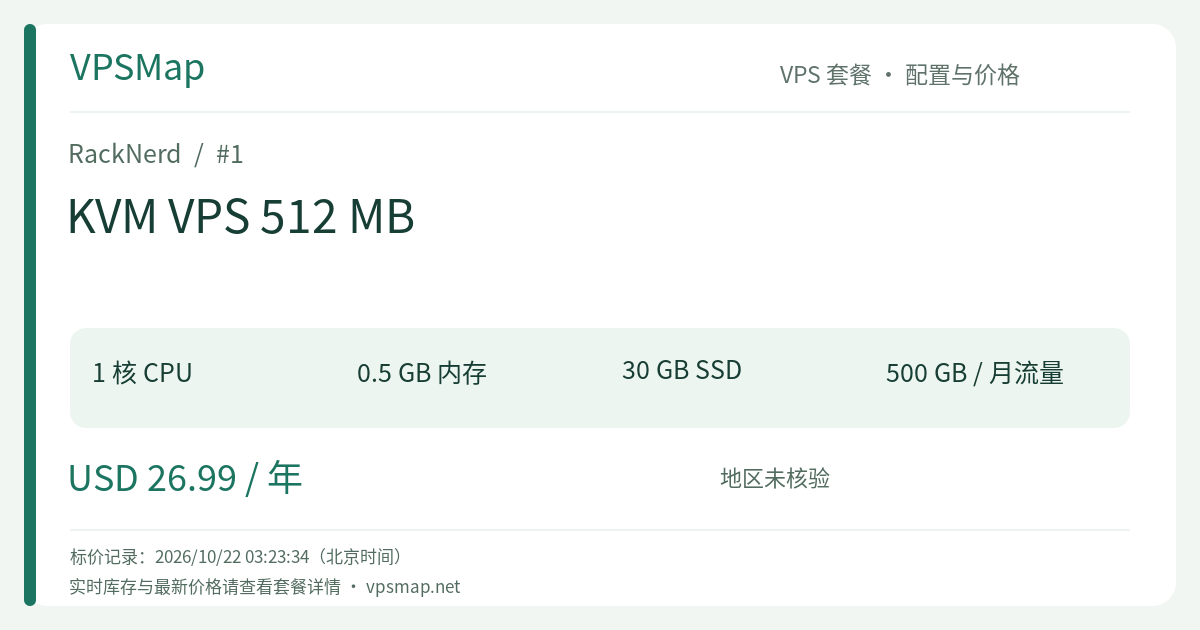
RackNerd KVM VPS 512 MB Buying Guide: A $26.99/Year Reliable Dedicated IP Outpost with 30GB RAID-10 Storage
Updated
In an era where enterprise cloud providers charge substantial hourly rates for virtual instances, finding a reliable virtual machine that runs 365 days a year with a clean dedicated IPv4 address for less than the price of two casual lunches is a huge win for developers, sysadmins, and tech enthusiasts. The RackNerd KVM VPS 512 MB plan, priced at an affordable $26.99 / year (approximately $2.25 per month), continues to be one of the most compelling entry-level nodes in the hosting market.
This is far from a disposable sandbox. When you examine its underlying architecture, physical storage redundancy, and network peering, you will find a dependable, production-ready foundation designed specifically for lightweight edge workloads, automated background tasks, and resilient network relays.
Hardware & Specifications Breakdown#
- vCPU Core: 1 vCore (Powered by enterprise Intel Xeon processors for broad instruction set compatibility)
- System Memory: 512 MB RAM (Optimized for streamlined Linux distribution footprints)
- Disk Storage: 30 GB RAID-10 Pure SSD (Delivering hardware redundancy and consistent I/O throughput)
- Monthly Bandwidth: 500 GB on a 1Gbps unthrottled port (Intelligently routed via Noction IRP)
- IP Allocation: 1 Dedicated IPv4 included (Up to 100 free IPv6 addresses available upon request via support ticket in Los Angeles and France)
- Virtualization: True hardware-level KVM virtualization with unrestricted full root access
- Management Portal: Modern proprietary
ctrlcontrol panel featuring HTML5 VNC console, network firewall rules, and instant OS provisioning - Pricing: $26.99 / year (Recurring annual billing)
Why 30GB RAID-10 SSD is the Decisive Factor for a 512MB VPS#
The most common frustration with sub-$30/year budget VPS solutions is not necessarily RAM starvation—it is acute disk constriction. Competitors (and even RackNerd's own Ryzen 512MB tier) often ship with a bare 10 GB disk. Once a modern Linux distribution like Debian or Ubuntu finishes kernel installation, package updates, and log indexing, you are frequently left with less than 5 GB of practical working space. A single log rotation hiccup or local backup can lock up the system.
The standard KVM 512MB configuration solves this cleanly by delivering a full 30 GB RAID-10 SSD:
- 3x Usable Storage Ceiling: After deploying a clean Debian 12 minimal install (~3 GB), you retain over 25 GB of clean, unencumbered SSD storage.
- Room for a Safe Swap Partition: You can comfortably allocate a 1 GB to 2 GB swapfile on the redundant SSD array, virtually eliminating out-of-memory (OOM) panic crashes during occasional memory spikes.
- Hardware RAID-10 Peace of Mind: The storage array protects your persistent volumes against physical drive failures while sustaining predictable input/output performance.
Practical, High-Value Use Cases#
This machine is not designed to run multi-tenant Java microservices or massive relational databases. However, deployed strategically, it excels as an always-on infrastructure component:
- 24/7 Uptime Monitoring & Heartbeat Telemetry (Uptime Kuma / Prometheus Exporters) Self-hosting your monitoring stack outside your core production cluster ensures independent, uncorrupted health checks. With 30 GB of storage, Uptime Kuma can log months of ping history, latency charts, and SSL certificate expiration alerts without storage warnings.
- Headless Cron Automation & Webhook Dispatchers Deploy continuous Python, Go, or shell daemons that listen to incoming webhooks, dispatch alerts to Telegram/Slack, or run scheduled backup routines that synchronize remote assets.
- Dedicated Private VPN & Security Gateway (WireGuard) Utilizing its full 1Gbps port and Noction IRP route optimization, you can run a private WireGuard (wg-easy) tunnel. Secure your laptop and mobile device traffic across untrusted public Wi-Fi networks and maintain a clean, stable external IP footprint.
- Secondary DNS Master & Edge Nginx Reverse Proxy Run authoritative DNS secondary resolvers (Bind9/Knot) or a lightweight Nginx ingress point that shields your backend servers and routes traffic efficiently.
Clear Boundaries: What Not to Do#
A realistic evaluation requires acknowledging mechanical constraints. To maximize uptime on a 512MB footprint, observe the following best practices:
- Avoid Heavy Docker Daemon Stacks: The standard Docker engine alone consumes 80 MB to 150 MB of resident memory. Stacking multiple multi-container Docker Compose applications will trigger aggressive swapping.
- Bypass Heavy Control Panels: Do not install resource-heavy web panels like cPanel or Plesk. Stick to native command-line administration via SSH or a heavily tuned Webmin instance.
- Refrain from High-Traffic Dynamic CMS Workloads: If your goal is hosting a dynamic WooCommerce store or high-volume WordPress portal, step up to the 2 GB or 4 GB tier for appropriate database buffer pools.
Head-to-Head: KVM 512 MB vs. Adjacent Configurations#
| Feature Matrix | KVM 512 MB (Featured) | KVM Special 1 GB | Ryzen 512 MB |
|---|---|---|---|
| Billing & Price | $26.99 / year | $21.99 / year (Promotional) | $26.99 / year |
| vCPU Processing | 1 vCore (Intel Xeon) | 1 vCore (Intel Xeon) | 1 vCore (AMD Ryzen 3900X) |
| RAM | 512 MB | 1024 MB (1 GB) | 512 MB |
| Storage Disk | 30 GB RAID-10 SSD | 20 GB SSD | 10 GB NVMe SSD |
| Bandwidth | 500 GB @ 1Gbps | 3000 GB (3 TB) | 500 GB @ 1Gbps |
| Key Advantage | High disk capacity, steady stock | 2x Memory at lower promo rate | Superior single-core NVMe speed |
| Best Scenario | Storage-dependent small daemons | General computing (when available) | Compute-heavy scripts, low disk |
Summary: If your workload demands steady 30 GB disk space for data logs, small backups, and swap space on an unmetered standard catalog SLA, the KVM 512 MB is unbeatable. If your project is memory-constrained and you catch the KVM Special 1 GB in stock, that makes a phenomenal alternative.
Setup Walkthrough: Ordering & Initial Hardening#
1. Placing the Order and Datacenter Selection#
Navigate directly to the RackNerd KVM VPS 512 MB Order Form. When choosing your datacenter:
- Asia-Pacific & Global Connectivity: Los Angeles (DC-02) or San Jose provide the lowest trans-Pacific transit times due to Noction IRP BGP optimization.
- Free IPv6 Eligibility: Deploying in Los Angeles DC-02 allows you to open a quick support ticket post-deployment to receive up to 100 free IPv6 addresses.
- European Reach: Select Amsterdam or France for local European low-latency delivery.
Choose Debian 12 64-bit Minimal during checkout for the lowest baseline RAM footprint (~35MB after clean boot).
2. Management via RackNerd ctrl#
Once the automated provisioning completes within minutes, access the ctrl control panel:
- Inspect real-time bandwidth consumption and server vitals;
- Configure the ctrl Network Firewall to enforce inbound port isolation directly at the hypervisor level;
- Leverage the browser-based HTML5 VNC console in case of accidental SSH lockout.
3. Essential 512MB Optimization (Configuring 1GB Swap)#
Log in via SSH and configure a resilient 1GB swapfile to handle unexpected memory spikes cleanly:
# Inspect current memory allocation
free -m

# Allocate and secure a 1GB swapfile
fallocate -l 1G /swapfile
chmod 600 /swapfile
mkswap /swapfile
swapon /swapfile

# Ensure swap persistence across reboots
echo '/swapfile none swap sw 0 0' >> /etc/fstab

# Set optimal swappiness (10 prioritizes physical RAM)
sysctl vm.swappiness=10
echo 'vm.swappiness=10' >> /etc/sysctl.conf
Final Verdict#
For less than 8 cents a day, securing an uninterrupted KVM cloud server equipped with 30GB of redundant SSD storage, full root control, and a dedicated public IPv4 address is an extraordinary value proposition. If you need a reliable, set-it-and-forget-it remote outpost that works behind the scenes without inflating your monthly IT bills, the RackNerd KVM VPS 512 MB is an outstanding investment.