Evoxt Premium Plus VM-0.5 Guide: Getting Maximum Value from a $3.49/mo Malaysia Premium Edge Node
Updated
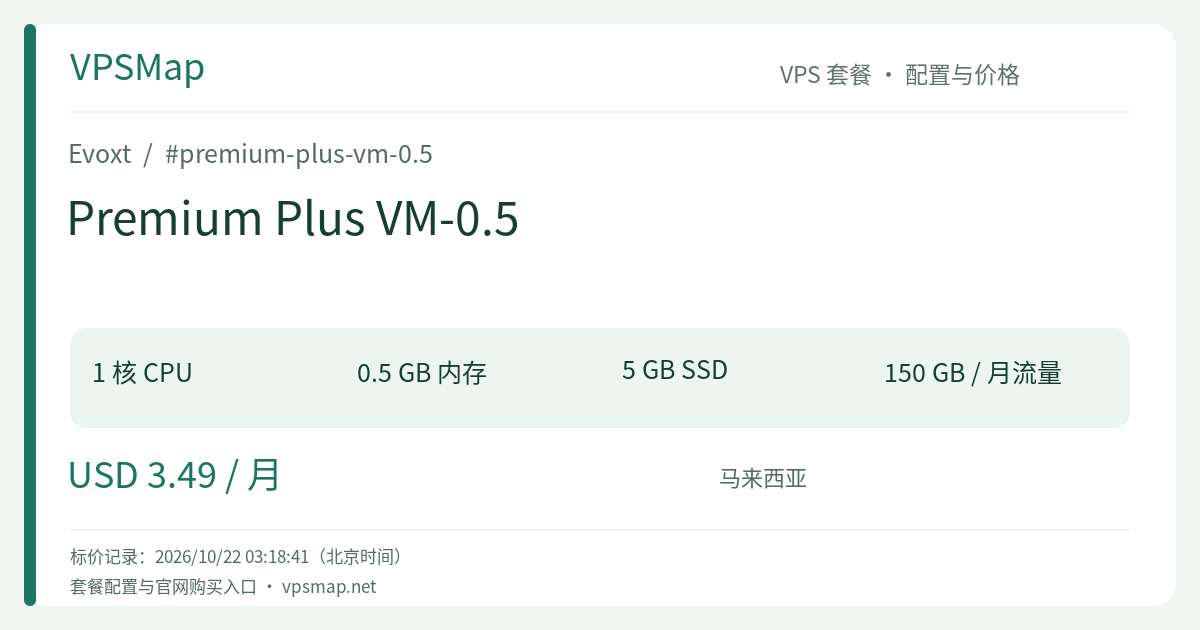
When choosing a cloud virtual machine, it is easy to default to oversized specifications. Yet many mission-critical network tasks do not require massive RAM or multi-core arrays—what they truly demand is a pristine geographic location and high-quality localized routing. The Evoxt Premium Plus VM-0.5 is the quintessential minimalist solution: for just $3.49/month, it provides a dedicated slice of compute in Kuala Lumpur, Malaysia, equipped with independent IPv4 and IPv6 connectivity.
This guide offers an honest, practical look at this 512MB RAM / 5GB SSD micro-instance: what it handles effortlessly, where its constraints lie, and how to extract maximum value from every dollar spent.
Hardware & Pricing Overview#
| Feature | Details |
|---|---|
| vCPU | 1 Core (Up to 6.0 GHz Turbo Clock; legacy base 3.5 GHz+) |
| Memory | 512 MB RAM |
| Disk Space | 5 GB SSD Storage |
| Monthly Transfer | 150 GB (1 Gbps Shared Port) |
| Network Tier | Premium Plus Network (Exclusive to: Malaysia Premium) |
| Included Utilities | Free weekly automated offsite backups, Layer 3 Cloud Firewall, native IPv6 |
| Pricing | $3.49 / month (Billed monthly up to 3 years; account credits supported) |
Core Value: Why Spend $3.49 on VM-0.5?#
1. Authentic Localized Malaysian Connectivity (MyIX Peering)#
In Evoxt's tier structure, the Premium Plus Network represents their highest-grade network profile, exclusively deployed in Malaysia (Kuala Lumpur). It is directly peered with the Malaysia Internet Exchange (MyIX), local telecommunications providers, Google, and Cloudflare. This infrastructure guarantees single-digit millisecond latency inside Malaysia, alongside exceptionally crisp transit into Singapore, Indonesia, Thailand, and across the ASEAN economic corridor.
2. High-Frequency vCPU (Up to 6.0 GHz Turbo)#
Many ultra-budget cloud providers recycle obsolete hardware that crawls during simple package updates. Evoxt provisions high-frequency cores reaching up to 6.0 GHz turbo clocks even on their entry-level plans. For short-burst compute operations—such as SSL certificate handshakes, payload decryption, or quick cron executions—the single-core responsiveness is remarkably agile.
3. Enterprise Foundations: Backups and Firewall Included#
Despite the $3.49 price point, Evoxt includes free weekly automated offsite backups. If a configuration mistake breaks the operating system, you can either boot into the web-based Rescue Mode for emergency maintenance or restore the entire machine from the latest weekly snapshot with one click.
Ideal Practical Use Cases#
- Southeast Asian Edge Gateway & Private Proxy (WireGuard / Tailscale): Establish a clean, local gateway into Malaysia. Perfect for verifying localized fintech gateways, monitoring region-specific search results, or providing a secure communication proxy for remote team members.
- Uptime Probing & Synthetic Health Checks (Uptime Kuma / Node Exporter): Deploy an independent monitoring sentinel directly within the Malaysian domestic backbone to inspect API latencies, SSL certificates, and DNS health across Southeast Asia 24/7.
- Lightweight Bot Runtimes & Webhook Endpoints: Custom Telegram notification bots, Discord event processors, or GitHub webhook handlers written in Go, Rust, or minimal Python require only a few dozen megabytes of RAM and run smoothly around the clock.
- Private DNS Resolver or Edge Reverse Proxy: Hosting lightweight CoreDNS, Unbound, or a minimal Caddy instance serving basic redirects and static caching.
Essential Architecture Trade-offs & Tuning#
Operating in a 512MB RAM and 5GB storage environment requires disciplined, lean systems administration:
- Avoid Heavy Web Control Panels: Never install resource-heavy web hosting control panels like cPanel or Plesk on a 512MB machine, as they will cause immediate Out-Of-Memory kernel panics. Stick to clean CLI administration and use lightweight web servers like Caddy or Nginx.
- Configure Swap or zram Immediately:
A minimal Debian 12 installation consumes around 1.2GB to 1.5GB of disk. Configuring a small 512MB swap file or enabling zRAM memory compression provides vital buffer space against transient memory spikes:
# Allocate a 512MB swap file fallocate -l 512M /swapfile chmod 600 /swapfile mkswap /swapfile swapon /swapfile echo '/swapfile none swap sw 0 0' >> /etc/fstab - Restrict System Logging:
Cap systemd journal storage in
/etc/systemd/journald.conf(e.g.,SystemMaxUse=50M) to prevent log files from gradually filling the 5GB disk.
Comparison with Adjacent Options#
- vs. Premium Plus VM-0.75 (1 Core / 1GB RAM / 10GB Storage / 250GB Transfer at $4.99/mo): The price gap is merely $1.50 per month. However, VM-0.75 provides 2x the RAM (1GB vs 512MB), 2x the disk space (10GB vs 5GB), and an additional 100GB of bandwidth. If you intend to run Docker containers, a lightweight WordPress site, or modern Node.js scripts, spending the extra $1.50 makes life vastly easier. But if your goal is strictly a single-purpose probe or lightweight proxy node, VM-0.5 avoids unnecessary overhead.
- vs. Standard Network Tiers in the US/Europe: While $2.99 to $4.99 can buy higher bandwidth in standard western datacenters, raw location and low-latency Asian peering cannot be replicated across oceans. Premium Plus in Malaysia is specifically tailored for regional performance.
Step-by-Step Purchase & Setup#
- Navigate to the Evoxt Official Console Deployment Portal and register or sign in.
- In the console overview, click Deploy a Cloud Virtual Machine.
- Select Region: Under the Premium Plus Network tab, choose Malaysia (Premium).
- Select Plan: Pick the entry-tier VM-0.5 (1 Core, 512 MB RAM, 5 GB Storage, 150 GB Transfer).
- Choose Operating System: Select a lean distribution—Debian 12 or Alpine Linux is strongly advised to maintain low memory overhead.
- Choose Payment Term: Opt for monthly billing or extend up to 3 years. Payment methods include credit/debit cards, PayPal, Bitcoin, and USDt Tron.
- Provisioning finishes automatically within approximately 2.5 minutes. Once initialized, retrieve your credentials from the dashboard, establish an SSH session, configure your swap file, and launch your lightweight services.