RackNerd KVM VPS 1 GB Deep Dive: Dual-Core 50GB Elastic Monthly Hosting for Staging & Lightweight Stacks
Updated
When shopping for a Virtual Private Server, many buyers fall into the trap of believing promotional annual plans are the only viable route. However, in professional software engineering, client staging, and agile business operations, month-to-month elastic billing, multi-core processor concurrency, and ample disk capacity frequently matter far more than annual price locks.
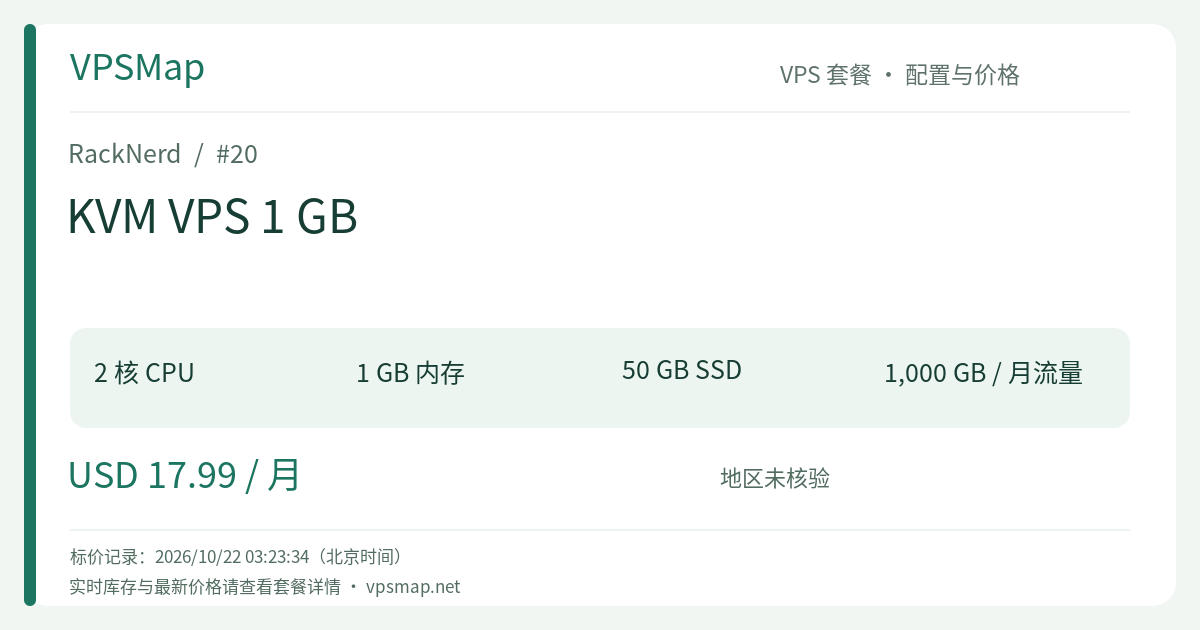
The RackNerd KVM VPS 1 GB (PID 20) is engineered specifically for these agile scenarios: providing 2 dedicated vCPU cores, 50 GB RAID-10 pure SSD, and 1 TB of premium bandwidth at an accessible $17.99 / month. This review breaks down its hardware capabilities, practical deployment targets, comparative tradeoffs, and operational tuning.
Technical Specifications at a Glance#
- Processor: 2 vCores (Powered by multi-threaded Intel Xeon infrastructure)
- System Memory: 1024 MB (1 GB) RAM
- Storage Volume: 50 GB RAID-10 Pure SSD (Hardware array protection for sustained I/O operations)
- Network Allocation: 1000 GB (1 TB) per month on a 1Gbps unmetered port (Noction IRP route-optimized)
- Dedicated IP: 1 Free Dedicated IPv4 (Up to 100 free IPv6 addresses available upon request in Los Angeles and France)
- Control Panel: Proprietary
ctrldashboard (Featuring out-of-band HTML5 VNC console, hypervisor firewall, and OS reinstallation) - Billing Cycle: $17.99 / month (Elastic, cancel-anytime monthly model)
The Core Value Proposition: Why Choose the Monthly 1GB Plan?#
1. Dual vCPU Cores for Real Concurrency#
Most entry-level 1GB virtual machines (especially budget annual promotions) restrict resources to a single shared vCore. During routine operations—such as executing an apt upgrade, compiling a package, or generating Let's Encrypt SSL certificates—a single core frequently saturates at 100% CPU utilization, causing web requests to queue and latency to spike.
With the standard KVM 1GB plan, you receive 2 vCores:
- The operating system and background daemons run on one core while your web server (Nginx/OpenLiteSpeed) handles traffic on the second;
- Package installations, git pulls, and script execution complete significantly faster;
- Your application easily handles concurrent visitor spikes without immediate CPU throttling.
2. A Generous 50 GB SSD Buffer Eliminates Storage Anxiety#
Compare the disk sizes across 1GB configurations:
- The Ryzen 1GB plan provides 15 GB NVMe;
- The KVM Special 1GB promotional plan offers 20 GB SSD;
- The standard KVM 1GB plan delivers 50 GB RAID-10 SSD!
This generous 50 GB storage ceiling means you can deploy full-featured LEMP stacks, maintain growing SQLite/MySQL databases, store media assets, and keep several rolling local backups without daily manual log pruning.
3. Maximum Agility Without Financial Lock-In#
- Client Project Staging: Delivering short-term client deliverables, client demos, or seasonal marketing landing pages often requires only 1 to 3 months of uptime. Monthly billing maps directly to project revenue and avoids wasted prepaid capital.
- Risk-Free Sandboxing: If you need to test a specific Linux environment, validate a microservice pipeline, or build an isolated proxy bridge, an elastic monthly plan provides complete peace of mind.
Proven Workloads & What You Can Deploy#
- Production-Ready Web Hosting (CyberPanel / Webmin + Nginx + PHP 8.2 + MariaDB) Powered by 2 vCPUs and 50 GB of storage, this instance comfortably hosts 2 to 4 small-business portals, portfolio sites, or blogs. With server-side caching (OPcache/Redis), dynamic response times remain snappy.
- Agile REST APIs & Microservices (Node.js / FastAPI / Go) Host your modern Python or Node backend web services. Backed by a dedicated IPv4 and low-latency 1Gbps connectivity, it acts as a reliable API endpoint.
- Self-Hosted Lightweight Git Service (Gitea) Unlike GitLab, which demands 4GB+ RAM, Gitea operates comfortably within 200–300 MB of RAM. Paired with 50 GB of SSD space, you can maintain your private team code repositories with complete data sovereignty.
- Secure Corporate WireGuard / Tailscale Gateway Utilize 1 TB of monthly bandwidth to provide encrypted transit for remote team members accessing sensitive internal endpoints.
Decision Framework: Standard 1GB vs. Alternatives#
| Feature | KVM VPS 1 GB (Featured) | KVM Special 1 GB | KVM VPS 2 GB |
|---|---|---|---|
| Price & Billing | $17.99 / month | $21.99 / year (Promotional) | $20.59 / month |
| CPU Cores | 2 vCores | 1 vCore | 3 vCores |
| RAM | 1024 MB (1 GB) | 1024 MB (1 GB) | 2048 MB (2 GB) |
| Disk Storage | 50 GB RAID-10 SSD | 20 GB SSD | 75 GB RAID-10 SSD |
| Bandwidth | 1000 GB (1 TB) | 3000 GB (3 TB) | 2000 GB (2 TB) |
| Best Suited For | Flexible monthly staging, 2-core speed | Extreme budget long-term nodes | Heavy container stacks, maximum value |
Strategic Takeaway:
- If your project requires an ultra-low annual cost and has no strict requirement for multi-core parallelism or large storage, check if the KVM Special 1 GB ($21.99/year) is in stock.
- But if you value dual-core processing, 50 GB SSD storage, and the freedom of monthly cancellation, this standard KVM plan is built for professional stability.
- Note: For just $2.60 more per month ($20.59/mo), the KVM VPS 2 GB (3 Cores / 75 GB SSD / 2 GB RAM) offers tremendous additional marginal value if your budget permits!
Deployment & Configuration Walkthrough#
Step 1: Datacenter Selection & Checkout#
Open the RackNerd KVM VPS 1 GB Order Page. Choose your ideal location:
- Asia-Pacific Audiences: Los Angeles (DC-02) or San Jose for optimal Pacific transit routes.
- US Central & East: Dallas, Chicago, New York, Atlanta, or Ashburn.
- Europe: Amsterdam or France.
Step 2: Utilizing the ctrl Control Panel#
Once provisioned, access the ctrl interface to manage your virtual server:
- Retrieve your root SSH credentials;
- Configure the ctrl Network Firewall to lock down unused inbound ports;
- Request up to 100 free IPv6 addresses via a quick ticket if deployed in Los Angeles or France.
Step 3: Server Provisioning & Swap Optimization#
Connect via SSH and apply these foundational hardening and performance steps:
# Refresh system repositories
apt update && apt upgrade -y

# Configure a 2GB Swap buffer on the fast SSD
fallocate -l 2G /swapfile
chmod 600 /swapfile
mkswap /swapfile
swapon /swapfile
echo '/swapfile none swap sw 0 0' >> /etc/fstab

# Install security and monitoring utilities
apt install -y htop ufw fail2ban curl

# Enable essential firewall rules
ufw allow OpenSSH
ufw allow 80/tcp
ufw allow 443/tcp
ufw --force enable
systemctl enable fail2ban
The Bottom Line#
RackNerd's KVM VPS 1 GB plan bridges the gap between disposable budget instances and costly enterprise cloud tiers. With 2 dedicated vCPUs, 50 GB of redundant SSD storage, and unconstrained monthly billing, it offers the perfect staging ground for projects where agility and stability matter most.