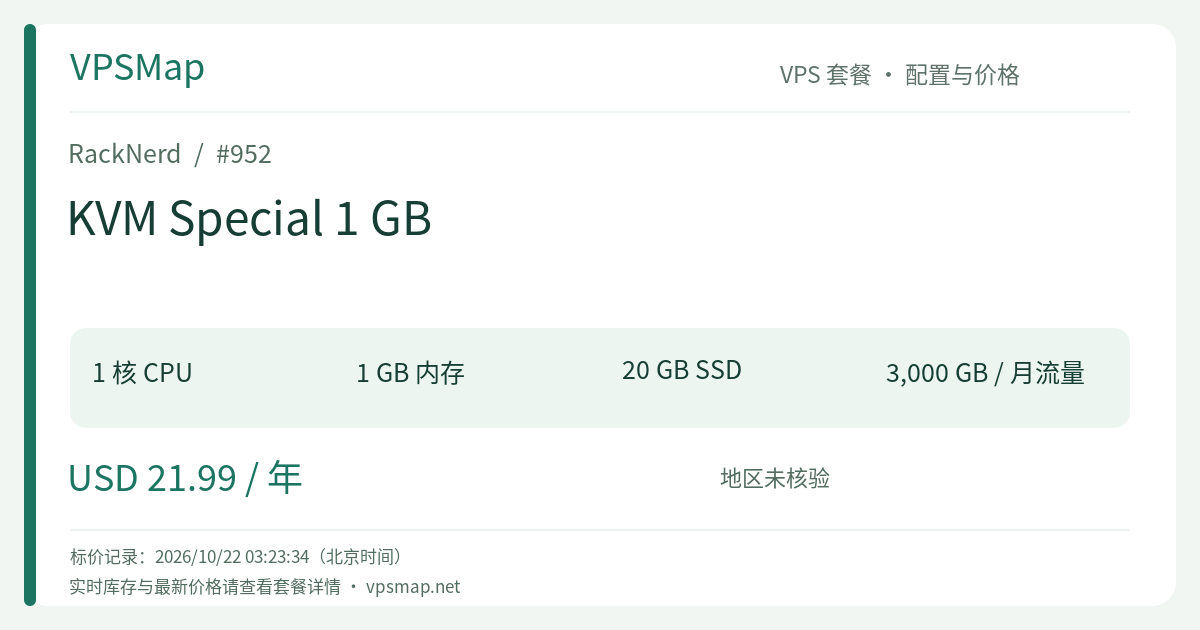
RackNerd 1 GB Annual Special VPS Review: $21.99/Year Budget Legend with 3 TB Monthly Transfer
Updated
In the contemporary cloud computing landscape, finding a server that provides a dedicated public IPv4 address, full root access, an unthrottled 1Gbps network port, and keeps costs capped at $21.99/year (less than $1.83 per month) is exceptionally rare. RackNerd’s KVM Special 1 GB is an established classic in this budget tier.
What makes this deal truly compelling is not merely its entry barrier, but its combination of a generous 3 TB monthly bandwidth allowance and lifetime recurring renewal price guarantees. As long as you maintain the subscription, your renewal rate remains unchanged. It stands as a reliable, go-to cloud utility box for developers and tech enthusiasts.
Core Specifications#
| Technical Metric | Specification Details |
|---|---|
| Processor | 1 vCPU Core (Shared Intel Architecture) |
| RAM | 1 GB (1024 MB) Memory |
| Disk Storage | 20 GB SSD Storage |
| Bandwidth Quota | 3 TB / month @ 1Gbps High-Speed Port |
| Dedicated IP | 1 Dedicated IPv4 Address |
| Virtualization Tier | Full KVM Virtualization (Full root SSH access) |
| Control Interface | RackNerd ctrl (Includes one-click apps, HTML5 VNC console, edge firewall) |
| Pricing & Terms | $21.99 / year (Lifetime recurring rate, no coupon needed) |
| Direct Order Link | Order RackNerd 1 GB Annual Special VPS |
Practical Applications: What Can You Run on This Server?#
While 1 GB of memory and 20 GB of storage are not suited for enterprise microservices, they excel in lightweight cloud utility setups:
1. Private VPN / Bastion Gateway (WireGuard / wg-easy)#
Using the ctrl panel’s built-in one-click application catalog, you can deploy WireGuard with the wg-easy web management interface in minutes. Supported by 3 TB of monthly high-speed bandwidth, you can manage remote access, routing, and testing without worrying about bandwidth exhaustion.
2. 24/7 Infrastructure Monitoring (Uptime Kuma)#
Host a self-contained Uptime Kuma dashboard to track all your websites, APIs, and home-lab endpoints. It monitors latency, tracks HTTP status codes, and dispatches automated alerts via Telegram, Discord, or webhooks whenever downtime occurs. A 1 GB RAM instance runs Uptime Kuma and its SQLite storage effortlessly.
3. Static Blogs, Documentation Sites & Light Web Hosting#
Host personal portfolios or documentation generated by Hugo, Astro, or Hexo served via Caddy or NGINX. The generous 3 TB monthly transfer capacity easily handles heavy content distribution. For dynamic setups, ctrl's one-click CloudPanel or Webmin makes managing simple WordPress or PHP sites straightforward.
4. Secure Jump Box and Remote Development Sandbox#
Use the VPS as an encrypted SSH jump server (bastion host) to securely reach private backends, or as an isolated Linux environment to practice shell automation, test Docker containers, or run lightweight notification bots.
Realistic Limitations and Boundaries#
To ensure a seamless experience, keep the physical constraints of a 1 GB instance in mind:
- Not for Heavy AI Stacks: The ctrl one-click catalog features heavier AI packages such as OpenClaw (requires 8+ GB), Ollama, Hermes Agent, or LibreChat (each requiring 4+ GB). None of these will function properly on 1 GB of RAM. For self-hosted AI workflows, upgrade to at least the KVM Special 4 GB or larger plans.
- Add Swap Memory: Memory-intensive multi-container stacks can cause out-of-memory errors. We strongly recommend configuring a 1–2 GB swap file upon first login to absorb transient memory spikes.
Plan Comparison: Why the Special Outshines the Regular Monthly Plan#
Looking at RackNerd's catalog, you will find two different 1 GB options:
1 GB Tier Decision Flow:
├── Looking for a long-term utility box / proxy / monitoring node? ──> This Plan: KVM Special 1 GB ($21.99/year)
└── Only need a temporary sandbox for 1–2 months? ──> Standard KVM VPS 1 GB ($17.99/month)
The standard KVM 1 GB plan costs $17.99 per month. In contrast, this special promotion costs just $21.99 for an entire year while delivering three times the monthly bandwidth (3 TB vs. 1 TB). For any usage spanning more than a single month, the Special plan provides overwhelming value.
Ordering and Initial Hardening Walkthrough#
- Access the Promotional Gateway: Go directly to the RackNerd 1 GB Annual Special Order Page.
- Choose Your Datacenter: For trans-Pacific and Asian traffic, choose Los Angeles or San Jose; for North American regional coverage, Dallas, Chicago, or New York are great options.
- Select Operating System: We strongly suggest Debian 12 or Ubuntu 22.04 LTS Minimal. Debian 12 boots with an exceptionally tiny memory footprint, leaving maximal RAM available for your applications.
- Onboarding & Initial Hardening:
- Following checkout, the server deploys automatically and credentials arrive via email within minutes.
- Connect via SSH, set up SSH key authentication, and disable password-only root login.
- Configure a 1–2 GB swap partition to guarantee system resilience under sudden resource loads.