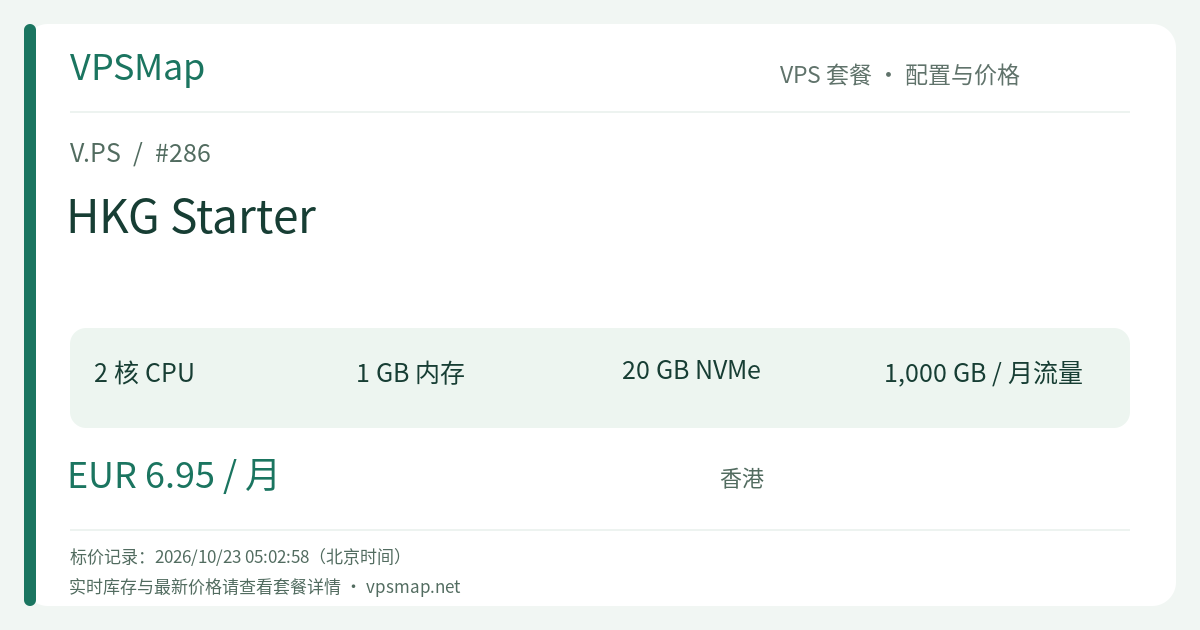
V.PS Hong Kong Cloud Starter Review & Guide: 2 Cores, 1GB RAM, and 1TB Bandwidth at €6.95/mo for Agile APAC Workloads
Updated
When deploying digital services for audiences across the Asia-Pacific region—including Hong Kong, Taiwan, Southeast Asia, Japan, and South Korea—server location dictates real-world user latency. Operated under the infrastructure umbrella of xTom, V.PS delivers a well-regarded Cloud KVM VPS lineup in its Hong Kong (HKG) data center, distinguished by 1 Gbps network ports, NVMe high-speed solid-state storage, and Tier 1 premium upstream routing.
Positioned as the foundational entry point of the Hong Kong Cloud family, HKG Starter is priced at just €6.95 per month. For developers seeking low-latency regional connectivity on a controlled budget, what specific engineering bottlenecks does this instance solve? What architectural trade-offs should be planned in advance? Here is the comprehensive breakdown.
1. HKG Starter Specifications & Technical Blueprint#
| Attribute | Detail |
|---|---|
| CPU Cores | 2 vCPU Cores |
| Memory (RAM) | 1024 MB (1 GB) RAM |
| Storage | 20 GB High-Speed NVMe SSD |
| Data Transfer | 1,000 GB (1 TB) per month |
| Network Uplink | 1 Gbps Port |
| IP Allocation | 1x Dedicated IPv4 + 1x Dedicated IPv6 |
| Service SLA | 99.9% Uptime Guarantee |
| Official Pricing | €6.95 / month (Billed in EUR, renewable monthly) |
Notice: Catalog listings reflect standard baseline pricing. Active inventory remains dynamic according to rack capacity and hardware allocation. Verify real-time availability in the customer portal.
2. Practical Problems Solved by This Instance#
A. Low-Latency Edge Reverse Proxies & API Aggregation Gateways#
Core application clusters hosted in North American or European regions often suffer from multi-hop TCP handshakes when serving users in East and Southeast Asia. With HKG Starter's 1 Gbps uplink and strategic placement in Hong Kong, you can effortlessly host Nginx, Envoy, or Traefik reverse proxies:
- Terminate SSL/TLS handshakes locally to drastically reduce connection overhead for mobile and desktop clients.
- Cache static frontend assets (CSS, JS, WebP bundles) right at the regional boundary, offloading bandwidth from origin clusters.
- Receive incoming webhooks and dispatch lightweight API calls with consistent low round-trip times.
B. Compiled Modern Microservices (Go / Rust / Lightweight Node.js)#
Because V.PS equips this entry-level tier with 2 CPU cores, HKG Starter handles multithreaded scheduling and sudden request bursts far more reliably than conventional single-core virtual machines. When deploying lightweight, compiled stacks written in Go, Rust, or optimized Node.js microservices, 1GB RAM is well-suited for high-throughput, stateless workloads. The 20GB NVMe pool delivers lightning-fast disk I/O for binary execution and real-time logging.
C. Secure Operations Bastions, Git Mirrors & Network Transit Hubs#
V.PS maintains extensive Tier 1 peering arrangements and direct connections to major global Internet Exchange Points (including DE-CIX, AMS-IX, and LocIX). Using HKG Starter as an operational jump host (SSH bastion), an automated sync mirror for Git repositories, or a WireGuard / Tailscale routing endpoint grants clean, reliable, and predictable performance.
3. Essential Trade-Offs: When Should You Upgrade?#
While 2 vCPU cores and 1 Gbps connectivity are generous for €6.95/mo, the 1 GB RAM and 20 GB NVMe thresholds require clear architectural discipline:
- Avoid Memory-Intensive Workloads: Do not attempt to run heavy JVM applications (such as Elasticsearch clusters), production-grade monolithic databases, or dozens of concurrent Docker containers on this machine. Doing so risks triggering the Linux Out-Of-Memory (OOM) killer.
- Modest Local Disk Size: After default operating system files are laid out, you will have approximately 13–16 GB of usable NVMe space remaining. For media assets or database backups, mount external block storage or offload to S3-compatible cloud storage.
- The €1 Upgrade Proposition: If your workload requires additional memory overhead, take a close look at the adjacent HKG Essential plan. For just €7.95 / month (€1.00 more), you double the RAM to 2 GB, upgrade storage to 30 GB NVMe, and double data transfer to 2 TB. If you plan to run local database services or multi-service containers, stepping up to Essential is frequently the more cost-effective choice.
4. Infrastructure & Management Highlights#
- Native Dual-Stack Networking: Every provisioned instance arrives with both a public IPv4 and an IPv6 address, enabling native modern IPv6 workflows and legacy fallback.
- netboot.xyz Custom Installation: In addition to curated distributions like Debian Stable, Ubuntu LTS, AlmaLinux, Rocky Linux, and CentOS Stream, V.PS lets users boot custom operating system ISOs via
netboot.xyzdirectly inside the control panel. - Engineer-Operated Developer Support: Standard support is directly maintained by network and systems staff who operate the physical infrastructure, guaranteeing actionable answers to technical inquiries.
- Network Transparency (Looking Glass): V.PS provides Looking Glass endpoints across its regions. You can ping, trace routes, and verify latency profiles before committing funds.
5. Step-by-Step Purchase & Setup Walkthrough#
To ensure proper affiliate allocation and avoid broken product links, follow this exact ordering procedure:
- Open the Portal: Navigate through the official referral entry link: V.PS Official Portal (https://vps.hosting/?affid=2581). This securely establishes your session and redirects to the homepage.
- Select the Hong Kong Location: Click Deploy a Server in the navigation bar, or browse to Pricing -> Cloud KVM VPS, then locate Asia Pacific -> Hong Kong (HKG).
- Identify HKG Starter: Locate HKG Starter (2 Cores / 1GB RAM / 20GB NVMe / 1TB Transfer at €6.95/mo) and click Order →.
- Configure Server Details:
- Operating System: Choose your desired base distribution (e.g., Debian 12 or Ubuntu 22.04 LTS).
- Hostname: Provide a valid server hostname (e.g.,
edge-hk.example.com). - Billing Cycle: Select monthly billing (€6.95 EUR) or a multi-month period.
- Complete Identity & Billing Information (Crucial Step):
- V.PS uses an automated anti-fraud security engine alongside manual audits.
- You must provide accurate, verifiable legal names and physical billing addresses. Orders containing synthetic or contradictory profile details will be flagged, rejected, and refunded immediately.
- Checkout & Payment:
- All charges are billed in Euros (EUR).
- Select from PayPal, major credit cards, or regional payment options (such as Alipay, iDEAL, and Bancontact).
- Instant Delivery: Upon successful transaction verification, automated orchestration provisions the KVM container, and your login credentials arrive in your inbox in minutes.
6. Official Refund Policy & Eligibility Checklist#
To ensure total purchase confidence, review V.PS's explicit refund policy before testing:
- 14-Day Guarantee: A refund request must be lodged via a support ticket within 14 calendar days of original order placement.
- Bandwidth Consumption Limit: The instance must have consumed under 10 GB of total data transfer.
- Account Limitation: Refund eligibility is granted once per user account lifetime.
- Ineligible Scenarios:
- Transactions completed via Cryptocurrency or direct Bank Wire transfers are strictly non-refundable.
- Services that have been transferred between accounts.
- Instances with active, custom BGP sessions or Internet Exchange interconnects.
- Instances that received abuse notices or whose IPs ended up on spam/security blacklists (Spamhaus, blocklist.de, etc.).
- Instances where an IP replacement has already been requested.
- Renewal invoices and discounted flash sale specials.
Summary#
At €6.95 per month, having 2 CPU cores, NVMe speed, and a 1 Gbps connection anchored in Hong Kong gives your web apps a low-latency regional hub without expensive cloud contracts. Explore real-time availability and deploy your instance directly on the V.PS Official Portal.