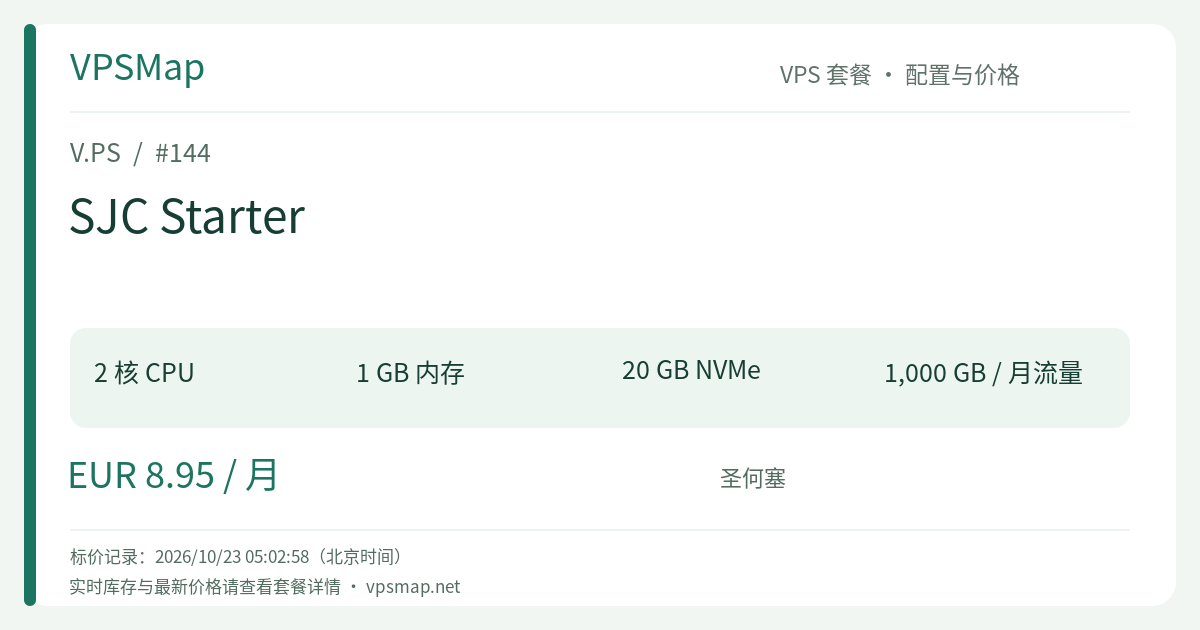
V.PS San Jose SJC Starter Review & Guide: €8.95/mo Dual-Core NVMe VPS for Lightweight Workloads
Updated
Why Consider the V.PS San Jose SJC Starter Plan?#
Deploying lightweight services in the heart of Silicon Valley often forces developers to make uncomfortable trade-offs. Mainstream hyperscalers frequently restrict budget tiers to a single shared vCPU, throttling build cycles and background tasks. Budget hosting providers often cut corners on storage performance or peer connectivity. The Cloud KVM VPS - SJC Starter from V.PS (operated by global infrastructure specialist xTom) presents a balanced alternative: for €8.95 per month, it provides 2 vCPU cores, 1 GB RAM, 20 GB NVMe storage, a 1 Gbps port, and 1 TB of monthly bandwidth, backed by dedicated IPv4 and IPv6 addresses.
Having two vCPU cores instead of one significantly improves multitasking efficiency, preventing kernel thread bottlenecks during concurrent TLS handshakes and automated system updates. Paired with high-throughput NVMe storage, this instance delivers agile performance for edge proxies, microservices, webhook aggregators, and light staging environments.
Hardware Specifications and Practical Workloads#
Below are the verified technical parameters for the SJC Starter configuration:
| Specification | Official Metric | Practical Assessment |
|---|---|---|
| vCPU | 2 Cores (KVM Architecture) | Handles concurrent scheduling, routine builds, and crypto handshakes with ease |
| Memory (RAM) | 1024 MB | The primary constraint; requires disciplined service selection and lightweight stacks |
| Storage | 20 GB NVMe | Pure NVMe array providing rapid I/O operations and fast system boots |
| Port Speed | 1 Gbps | High burst headroom for rapid package pulls and static asset distribution |
| Monthly Bandwidth | 1000 GB (1 TB, bi-directional) | ~33 GB/day average; ample for personal development and targeted APIs |
| IP Allocation | 1 × IPv4 + 1 × IPv6 | Full dual-stack connectivity for global reach and IPv6 validation |
| Uptime SLA | 99.9% Availability | Tier 1 transit routes with direct control panel and API management |
Best-Fit Applications#
- Edge Reverse Proxy and TLS Offloader: Utilizing lightweight web servers like Caddy or Nginx to handle SSL/TLS termination and reverse-proxy traffic to regional backend services.
- Compiled Language Microservices: Running high-efficiency binaries written in Go, Rust, or optimized Node.js with a small runtime memory footprint.
- Developer Automation & Webhooks: Serving as an always-on deployment runner, repository mirror, or lightweight CI/CD event receiver.
- Infrastructure Probes: Hosting network monitoring daemons such as Uptime Kuma or Prometheus node exporters (with optional BGP sessions supported upon request).
Architectural Trade-offs#
- 1 GB RAM Constraints: Attempting to host heavy administrative control panels, unindexed MySQL 8.0 instances, or multiple Docker stacks will quickly trigger out-of-memory (OOM) conditions. Configuring a swap file and utilizing SQLite or pruned PostgreSQL instances is strongly advised.
- Bandwidth Limits: The 1 TB monthly cap is intended for production APIs and development servers, rather than high-volume media distribution or streaming relays.
Comparison: SJC Starter vs. Adjacent Plans#
The pricing tiers for V.PS in San Jose feature very narrow increments:
SJC Starter  (€8.95/mo) ── [€1.00 Difference] ──> SJC Essential (€9.95/mo)
[2 Cores / 1GB RAM / 20GB NVMe] [2 Cores / 2GB RAM / 30GB NVMe]- Compared to SJC Essential (€9.95/mo): This is the pivotal decision point. For just €1.00 more per month, the Essential tier doubles RAM to 2 GB and increases NVMe capacity to 30 GB. If your project involves Docker Compose, WordPress with caching, or modern full-stack frameworks, upgrading to SJC Essential is the overwhelmingly pragmatic choice.
- When to Choose SJC Starter (€8.95/mo): If your service has been rigorously optimized to operate well within 500 MB (such as headless Go daemons, single-site Nginx setups, or minimal monitoring collectors) and you are deploying multiple nodes where every Euro counts, the Starter plan keeps fixed costs low while retaining dual-core compute.
Recommended System Optimization#
To ensure peak stability under a 1 GB RAM profile, implement the following Linux tuning steps immediately after provisioning:
1. Configure Swap Memory#
Prevent unexpected service crashes by provisioning a 2 GB dedicated swap file:
# Allocate and secure swap file
sudo fallocate -l 2G /swapfile
sudo chmod 600 /swapfile
sudo mkswap /swapfile
sudo swapon /swapfile

# Enable persistence across reboots
echo '/swapfile none swap sw 0 0' | sudo tee -a /etc/fstab

# Adjust swappiness to favor physical RAM
sudo sysctl vm.swappiness=20
echo 'vm.swappiness=20' | sudo tee -a /etc/sysctl.conf
2. Streamlined Operating System Selection#
Opt for clean minimal distributions like Debian Stable or Rocky Linux. V.PS supports custom ISO deployment through netboot.xyz, enabling complete control over installed system libraries.
Official Terms, Refund Policy & Anti-Fraud Verification#
V.PS enforces explicit, strictly regulated terms of service:
- 14-Day Refund Policy & Conditions:
- VPS plans are eligible for a refund request within 14 calendar days of order activation via ticket.
- Data Transfer Cap: Bandwidth consumption must not exceed 10 GB.
- Account Limit: Only one refund is allowed per customer account.
- Non-Refundable Scenarios: Payments made via Cryptocurrency or Bank Transfer cannot be refunded; active BGP/IX setups, IP replacements, service transfers, and discounted flash sales void refund eligibility. Furthermore, servers with abuse complaints or IPs flagged on blacklists (Spamhaus, blocklist.de, GFW) are strictly ineligible for refunds.
- Anti-Fraud Account Verification:
- Orders are audited by automated anti-fraud engines and personnel. Users must provide their genuine legal name and accurate billing address.
- Using commercial VPNs, proxies, or fabricated credentials during checkout will result in immediate cancellation and refund.
- Billing and Payment Gateways:
- Supported payment methods include PayPal, major Credit Cards (Visa, MasterCard, Amex), and regional options such as Alipay, iDEAL, and Bancontact depending on your country. All services are billed in EUR (€).
Step-by-Step Purchase Walkthrough#
Because the provider utilizes top-level domain attribution, follow these sequential steps to order the exact SJC Starter specification:
- Open Official Portal: Navigate to the official website via the verified link V.PS Home Portal to establish attribution.
- Access Deployment Menu: On the header menu, select Deploy a Server or go to Pricing.
- Select Product Family: Choose Cloud KVM VPS (featuring standard NVMe storage on a 1 Gbps port).
- Locate San Jose: Scroll to North America -> San Jose (SJC).
- Tip: You can click Test this network to access the live Looking Glass to run ping, MTR, and traceroute diagnostic queries before ordering.
- Pick SJC Starter: Locate the SJC Starter tier (€8.95 /mo, 2 CPU cores, 1 GB memory, 20 GB NVMe), and click Order.
- Configure and Check Out: Choose your preferred operating system template, enter accurate account credentials, select a payment method, and complete the order. Your virtual server will provision automatically within seconds.